Sometimes you need to get data from somewhere and it to be in a usable format. Maybe it’s a set of locations and opening times for a particular service, a price listing from a supplier, or it could be that you need alerting when some data out in the wild changes. Chances are that when you’re dealing with a lot of data you’ll end up finding places where you just can’t get what you need in the way you need it.
Typically most folks you deal with would have some method for exchanging data via an API, cloud storage/bucket, SFTP, etc. There are times however when it’s just out there on the web and you have to go and get it yourself. Recently I found myself in this exact situation helping out a friend and took me back to many years ago when I’d dabbled with collecting various types of metadata.
Scraping in most instances can be quite straight forward, particularly for publicly available information. A handy site to use for a sandbox to play in is toscrape.com, and in this example we’re going to use the books sample over at http://books.toscrape.com/.
Just a note that I’m using .net framework version 4.5 with a simple console application for this example if you wanted to give it a try yourself.
Grabbing a page via C# isn’t particularly complex, for example using the namespace System.Net.Http we could simply:
using (var client = new HttpClient())
{
	client.BaseAddress = new Uri("http://books.toscrape.com");
	var pageString = await client.GetStringAsync("/catalogue/page-1.html");
}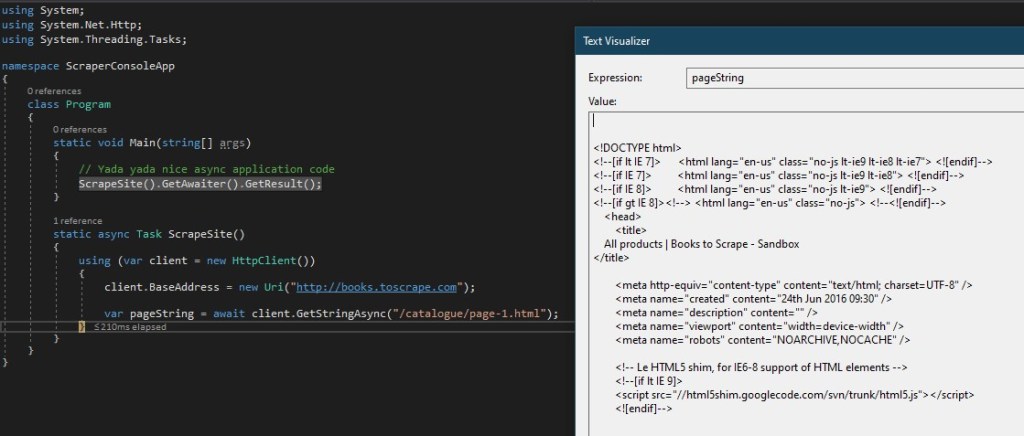
So now we’ve got the page content as a string but we need to parse it and do something useful with it. Firstly lets decide what details we want to grab for each of the books on a page and create a small class to be storing them in:
class Book
{
	public string Title { get; set; }
	public decimal Price { get; set; }
	public string PageUrl { get; set; }
}
In terms of parsing the data to get it into these objects we’ll need to trawl the text. There are a few ways we can do this such as Regex however to make it simpler we’ll take to Nuget and install the HtmlAgilityPack to do all this leg work for us:
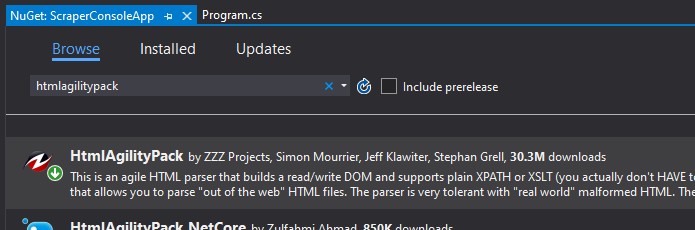
After adding the package we’re now able to start extracting data from the page. This is where things will differ depending on the information you’re using and what you’re trying to achieve. It can be useful to have an Xpath reference to hand to work through this with if you’re not familiar with the syntax. After creating a list of books to store the details in we can then iterate over each of the books on a page (in this case they’re contained within an article tag) and add it to the list:
var document = new HtmlAgilityPack.HtmlDocument();
document.LoadHtml(pageString);

foreach (var node in document.DocumentNode.SelectNodes("//article"))
{
	string title = node.SelectSingleNode("h3/a").Attributes["title"].Value;
	decimal price = decimal.Parse(
		node.SelectSingleNode("div/p[@class='price_color']").InnerText,
		System.Globalization.NumberStyles.Currency);
	string page = node.SelectSingleNode("h3/a").Attributes["href"].Value;

	books.Add(new Book()
	{
		Title = title,
		Price = price,
		PageUrl = page
	});
}
In this example it’s nice and easy that we’ve got exactly 50 pages with 20 books per page so we can wrap the whole thing up into a loop and run through to grab all 1,000 books. In reality you’ll also likely want to be scraping the page numbers as you go – that way you’d know how far to keep going, or adding some error handling for situations where you may get a page not found or hit the end of the data set.
Extending this, you may also want to look at storing your newly acquired data, it could be just within the application context, in a database to persist it, or as flat files to be consumed by another process. Going further still, could consider how to refresh the data and keep it up to date, how about triggering another workflow if something changes or you find something new, there are so many opportunities depending on your use case.
Whatever you do though, be mindful that this is someone else’s data and it’s also someone else’s web server too – don’t go playing too rough with the number of requests you’re throwing at it. Otherwise, have fun exploring!
The completed version of the script can be found below:
using System;
using System.Collections.Generic;
using System.Net.Http;
using System.Threading.Tasks;

namespace ScraperConsoleApp
{
	class Program
	{
		static void Main(string[] args)
		{
			// Yada yada nice async application code
			ScrapeSite().GetAwaiter().GetResult();
		}

		static async Task ScrapeSite()
		{
			var books = new List<Book>();

			using (var client = new HttpClient())
			{
				client.BaseAddress = new Uri("http://books.toscrape.com");

				for (int pageCounter = 1; pageCounter <= 50; pageCounter++)
				{

					var pageString = await client.GetStringAsync($"/catalogue/page-{pageCounter}.html");

					var document = new HtmlAgilityPack.HtmlDocument();
					document.LoadHtml(pageString);

					foreach (var node in document.DocumentNode.SelectNodes("//article"))
					{
						string title = node.SelectSingleNode("h3/a").Attributes["title"].Value;
						decimal price = decimal.Parse(
								node.SelectSingleNode("div/p[@class='price_color']").InnerText,
								System.Globalization.NumberStyles.Currency);
						string page = node.SelectSingleNode("h3/a").Attributes["href"].Value;


						books.Add(new Book()
						{
							Title = title,
							Price = price,
							PageUrl = page
						});
					}
				}

			}
		}
	}

	class Book
	{
		public string Title { get; set; }
		public decimal Price { get; set; }
		public string PageUrl { get; set; }
	}
} Andy Brownsword