Introduction
Window Functions in SQL Server are functions which can be applied in the SELECT portion of a statement and will return a value relative to other records in the same data set. These functions differ from standard functions such as aggregates where those would combine multiple records together to come up with a result – for example a SUM function with a GROUP BY clause in the query. A window function would return the same number of records as the source data.
It’s probably easier to see them in action to better convey this. Let’s create a table with some quarterly sales data in it which we’ll use as our test bed:
CREATE TABLE #QuarterlySales (
	FinancialYear CHAR(6),
	FinancialQuarter CHAR(6),
	QuarterlySales INT
);

INSERT INTO #QuarterlySales
VALUES ('FY2020', '2020Q3', 1), ('FY2020', '2020Q4', 2),
	('FY2021', '2021Q1', 4), ('FY2021', '2021Q2', 8),
	('FY2021', '2021Q3', 16), ('FY2021', '2021Q4', 32),
	('FY2022', '2022Q1', 64), ('FY2022', '2022Q2', 128),
	('FY2022', '2022Q3', 256), ('FY2022', '2022Q4', 512),
	('FY2023', '2023Q1', 0);
An ordered example
One of the popular and more straight forward uses of window functions is for ranking records based on a certain order. Let’s see about how we could use a window function to assign a row number to each record in the table based on the order of the quarters:
SELECT *, ROW_NUMBER()
	OVER (ORDER BY FinancialQuarter)
	AS [Row_Number]
FROM #QuarterlySales;
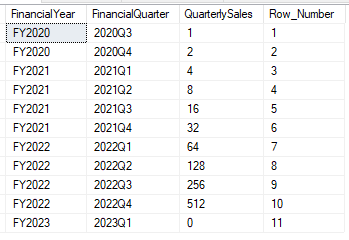
It’s that easy. In here though we’ve got a new keyword in use , the OVER clause in the field definition. This is used to define how we want the window function to be applied to the records in the data set – in this example we’re applying a ROW_NUMBER to all of the records in the order of the Financial Quarter.
A partitioning example
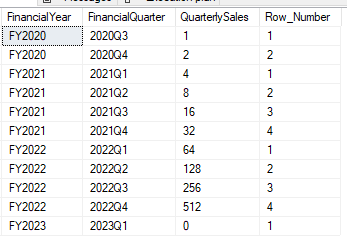
Now that we’ve seen how the ROW_NUMBER function works across the entire data set, there’s another feature we can use within the window function which is partitioning. This is also part of the OVER clause and allows us to to perform the same function but split the scope of it to be a selection of records in the data set.
Below is the same example as above but this time we’re splitting the results into Financial Years and applying the row number inside of each group:
SELECT *, ROW_NUMBER()
	OVER (PARTITION BY FinancialYear
	ORDER BY FinancialQuarter)
	AS [Row_Number]
FROM #QuarterlySales;
How does that work?
I thought it was worth taking a moment to see how these window functions manifest themselves into the execution plan. As with most features it isn’t free to be using these in a query and you’ll see some additional operators in your query plan. Here’s a comparison showing a regular query against our table versus one where we’re using a window function:
SELECT *
FROM #QuarterlySales;

SELECT *, ROW_NUMBER()
	OVER (PARTITION BY FinancialYear
	ORDER BY FinancialQuarter)
	AS [Row_Number]
FROM #QuarterlySales;

You’ll see that we’ve got the data being sorted (for the ORDER BY) and segmented (for the PARTITION BY) before the sequence is being applied to the data, and as with any operator these can be expensive – such as the sort in this case. The operators will differ depending on the function and parameters being used but its worth paying attention to these if you need to hit particular performance goals with your query.
As with other operators you find in your query plans it can be possible to manipulate these in some cases. In this instance if we’d got the clustered index below on the Financial Year and Quarter we’d remove the need for that sort operation. Of course this isn’t always feasible but may be something to consider if performance is key.
CREATE CLUSTERED INDEX cx_FinancialYearQuarter
ON #QuarterlySales (FinancialYear, FinancialQuarter);
Other ranking functions
In addition to the ROW_NUMBER function we’ve already looked at there’s a few other ranking functions available which we may also be of use. As all of these are ranking functions they involve ordering data, and therefore they all require the ORDER BY clause as part of the function definition. A brief summary of the other functions can be found below:
ROW_NUMBER– as we’ve already seen this provides a sequential row number to records, with each row number being uniqueRANK– this is similar to the row number however tie breakers are given the same ranking and these will produce gaps in the sequence numbers, for example: 1, 2, 2, 4, 5, 5, 5, 8DENSE_RANK– the same as theRANKfunction and the tie breakers are also attributed the same sequence, however no gaps will occur in the sequence, for example: 1, 2, 2, 3, 4, 4, 4, 5NTILE– indicates which n-tile a record belongs to based on the parameter provided, for example if called with the parameter 4 then each group will be split into 4 (quartiles) of roughly the same size
More details can be found in the documentation for the ranking functions but since we’ve already got a set of data lets take a look at them in action in a single query. Note that unlike the other ranking functions, the NTILE function takes a parameter which we haven’t used previously:
SELECT *,
	ROW_NUMBER() OVER (
		PARTITION BY FinancialYear
		ORDER BY FinancialQuarter) AS [Row_Number],
	RANK() OVER (
		ORDER BY FinancialYear) AS [Rank],
	DENSE_RANK() OVER (
		ORDER BY FinancialYear) AS [Dense_Rank],
	NTILE(2) OVER (
		PARTITION BY FinancialYear
		ORDER BY FinancialQuarter) AS [Ntile]
FROM
	#QuarterlySales

Wrap Up
Window Functions can provide solutions to otherwise complex challenges when querying data. This time we’ve looked at how the functions are structured, taken a look at the options available for ranking data, and potential impact on our execution plan from using these.
There are other functions available to us too, and next time we’ll take a look at aggregate window functions and what magic they can work with our data too.
Just to note that window functions were added in earlier versions of SQL Server and enhanced to support more functions in SQL Server 2012 so as long as you’re on 2012 and above you’re good to go. If you’re on an older version then this documentation may be of use as a point of reference.
In this series
- Window Functions and Ranking – an introduction to Window Functions and Ranking
- Aggregate Window Functions – Aggregate functions and Row clauses
- Analytical Window Functions – Analytical functions, alternatives, and series wrap up
 Andy Brownsword
5 replies on “Window Functions and Ranking”
[…] Last time out we talked about the Ranking options which are available for Window Functions. This time we’ll be covering the Aggregate options which are available to us with them. We’ll also introduce a new feature to see how we can limit the rows the function is performed on, but different to the PARTITION method. […]
[…] the previous posts we covered the ranking and aggregate window functions and this time we’ll be finishing the series covering the […]
[…] If you’re looking to go a little further with ranking, these functions are also known as Window Functions as the ranking can be scoped to a specific window of data. An example of this could be if we had the class of the student included above and we could perform ranking within each class. If you’d like to see more about using them in this way check out this previous post for more details. […]
[…] blog before if you’d like to dive into those further. Here are some specific posts related to ranking, aggregates and analytical […]
[…] use the sample table from the introduction to window functions to look at the new syntax. A typical window function could return year to date sales like […]