Last time out we took a brief look at temporal tables, how to create them and what they can do for us. This time I’d like to dive a bit deeper into them and see how they look under the covers. For this we’ll be using the same table which we ended up creating previously:
CREATE TABLE dbo.TemporalSample
(
  ProductID INT PRIMARY KEY,
  ProductName VARCHAR(100),
  StockQuantity INT,
  StartDate DATETIME2 GENERATED ALWAYS AS ROW START HIDDEN,
  EndDate DATETIME2 GENERATED ALWAYS AS ROW END HIDDEN,
  PERIOD FOR SYSTEM_TIME (StartDate, EndDate)
 )
WITH (
	SYSTEM_VERSIONING = ON (
		HISTORY_TABLE = dbo.TemporalSampleHistory
	));
So how do they work
When creating a temporal table we’ll actually be creating two tables in the database – one to hold the core data like a regular table, and another behind the scenes to hold the historical entries. We can run the script below to see both of these tables and a little more detail about their roles within the temporal table setup:
SELECT
	t.[name],
	t.[object_id],
	t.temporal_type_desc,
	t.history_table_id,
	p.data_compression_desc
FROM sys.tables t
	INNER JOIN sys.partitions p
		ON t.[object_id] = p.[object_id]
WHERE [type] = 'U';

You can see here that the engine knows which is the temporal one and is linked to the other table which is marked as the history. You’ll also see that the compression for the history table is set to PAGE which is the default for any history tables when they are created.
In addition to seeing this in the metadata we will also see the icon change within Object Explorer too and expanding the node for the table will show the history table nested under it. We can expand the history table like a regular one to see the contents of that too such as the columns and indexes. Below is how the columns and indexes compare between our two tables:
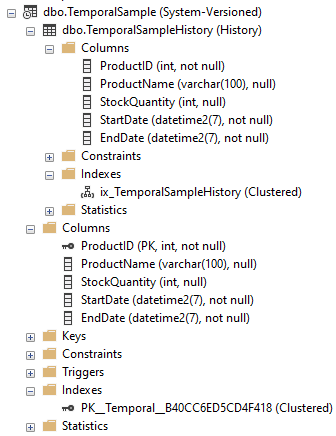
Now we start to look at this level we’ll begin to notice a couple of differences between the tables…
Even though we needed to have a primary key present in the definition to allow it to be created as a temporal table, this isn’t carried over to the history table. In fact the history doesn’t have a primary key at all, its just clustered. The clustering also doesn’t align to the source table either, the history is clustered based on the EndDate and StartDate which we used to define our period.
This leads us on to the next difference in the fact that since they’re different tables they can actually have their own indexes applied to them. They don’t have to align between the two tables so you can implement different indexing strategies based on how you plan to use them. Both this and the page compression on the history table mean that you can have a fast and performant main table whilst the history won’t get too bloated from those extra records and unneeded indexing being applied.
This is also true for other additions we can make to tables, so can also apply different triggers, statistics, etc. to this history table which may or may not be present in the regular one – or vice versa.
Wrap up
Here I just wanted to take this bit of time to just look a little deeper into the temporal tables as a background into how they’re implemented. We’ll continue to discuss these further such as our options for querying the historical data and how we can manage the tables in the future.
 Andy Brownsword
One reply on “Diving Deeper into Temporal Tables”
[…] Diving deeper into temporal tables […]