Recently we’ve been looking at temporal tables including the basics for using them and options for querying them. Continuing with this theme – and given that tables rarely remain static – we’ll look at what we might need to consider when modifying their structure.
As with the previous posts we’ll start our with our sample table and data:
CREATE TABLE dbo.TemporalSample
(
  ProductID INT PRIMARY KEY,
  ProductName VARCHAR(100),
  StockQuantity INT,
  StartDate DATETIME2 GENERATED ALWAYS AS ROW START HIDDEN,
  EndDate DATETIME2 GENERATED ALWAYS AS ROW END HIDDEN,
  PERIOD FOR SYSTEM_TIME (StartDate, EndDate)
 )
WITH (
	SYSTEM_VERSIONING = ON (
		HISTORY_TABLE = dbo.TemporalSampleHistory
	));

INSERT INTO TemporalSample (
	ProductID,
	ProductName,
	StockQuantity
)
VALUES (1, 'Apples', 10),
	(2, 'Pears', 15),
	(3, 'Oranges', 8);
Adding a new field
We’ve already discussed how the temporal tables are actually comprised of two separate tables behind the scenes – one for the current data and one for the history. So does this limit our ability to make changes?
Well not really, no! When we attempt to make a change to the schema for the current table the engine will look to replicate the change into the history table for us. Lets add a price for each of the items and see how it looks:
ALTER TABLE dbo.TemporalSample
ADD Price VARCHAR(50);
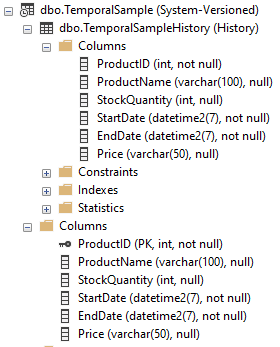
That’s all done for us, how useful. Its really handy not to need to think about these things when extending tables and letting the engine take care of things. How about modifying the field though?
Modifying an existing field
Ok, so we’ve got an issue with this field which we’ve added. I’ve added a Price for the items but its been set as a text field rather than a decimal which I should have added. Lets get that corrected:
ALTER TABLE dbo.TemporalSample
ALTER COLUMN Price DECIMAL(6, 2);
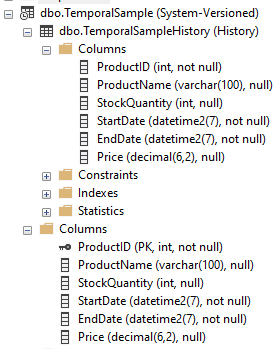
Wonderful, similar to what we did before – a single statement and the changes are reflected in both tables!
There’s one more change I want to do in here too, I want to make sure we have a price entered for all our products, we can’t be giving them away for free!
ALTER TABLE dbo.TemporalSample
ALTER COLUMN Price DECIMAL(6, 2) NOT NULL;
Cannot insert the value NULL into column ‘Price’, table ‘Blog.dbo.TemporalSample’; column does not allow nulls. UPDATE fails.
Looks like I forgot to default the pricing before the modification, silly me eh. One more time!
UPDATE dbo.TemporalSample
SET Price = 1.00;

ALTER TABLE dbo.TemporalSample
ALTER COLUMN Price DECIMAL(6, 2) NOT NULL;
Cannot insert the value NULL into column ‘Price’, table ‘Blog.dbo.TemporalSampleHistory’; column does not allow nulls. UPDATE fails.
Ah, there’s the catch. Since we’ve got records in our history table which were created before the field was compulsory they’re not populated so we can’t change the field to being NOT NULL. We need to default the history records too:
UPDATE dbo.TemporalSampleHistory
SET Price = 1.00;
Cannot update rows in a temporal history table ‘Blog.dbo.TemporalSampleHistory’.
…but you see we can’t do that. You can’t update records in the history table. So how can we make this type of change to our temporal table?
The thing is it’s just a little more long winded and the exact reason I wanted to give it its own post to make sure its covered. In order to make this change we need to do a few things:
- Disable the temporal table so we have two separate tables
- Update the current table as we need to
- Make the same changes to our history table to mirror
- Enable the temporal table again to bring them back together
Unfortunately you can see that it may be that long winded if we want to make these types of changes to a temporal table. Lets see how that looks scripted out:
ALTER TABLE dbo.TemporalSample
SET (SYSTEM_VERSIONING = OFF);

UPDATE dbo.TemporalSample
SET Price = 1.00;

UPDATE dbo.TemporalSampleHistory
SET Price = 1.00;

ALTER TABLE dbo.TemporalSample
SET (SYSTEM_VERSIONING = ON (
	HISTORY_TABLE = dbo.TemporalSampleHistory)
	);
You’ll see the statements lining up with our steps above and once complete we’ll have our table just right.
Dropping a field
Much like adding a field, dropping a field can generally be completed without any fuss. We can ask the engine to drop the column and it’ll be removed from both of the tables:
ALTER TABLE dbo.TemporalSample
DROP COLUMN Price;
Now with the changes we’ve been making here we’ve been looking at how they impact the temporal table – both the current and historical tables. Separately to these changes we should be aware that there can be different objects dependant on these separate tables which might inhibit the changes we want to make.
As an example we could add an index onto the history table which would stop us dropping the column from the current table:
CREATE INDEX ProductName
ON dbo.TemporalSampleHistory (
	ProductName
);

ALTER TABLE dbo.TemporalSample
DROP COLUMN ProductName;
The index ‘ProductName’ is dependent on column ‘ProductName’. ALTER TABLE DROP COLUMN ProductName failed because one or more objects access this column.
It’s not just the one table we need to keep an eye on when making modifications to temporal tables – it’s both of them.
Dropping the table
When we tried to update the records in the temporal table we saw the operation wasn’t allowed on the history table. We also see a similar issue when trying to drop a temporal table too:
DROP TABLE dbo.TemporalSample;
Drop table operation failed on table ‘Blog.dbo.TemporalSample’ because it is not a supported operation on system-versioned temporal tables.
Much like with the modification we need to remove the system versioning before we can drop the table. Also bearing in mind that we actually have two underlying tables, we’ll need to drop both of them:
ALTER TABLE dbo.TemporalSample
SET (SYSTEM_VERSIONING = OFF);

DROP TABLE dbo.TemporalSample;

DROP TABLE dbo.TemporalSampleHistory;
Wrap up
In this post we’ve looked at making modifications to temporal tables. Whilst some of them may be straight forward there are other instances where we need to be mindful about exactly how we go about making the changes.
These types of changes can trip us up if we’re using automated scripts to roll changes forwards and backwards and it isn’t always as straight making one change versus another. We’ll be able to make the changes we’d usually expect, we might just have to go about it a slightly longer way sometimes.
 Andy Brownsword
One reply on “Modifying Temporal Tables”
[…] Modifying temporal tables […]