A few weeks back we looked at altering an object inside our database and changing the schema in which it resides. Whilst the ALTER SCHEMA ... TRANSFER statement itself is straightforward, there are some gotchas you might find as a result of the change which I thought it was worth covering.
To set up for what we’re going to look at we’ll be creating a table, a procedure to query it, and schema to transfer objects into and out of like so:
CREATE TABLE dbo.TableForOne (
	[Value] INT
);

INSERT INTO TableForOne ([Value])
VALUES (1);
GO

CREATE OR ALTER PROC dbo.GetTheValueOne AS
BEGIN
	SELECT *
	FROM dbo.TableForOne
END
GO

CREATE SCHEMA NewSchema
AUTHORIZATION dbo;
GO
Moving a referenced object
One of the more obvious issues which may arise when renaming objects is that any references to them – for example in views or procedures – will not be automatically updated so their functionality can break.
Conveniently we have a procedure which references a table in this way so let’s see what happens if we go ahead and rename the table then try to run the procedure:
ALTER SCHEMA NewSchema
TRANSFER dbo.TableForOne;
GO
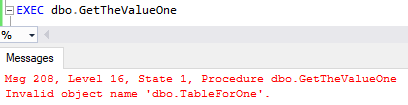
Oops that’s not good. In this case it’s a pretty obvious fix, but what about about any other procedures which might be around which we’ve forgotten about?
Well thankfully there’s a DMV which we can use to look at dependencies which have been defined in any persisted SQL expression. We can query the DMV as follows to find our dependency:
SELECT
	OBJECT_NAME(referencing_id) [ObjectName],
	referenced_class_desc,
	referenced_schema_name,
	referenced_entity_name
FROM
	sys.sql_expression_dependencies;

When we said a persisted expression, we mean that if we have a regular procedure or view referencing another object it should appear in here, however if we’re calling the procedure via dynamic SQL this wouldn’t be shown in the results. As the code isn’t defined until runtime it is not persisted.
With the details of referenced objects in hand we can get those changes made and hopefully avoid any further issues.
Objects with bespoke permissions
Sometimes in our database we might have objects which have bespoke permissions. An example of this could be a reporting procedure which needs to be executed by a read-only account.
We’ve got a Dummy user in our database which we can assign the permission to execute our procedure as follows:
GRANT EXECUTE
ON OBJECT::dbo.GetTheValueOne
TO Dummy;
With that in place we can now check the permissions which have been applied to our object using one of the built-in helper functions by passing the name of our procedure:
sp_helprotect 'dbo.GetTheValueOne';
GO

Exactly the permissions we’ve applied, that’s the baseline permission we’d like to keep with the procedure. Now we can try to transfer our procedure over and see what impact that may on the permission we’ve just assigned for our Dummy user:
ALTER SCHEMA NewSchema
TRANSFER dbo.GetTheValueOne;
GO

sp_helprotect 'NewSchema.GetTheValueOne'
GO

sp_helprotect 'dbo.GetTheValueOne'
GO

Ugh, that’s not good.
For this example I’ve purposefully checked both the newly-renamed and original procedures. We can see that not only are our explicit permissions aren’t present after the transfer, but they aren’t even left orphaned in the old schema, they’re completely removed.
This is one reason why it’s key to undertake reviews of objects before you consider making changes like renaming them to ensure these types of details are captured.
Object definition changes
Whilst we’re looking at the procedure there are some objects such as functions or views which can behave similarly when it comes to transferring their schemas. These types of objects which have definitions stored in the database wont have their definition updated to reflect the new schema.
This will mean that the definition for our procedure still indicates that it belongs in dbo. We can look at this through either a DMV or a system function:
/* Using the DMV */
SELECT [definition] AS [DMVDefinition]
FROM sys.sql_modules
WHERE OBJECT_NAME(OBJECT_ID) = 'GetTheValueOne';

/* Using the function */
SELECT OBJECT_DEFINITION(OBJECT_ID(
	'NewSchema.GetTheValueOne')) [FunctionDefinition];
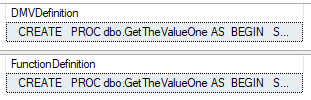
Now these changes won’t break the functionality of the procedure (or view or function) however it may interfere with anything which interrogates the object definitions in your database such as monitoring or deployment tools.
Due to this the online documentation recommends that any of these objects should ideally be dropped and recreated in the new schema to avoid this potential issue.
Wrap up
As we saw previously, changing the schema for an object is a trivial task but we do have things we need to watch out for.
Whilst we can’t avoid the issues discussed here without a little extra work, we’ve seen how we can use system functions and DMVs to help support us in identifying objects which are dependent on the ones we want to move. This can help us to advise where we need to start making changes in code to be as prepared as we can for any modifications.
The key to making these types of schema changes successfully – whether it’s moving the schema or even renaming an object – is to have a plan for how we’ll approach the change and to make sure we’ve got enough details together to allow us to forward fix or back out any of these changes if there are issues with the deployment.
 Andy Brownsword