Within SQL Server we can store Boolean data using the BIT data type. This value is a single bit which will store a True or False (or null) value. However if you dive a little deeper with the data type it’s actually a little less clear cut in terms of the storage needed for this data type.
Let’s start with a table which has an identity field and a single boolean data type, then populate one million records into it:
CREATE TABLE dbo.BooleanData (
	ID INT IDENTITY(1, 1) PRIMARY KEY,
	BoolValue BIT NOT NULL
);
GO

WITH TestData AS (

	SELECT 1 ID, CAST(ABS(CHECKSUM(NEWID()) % 2) AS BIT) Boolean
	UNION ALL
	SELECT ID + 1, CAST(ABS(CHECKSUM(NEWID()) % 2) AS BIT)
	FROM TestData
	WHERE ID < 1000000
)
INSERT INTO dbo.BooleanData (BoolValue)
SELECT Boolean
FROM TestData
OPTION (MAXRECURSION 0);
With our table in place we can now take a look at the number of pages in use through the DMV sys.dm_db_partition_stats to see our starting point:
SELECT used_page_count, row_count
FROM sys.dm_db_partition_stats
WHERE object_id = OBJECT_ID('dbo.BooleanData');
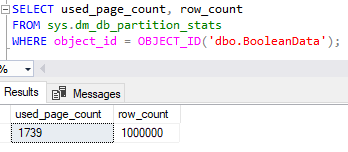
More bits
Now that we’ve got a baseline in place we’ll look to add a few more boolean columns to our table to assess the impact:
ALTER TABLE dbo.BooleanData
ADD BoolValue2 BIT,
	BoolValue3 BIT,
	BoolValue4 BIT,
	BoolValue5 BIT;
GO

UPDATE dbo.BooleanData
SET BoolValue2 = CAST(ABS(CHECKSUM(NEWID()) % 2) AS BIT),
	BoolValue3 = CAST(ABS(CHECKSUM(NEWID()) % 2) AS BIT),
	BoolValue4 = CAST(ABS(CHECKSUM(NEWID()) % 2) AS BIT),
	BoolValue5 = CAST(ABS(CHECKSUM(NEWID()) % 2) AS BIT);
With those columns added we’ll re-check to see how many data pages have been added:

It’s the holy grail – free storage! There was much rejoicing.
How are boolean values stored
Within SQL Server when we use a BIT data type then engine will allocate a whole byte to store our single bit value. This is intentional and an optimisation to ensure that data values remain byte-aligned. It does however mean that a single bit isn’t quite as small and innocent as we may have thought.
There is however an advantage in this approach – the first 8 BIT values within the table will all occupy the same byte of storage. This means that like we’ve just seen adding the new fields won’t have an impact as the storage is already allocated and we’re just populating it.
This happens for multiples of 8 too, so if we have between 9 and 16 BIT fields in a table then they’d all combine into 2 bytes of storage, and so on.
The fact that multiple fields are combined into a single byte is also advantageous from a querying and indexing perspective.
When you need a large number of boolean values, it could be implemented by merging the data into larger fields such as INT or BIGINT types. This can create issues when splitting out or trying to search the data for specific flags as each value would need to be interrogated. The way that the BIT fields are combined in SQL means that the flags can be stored together yet when querying they can be referenced individually and even indexed separately to improve performance.
Let’s try more fields
We’re currently at 5 fields in the table so let’s add another 4 of them which should increase the number of pages in use:
ALTER TABLE dbo.BooleanData
ADD BoolValue6 BIT,
	BoolValue7 BIT,
	BoolValue8 BIT,
	BoolValue9 BIT;
GO

UPDATE dbo.BooleanData
SET BoolValue6 = CAST(ABS(CHECKSUM(NEWID()) % 2) AS BIT),
	BoolValue7 = CAST(ABS(CHECKSUM(NEWID()) % 2) AS BIT),
	BoolValue8 = CAST(ABS(CHECKSUM(NEWID()) % 2) AS BIT),
	BoolValue9 = CAST(ABS(CHECKSUM(NEWID()) % 2) AS BIT);

ALTER TABLE dbo.BooleanData REBUILD;
Admittedly I’ve rebuilt the table here as we’ve needed to allocate storage for every record and split all of the pages through this function. The rebuild will bring that down to just the right number of pages to store our data.

Now we can see the number of pages has increased as we’ve gone over 8 columns so the 9th column will be stored in a second byte. If we now add a few more columns we shouldn’t see this increase while staying within our second byte:
ALTER TABLE dbo.BooleanData
ADD BoolValue10 BIT,
	BoolValue11 BIT,
	BoolValue12 BIT;
GO

UPDATE dbo.BooleanData
SET BoolValue10 = CAST(ABS(CHECKSUM(NEWID()) % 2) AS BIT),
	BoolValue11 = CAST(ABS(CHECKSUM(NEWID()) % 2) AS BIT),
	BoolValue12 = CAST(ABS(CHECKSUM(NEWID()) % 2) AS BIT);

Wrap up
In this post we’ve looked at how the BIT fields are stored within SQL Server to handle boolean values. We’ve seen the overhead which can come from a single field and requiring a whole byte per record. Conversely we’ve seen how we can benefit having multiple fields in the same table to help use up those bytes allocated per record.
Given the choice between a solution using 8 BIT fields or one using a TINYINT field and various bit mask operations for reading the data, my preference would be using multiple fields from the examples we’ve outlined here.
Not only is usage of multiple fields much clearer when coming to review code or design queries for the data, it also allows us to index the data much more selectively and effectively. A much tidier solution all around.
 Andy Brownsword
One reply on “Boolean Value Storage”
[…] more into how it impacts our data storage using this option. We’ve previously looked at how these values are stored by the engine and we know that when adding a BIT value to a table we’ll actually allocate a […]