In SQL Server we have the ability to create triggers to respond to events occurring within our databases or across the server. These typically come in two varieties – DDL and DML triggers. Here we’ll look at what DDL triggers are and how to implement them.
What are DDL triggers
A DDL trigger is a specific type of trigger which will respond to events related to changes in the Data Definition Language (DDL). These events are related to how the server or database are configured, or how the structure of the database is changed.
Examples of DDL events include server events such as creating a database, or database events such as creating a table, view or procedure. The events available also include ALTER and DROP equivalents.
In addition to the individual events, the triggers can be assigned against event groups which is a collection of events. For example instead of needing to create a trigger to capture CREATE, ALTER, or DELETE events against tables, you could use a single event group (DDL_TABLE_EVENTS) which would achieve the same result.
A full list of events which the triggers can respond to can be found here, and details of the event groups are available here.
Creating DDL triggers
When creating a trigger we have a block of code which can run SQL commands for us. This could be to perform checks, logging, or even roll back the operation being attempted.
For our example we’ll look at recording the events. We’ll create a table to store the details and a trigger to capture them. Let’s jump in with the script and then we’ll look at the creation of the trigger in more detail:
USE master;
GO

CREATE TABLE [dbo].[DDLEventData] (
	[EventXML] XML
);
GO

CREATE TRIGGER DDLDbTrigger
ON ALL SERVER
FOR DDL_DATABASE_EVENTS AS
BEGIN
	INSERT INTO dbo.DDLEventData
	SELECT EVENTDATA();
END
GO
Let’s break down the creation of the trigger to see how that statement is constructed:
CREATE TRIGGER– we’re creating a trigger with an appropriate nameON ALL SERVER– this indicates that we’re creating a DDL trigger with a server level scope. Alternatively if this was only for our current database we could useON DATABASEto restrict the scopeFOR DDL_DATABASE EVENTS– we’re indicating which events we want the trigger to fire for. In this example we’re using the event group that includesCREATE,ALTERandDROPdatabase statementsAS BEGIN ... END– this is our script block which has the command/s to execute when the trigger is fired. In our case this is to log the event data into a table
Within our script block we’re inserting into our event table which has a singular XML field. The EVENTDATA() function returns XML data about the event which has caused the trigger to fire. If we were to create a database we’d log the following XML:
<EVENT_INSTANCE>
  <EventType>CREATE_DATABASE</EventType>
  <PostTime>2023-04-25T08:00:00.0000</PostTime>
  <SPID>62</SPID>
  <ServerName>Desktop</ServerName>
  <LoginName>Desktop\Andy</LoginName>
  <DatabaseName>BlogTest</DatabaseName>
  <TSQLCommand>
    <SetOptions ANSI_NULLS="ON" ANSI_NULL_DEFAULT="ON" ANSI_PADDING="ON" QUOTED_IDENTIFIER="ON" ENCRYPTED="FALSE" />
    <CommandText>CREATE DATABASE BlogTest</CommandText>
  </TSQLCommand>
</EVENT_INSTANCE>
We could of course choose to break this down and log specific elements from the data with XML methods but that’s for another time.
Just to briefly note that we can create database level triggers and that functional code can be added into the script block. As a brief example below is a trigger which stops tables being dropped in a database:
CREATE TRIGGER DontDropTables
ON DATABASE
FOR DROP_TABLE AS
BEGIN
	ROLLBACK;
END
GO
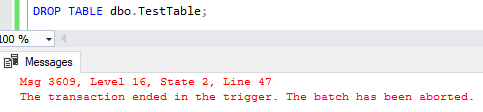
When trying to drop a table on the database we’d see something similar to below:
Where to find triggers
Details of the triggers we create can be found both through the Object Explorer in Management Studio as well as via SQL Server DMVs.
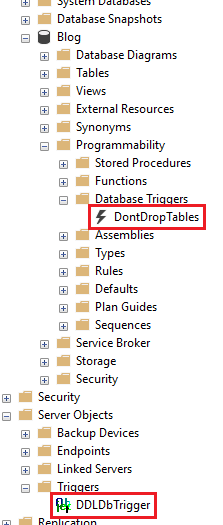
Starting with Object Explorer we can find the database triggers under the Programmability heading within our database and then Database Triggers section. For server level triggers we need to look under the top level Server Objects node and then Triggers. Both of the examples created above can be seen in the snip below:
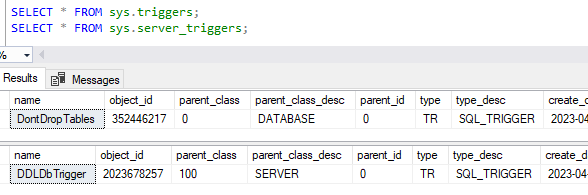
Additionally we can see the details for the triggers across two separate DMVs. Database level triggers are present in the DMV sys.triggers for the database where they’re created. For server level triggers these are in the DMV sys.server_triggers which is available regardless of your target database. Examples of these can be seen below:
Removing triggers
Dropping a DDL trigger is slightly different to how we’d drop other objects such as tables or views from a database. We need to mirror the portion of the creation statement to indicate where the trigger should be dropped from.
The commands to drop the DDL triggers need to include an indication of whether we’re dropping database or server level triggers. To remove the triggers created above we’d use the following commands:
DROP TRIGGER DontDropTables ON DATABASE;
DROP TRIGGER DDLEventData ON ALL SERVER;
Wrap up
Here we’ve taken a look at how we can create and manage DDL triggers in a SQL Server instance. We’ve seen a couple of examples of scripts we can put into the trigger which could capture the event occurring as an audit, or we could stop the event occurring altogether.
DDL triggers help us to react to changes in the structure of our environment and databases. Next time out we’ll look at DML triggers which will react to changes within the actual data that we’re storing.
 Andy Brownsword