A view can be created in SQL Server to allow data to be presented in a specific way for a particular user or use case which may need to consume it.
Recently I came upon a feature which I hadn’t been aware of throughout my career around SQL Server – you can perform data modifications against a view.
Let’s create a nice simple setup for this:
USE DbOne
GO

CREATE TABLE dbo.TestTable (
	TestID INT IDENTITY(1, 1),
	TestText VARCHAR(100),
	PRIMARY KEY CLUSTERED (TestID)
);

USE DbTwo
GO

CREATE VIEW dbo.TestView
AS
	SELECT *
	FROM DbOne.dbo.TestTable;
GO
We’ve now got a table in one database and a view in another which points back to our table. This can help to obscure a dependency between two databases which is a common use case for implementing a view.
Modifying the data
Jumping straight in we’ll look adding some new records into the table, but we’ll do this through the view rather than the actual table.
USE DbTwo;
GO

INSERT INTO dbo.TestView (
	TestText
)
VALUES ('TestOne'),
	('TestTwo'),
	('TestThree');
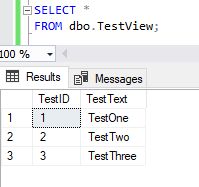
Not knowing that this was a feature I was floored when saw it happen for the first time. For me, views are about the ability to present data in a specific way and I hadn’t seen them used in this way before.
As you’d expect this isn’t only limited to INSERT statements either, we can perform UPDATE and DELETE operations too:
USE DbTwo;
GO

UPDATE v
SET v.TestText = 'TestTextTwo'
FROM dbo.TestView v
WHERE v.TestID = 2;

DELETE v
FROM TestView v
WHERE v.TestID = 1;
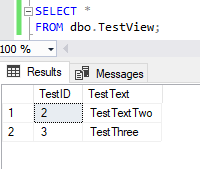
Very eye opening, so what about something a little more complicated?
Updating multiple tables
Next up let’s look at something a little more complex. How does this approach work when we have multiple tables within the same view?
We’ll try to keep things as simple as we can here. We’ll use two tables with uniquely named fields to remove ambiguity. We’ll also use an INNER JOIN between the two tables and both will have IDENTITY columns which will be in sync purely due to inserting records at the same time.
Firstly let’s get the objects created:
USE DbOne;
GO

CREATE TABLE TestTable (
	TestID INT IDENTITY(1, 1),
	TestText VARCHAR(100),
	PRIMARY KEY CLUSTERED (TestID)
);

CREATE TABLE RefTable (
	RefID INT IDENTITY(1, 1),
	RefText VARCHAR(100),
	PRIMARY KEY CLUSTERED (RefID)
);

USE DbTwo;
GO

CREATE VIEW TestView
AS
	SELECT *
	FROM DbOne.dbo.TestTable t
		INNER JOIN dbOne.dbo.RefTable r ON t.TestID = r.RefID;
GO
With those in place we can attempt a simple INSERT statement like we did last time:
USE DbTwo;
GO

INSERT INTO dbo.TestView (
	TestText,
	RefText
)
SELECT 'Test', 'Ref';
View or function ‘dbo.TestView’ is not updatable because the modification affects multiple base tables.
Unfortunately this is a no-go. As you can see from the error message above the ability to update a view referencing multiple tables isn’t possible. The ability to update is restricted to views referencing only a single table.
Wrap up
Here we’ve looked at the ability to perform DML operations against a view to modify the data in the underlying table. As we’ve seen this isn’t supported for views containing multiple tables, however if you’re using a view as a bridge between two databases (for example to obfuscate an external set of data) then this may be of use.
Whilst performing these operations on views which contain multiple tables isn’t natively supported that doesn’t necessarily mean it can’t be achieved. In an upcoming post we’ll look at a way that we are able to achieve that result.
 Andy Brownsword