
In the previous post we looked at how ISNUMERIC and TRY_CAST work and why we may want to utilise the latter when building validation for our data. When SQL Server 2012 rolled around it wasn’t only TRY_CAST which was added, we also had TRY_CONVERT and TRY_PARSE introduced too.
Here we’re going to look at how those function and the differences in the outputs which they can provide. We’ll start with the sample data below as the basis for these demonstrations:
CREATE TABLE #Numerics (
    ID INT IDENTITY(1, 1) PRIMARY KEY,
    [Value] VARCHAR(50)
);

INSERT INTO #Numerics ([Value])
VALUES (NULL), (''), (' '),
    ('0'), ('-1'), ('1'), (' 1'), ('2 '),
    ('123456'), ('1,234,567,890'), ('12345678901234'),
    ('$'), ('£1.23'), ('One'), ('1.234567890'), ('-1.23E45');
Revisiting TRY_CAST
Briefly recapping the previous post, we looked at the definition from the online documentation as being:
Returns a value cast to the specified data type if the cast succeeds; otherwise, returns null.
We can provide the function with a value and the data type to cast it to, and it will either return our value as the desired data type, or a NULL value if it was unable to convert.
For our sample data the results look something like this:
SELECT [Value],
    [IsNumeric] = ISNUMERIC([Value]),
    TryCast = TRY_CAST([Value] AS FLOAT)
FROM #Numerics;

We can see that the ISNUMERIC function would ignore empty strings, however with TRY_CAST they are being handled as zero values. There are also issues handling the numeric values which have separators and currency symbols.
That’s where we left it last time, let’s continue to the next function.
Try again
In addition to the TRY_CAST function we have a similar function in TRY_CONVERT. When we look at converting text to a numeric value these are effectively the same.
The TRY_CONVERT supports an additional parameter – style – which can be used to adjust the formatting of values when converting to text, for example:
DECLARE @MyDate DATE = '2023-12-25',
	@MyMoney MONEY = '1234.5678';

SELECT [DateStyle] = TRY_CONVERT(VARCHAR, @MyDate, 106),
	[NumberStyle] = TRY_CONVERT(VARCHAR, @MyMoney, 1);

If you check out the style details you’ll see that code 106 is to format dates in the format dd mon yyyy, and style code 1 for monetary values will add thousand separators and round to two decimal places.
Let’s compare the results from our sample data using both the TRY_CAST and TRY_CONVERT functions to see how similar they are:
SELECT [Value],
    [IsNumeric] = ISNUMERIC([Value]),
    TryCast = TRY_CAST([Value] AS FLOAT),
    TryConvert = TRY_CONVERT(FLOAT, [Value])
FROM #Numerics;
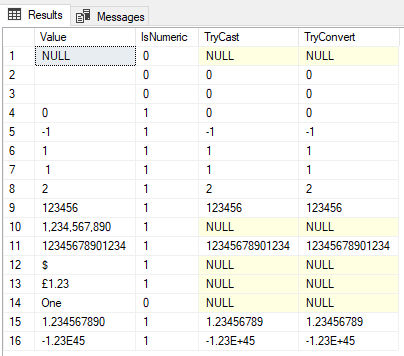
Very anticlimactic, we’re getting the same results.
That’s not surprising though as they have identical descriptions in the documentation and the original functions CAST and CONVERT even share the same page.
So when it comes to parsing to a numeric value would we prefer either one over the other?
There is one differentiator in this context. To use TRY_CONVERT you need your database compatibility set to at least 110 (2012). If you don’t, you’ll have an error thrown up when trying to use the function. That shouldn’t be a deal-breaker in 2023, but it’s enough to tip the scales for consistency.
Try, try again
We’ll round this out looking at the TRY_PARSE function. This behaves similar to the functions above, however the key difference with this is the ability to specify a culture as part of it’s definition.
Microsoft only recommends using this for date/time and numeric data types. This makes sense as those types can be formatting very differently in some regions.
Including the culture with the USING clause is optional, but can help us to convert from localised text into the data type required. Below are examples to demonstrate this with both date and numeric types to see how the cultures impact the results:
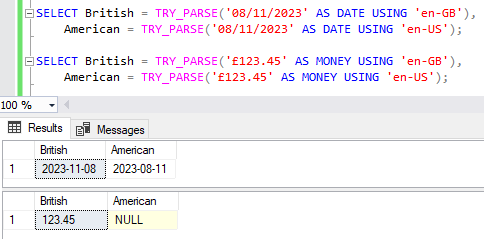
We can see the difference between British and American date formats and whether the day or month is perceived to come first. Additionally it shows that Americans’ have no regard for our strange British pounds, shillings, nor sixpence.
Let’s see how it stacks up to our previous functions with our sample data:
SELECT [Value],
    [IsNumeric] = ISNUMERIC([Value]),
    TryCast = TRY_CAST([Value] AS FLOAT),
    TryConvert = TRY_CONVERT(FLOAT, [Value]),
    TryParse = TRY_PARSE([Value] AS FLOAT)
FROM #Numerics;

The majority of these values are the same but we can see that TRY_PARSE aligns closer to ISNUMERIC as it doesn’t convert empty string to zero values.
Let’s try again but this time using the MONEY data type as currencies can be regional. Now we’ll see another difference:
SELECT [Value],
    [IsNumeric] = ISNUMERIC([Value]),
    TryCastMoney = TRY_CAST([Value] AS MONEY),
    TryConvertMoney = TRY_CONVERT(MONEY, [Value]),
    TryParseMoney = TRY_PARSE([Value] AS MONEY)
FROM #Numerics;

As mentioned above the USING clause is very much optional, however when we’re converting data which is regional – such as the monetary value £1.23 in this case – then we want to include it as we showed in the example above.
My instance is installed under US English rather than British language, so by default only US dollars will be parsed rather than British sterling.
If we have data with mixed currencies within a field included this could be a headache. Thankfully that is a rare issue so in most cases this can help to validate the data better than a regular numeric value check.
Wrap up
Here we’ve looked at the TRY_CAST, TRY_CONVERT, and TRY_PARSE functions. Broadly speaking they’re very similar, and in most instances could be used interchangeably.
The TRY_CAST and TRY_CONVERT functions are effectively identical when it comes to numeric values. They do convert blank spaces to zero values rather than NULL however. Using TRY_PARSE would resolve that issue, but it can be more tricky when it comes to localised data such as monetary values with a currency symbol included.
When creating new features I would always start by using TRY_PARSE in preference to TRY_CAST or ISNUMERIC. This is due to the slightly tighter control we have in its features.
If I were updating existing code I’d recommend sticking with whatever is in place. Unless there’s a very full suite of tests backing up the changes, it can be easy to get caught out by some of the nuances between the different functions.
There are some additional subtleties with the TRY_PARSE method which I wanted to highlight in a separate post, but if there’s anything else I’ve missed with these functions please drop me a comment and let me know.
 Andy Brownsword
2 replies on “Comparing TRY Functions for Numeric Conversion”
[…] Andy Brownsword tries and tries and tries again: […]
[…] the previous post we looked at the functions TRY_CAST, TRY_CONVERT, and TRY_PARSE and how they compared. I […]