
Performing a wildcard search by throwing a % into a LIKE expression is bread and butter. How do we handle this when we actually want to search for the wildcard though?
This was an issue I first saw early in my career before I was even building database solutions. The business had a back office solution where you could search through offers on the UI. Unfortunately it threw up some strange results.
Searching for ‘30%’ offers would return more than expected. The code and results looked a little like this:
/* Stored proc parameter */
DECLARE @SearchTerm VARCHAR(100) = '30%';

SELECT PromoNumber, PromoDescription
FROM dbo.Promotions
WHERE PromoDescription LIKE '%' + @SearchTerm + '%';
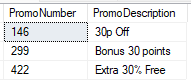
The engine is parsing this as a double wildcard:
WHERE PromoDescription LIKE '%30%%';
So its picking up whatever may come after the ’30’ value in the table.
Wildcards
Wildcard characters come in a few flavours. Unfortunately it’s not quite regular expression support for searching text, but that’s on its way soon. I digress.
We can accept a few variations as per the documentation:
- A single character (using an underscore:
_) - A string of characters (using a percentage:
%) - A range of characters (using square brackets:
[abc],[^x-z])
The issue with these is that they can overlap with what we may be searching for. Above we’ve wanted to search for a ‘%’ symbol. We may also want to search for a filename using underscores.
So how can we search for these characters?
The great escape
We can solve this issue by using an escape character.
You’ve probably come across them before. You may have seen \n to represent a newline character, or \t to represent a tab character.
The backslash in these cases indicate that what follows should be treated differently, not just another character. The backslash is the escape character.
The LIKE operator supports the same functionality. We can choose our own escape character.
To achieve this we add a new keyword to our LIKE expression. An ESCAPE clause can be added followed by a single escape character.
Let’s see a modified version of our WHERE clause above:
WHERE PromoDescription LIKE '%' + REPLACE(@SearchTerm, '%', '\%') + '%' ESCAPE '\';
There’s a couple of changes here.
Firstly the ESCAPE clause is added to our expression to use \ as our escape character. We’ll use that as its a familiar example.
Next up we’ve modified our @SearchTerm parameter. We’ve now replaced any % symbols in the string with an escaped \% string so we can search for them.
The combination of these will now return the expected result:
DECLARE @SearchTerm VARCHAR(100) = '30%';

SELECT PromoNumber, PromoDescription
FROM dbo.Promotions
WHERE PromoDescription LIKE '%' + REPLACE(@SearchTerm, '%', '\%') + '%' ESCAPE '\';
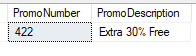
There are a few points to note here:
- If the search term includes the escape character, the user may see unexpected results
- We explicitly replace the wildcard character we want to escape. Other wildcards such as
_will be unaffected - It’s critical to choose an appropriate escape character for your data. You wouldn’t want to use
\with file names as it could be a directory separator
Wrap up
In this post we’ve looked at how we can search for wildcard characters such as % when using a LIKE condition using the same wildcard.
The solution is to use the ESCAPE clause on the LIKE operator. This allows us to provide an escape character to use as a prefix. The escape character will differentiate characters to be matched from those used as wildcards.
Its not often I’ve ran into an issue with this type of search. I see it most often with file names containing underscores but I thought this early example demonstrated the problem and solution well.
Happy searching!
 Andy Brownsword
One reply on “Searching with Wildcard Characters”
[…] Andy Brownsword is looking for a discount: […]