
One method for transferring a database to a different environment is using a Data-Tier Application – in the form of a DACPAC (for schema) or BACPAC (for schema and data).
Trying to use this approach with multi-database solutions is a challenge though as Data-Tier Applications don’t play nicely with cross-database objects.
Let’s look at how we can ease that pain.
We’ll use a MainDb database which has a Customers table, a RefDb database which has a view to that table, and a procedure which references the view.
If we attempt to extract the schema with a DACPAC in Management Studio (Tasks > Extract Data-tier Application) we’re greeted with an error:
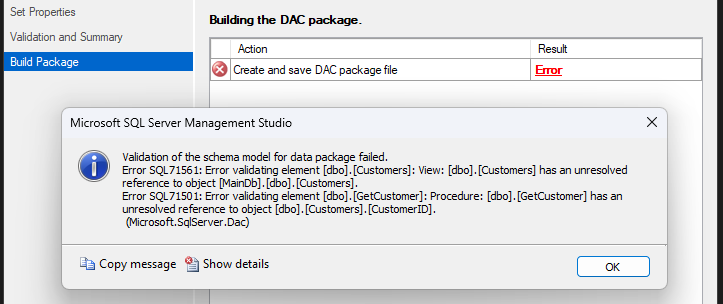
The validation doesn’t like references to other databases. There are a couple of elements we need to look at here. Let’s get started.
Synonym shuffle
The issue being raised here is that the View links to another database. If that database doesn’t exist when deploying the DACPAC, we won’t be able to create the View. It’s a valid point.
So I want to change the View to a Synonym. I’ve compared views and synonyms previously and I really like what synonyms offer.
One interesting difference between them is that a View requires the target table to be present whereas a Synonym doesn’t. For example:
/* This will fail */
CREATE VIEW [dbo].[Dummy] AS
	SELECT *
	FROM [DummyDb].[dbo].[Dummy];

/* This succeeds */
CREATE SYNONYM [dbo].[Dummy]
FOR [DummyDb].[dbo].[Dummy];
That sounds exactly like what we want for our DACPAC, so let’s change that:
DROP VIEW [dbo].[Customers];

CREATE SYNONYM [dbo].[Customers]
FOR [MainDb].[dbo].[Customers];
With that change in place if we try to create the DACPAC again, it’ll succeed:
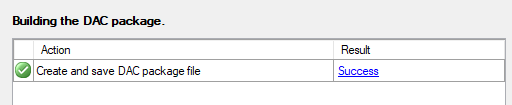
So that’s the schema side sorted, how about the schema and data (BACPAC)?
We can try to export a BACPAC from the database (Tasks > Export Data-tier Application). Unfortunately this flags up yet another issue:
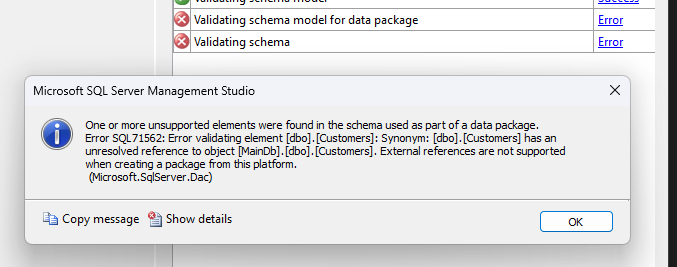
Unlike the DACPAC, a BACPAC has spotted our external reference in the Synonym and won’t complete the process.
Visual Studio wizardry
I haven’t seen a solution for this within Management Studio. But Visual Studio is a different story.
With SQL Server Data Tools (SSDT) you can connect to SQL Server similar to Management Studio (View > SQL Server Object Explorer).
When selecting a database here we only have the option to Extract and create a DACPAC file. What’s interesting however is that within this dialog we have the ability to select Schema and Data:
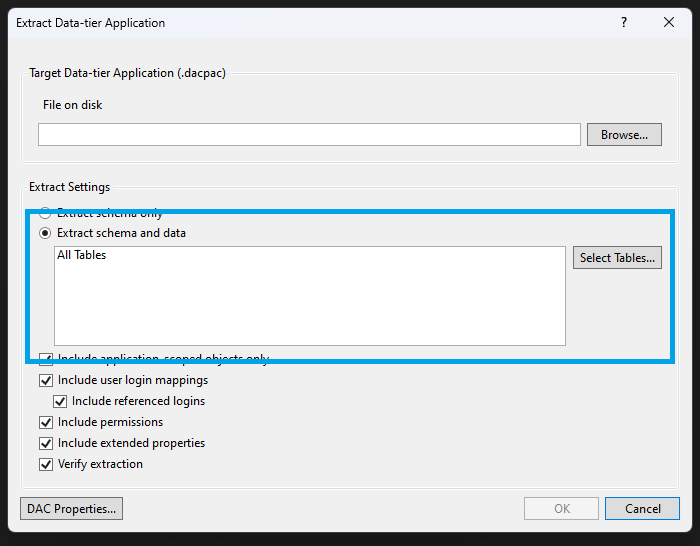
And it works.
Visual Studio will create a DACPAC file but containing the table data like a BACPAC would. So we’re good to go?
Not quite.
Restoring the database
This is where it’s getting a bit odd.
So we currently have a DACPAC created which contains data like a BACPAC. So we should be able to Import it like a BACPAC right?
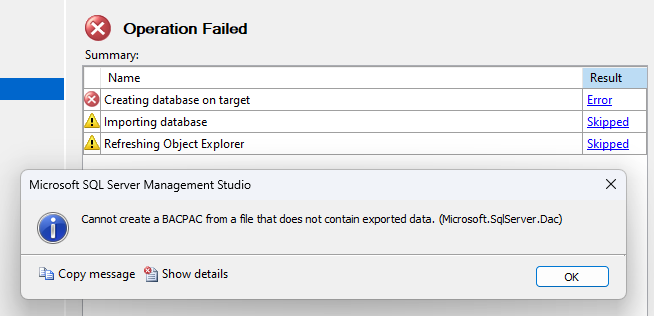
Management Studio doesn’t think there’s any data in the file. That’s due to the metadata which Visual Studio added to the package:

Wonderful.
The answer here is to Deploy the package like you would a typical DACPAC which would usually only restore the database schema:

As you can see though, the DACPAC deployment has spotted the data in the package and deployed it at the same time.
That’ll leave us with our database schema and data deployed in another environment without the need for any referencing databases to be available. It’s also very handy if you have circular references between your databases which would be deployed independently.
Wrap up
The usage of cross-database objects can be key where businesses have a SQL Server instance which serves multiple purposes, or even in more established solutions that have outgrown a single database.
In this post we’ve looked at how we can deploy Data-Tier Applications when we have these cross-database references. The solution we’ve looked at uses Visual Studio to extract the schema and data which appears to ignore some of the validation which Management Studio uses.
It doesn’t do it in the most obvious way – extracting a (typically) schema-only DACPAC, with the data of a BACPAC, and indicating that there’s actually no data in there – but it does in fact work.
I don’t use DACPACs and BACPACs often enough to run into these quirks. Is this a head-scratcher you’ve run into before? Are there any alternative or better ways you’ve found to solve this?
 Andy Brownsword
One reply on “Using External References with Data-Tier Applications”
[…] Andy Brownsword needs to make a call out: […]