
Automated email alerts lead to information overload. Emails for failures, confirmation, or just for information.
So, we build rules and filters to try and handle them, hoping nothing new slips through the net.
How about an alternative to bring consistency and streamline your inbound emails? Let’s take a look at Sub-addressing to overcome the overload.
What is sub-addressing?
The term sub-addressing (or plus addressing) refers to adding a + after your email prefix followed by some sort of tag. They’re like sub-domains for your email address.
For example andy.brownsword@... can become andy.brownsword+custom-tag@.... This could be used as an operator in the SQL Agent like this:

The email will still be delivered to the same inbox, and the content will be the same. This provides a way to change part of the email outside of a subject or the body.

We can use this tag in the email address to determine what action we need to take. Let’s look at a couple of examples.
Taking action
Firstly we need to identify what tags we want to use. For the first example I’ll use a critical alert, and then another for an information alert.
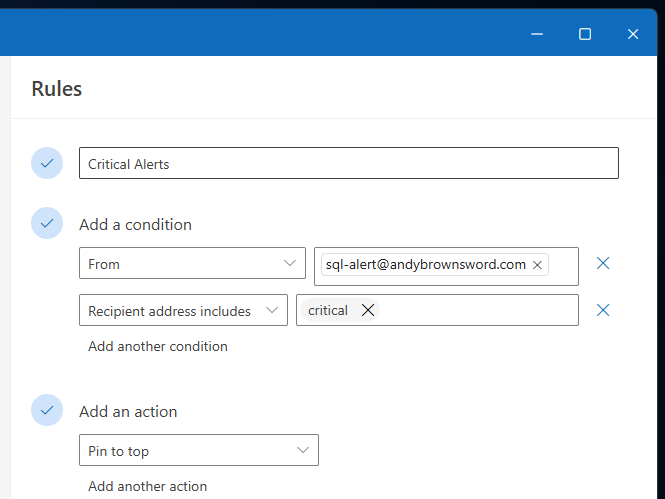
Within the Rule configuration in Outlook we can use the condition ‘Recipient address includes’ to filter the relevant tag.
The example below also uses the sender plus the tag to identify mails that we want to pin to the top of the inbox for urgent attention:
For the information alert we’ll use a Filter within Gmail to route them to a separate folder. The ‘To’ field can be used for partial matching in this case.
The example below is set up to catch the tag, assign a tag, and mark the informational message as read:

This sub-addressing notation is industry standard according to the Exchange documentation so I’d expect this to be broadly available. I’ve also seen this used by SAAS services for automatic routing or workflows too.
Wrap up
In this post we’ve looked at how to use sub-addressing (or plus-addressing) to help easily categorise email alerts without the need to scan the subject or body for specific text elements.
By using a defined list of tags within the emails we can handle the emails more consistently across a wide range of alerts. Here we’ve demonstrated how these can be handled within Outlook and Gmail interfaces.
So if you’re suffering from email overload this festive season, try to find a moment to give sub-addressing a try to see if its the gift you never knew you needed.
 Andy Brownsword
One reply on “Streamlining Email Alerts with Sub-addressing”
I’ll give this a try with Google Mail too but it looks like it will work.