
I recently had an issue when sourcing data in Power BI from a server which was accessed by a DNS alias. Here I’ll demonstrate the issue and how to resolve it.
After entering the server details, we could be greeted with the message below:

The server name provided does not match the server name on the SQL Server SSL Certificate. Please contact your administrator or try changing your Connection encryption settings
Power BI Desktop
You may also see a similar prompt to the above, prompting you to continue with an unencrypted connection:
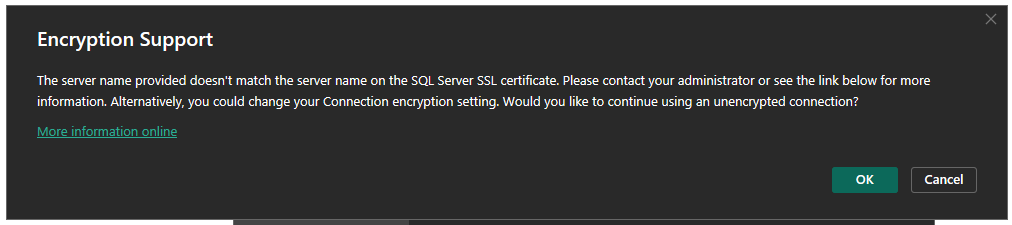
That won’t work.
As indicated in the message, the issue here is that the certificate which is used by the SQL Server doesn’t have an entry for the DNS alias. Power BI doesn’t know if it can trust this connection so it won’t let us proceed.
The correct solution could be to issue a certificate which contains the DNS alias in addition to the machine’s own address. But that might not be our place to solve right now, so what else can we do?
If we’re aware of the situation and want to work around this for the server we can provide an exception for it.
This exception doesn’t reside within the Power BI app, its set within the environment variables on the machine. We can create a variable named PBI_SQL_TRUSTED_SERVERS and add the server name, for example:
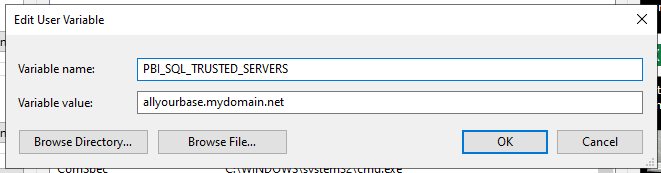
Adding the machine as a ‘trusted server’ will bypass the certificate check which is failing for us.
I believe the value for the variable can support multiple comma separated values and a wildcard, for example: allyourbase.mydomain.net,*.andybrownsword.co.uk.
With this exception in place (and a restart of Power BI Desktop), we can now connect to the server without issue.
It’s worth noting that even though this was needed to connect to the server when building a report, the same check doesn’t appear to be done when publishing to the Power BI service as that had no such issues.
 Andy Brownsword
One reply on “Solving Certificate Server Name Mismatch for Power BI Data Sources”
[…] Andy Brownsword works around an issue: […]