
Case sensitivity in data can trip us up unknowingly and Integration Services is no exception. Depending on the components we’re using we may notice different behaviour.
Without understanding the way case sensitivity is treated within SSIS packages, we may see unexpected results with string comparisons.
Let’s clear things up and dive into a few examples to see when they behave differently.
Expressions
When using expressions in SSIS they are case sensitive. A solid example of this is searching within a string using the FINDSTRING function. We can see no match found with the example below:
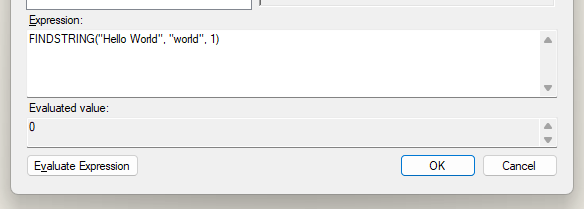
The value of zero shows the text was not found due to the difference in case between the ‘W’ character. To resolve this we need to negate the case differences. There are a couple of ways We could achieve this:
Either use the UPPER or LOWER functions in the expression to ensure both sides are using consistent casing, for example:
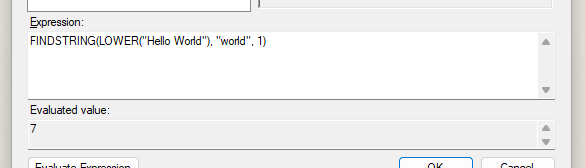
Alternatively, if we’re using a value in the data flow we can use the Character Map operator to adjust the casing and output a new value for comparison:

Lookup transformation (full cache)
Next up is the lookup function – specifically using the Full Cache mode, which is the default. In this mode the lookup operates case sensitive.
This is due to the matching being done within Integration Services. As with the expression above, this performs a case sensitive comparison.
When performing this type of lookup, the full data set is taken from the database. A trace reveals a query requesting the full table:

Using a full cache has the performance benefit of not needing to perform round-trips to the database for each record, but we will be forced to have a case sensitive match.
To use this option whilst allowing a case insensitive match, we need to alter both the source and lookup values to align the text case.
The source could use a Character Map as above for Expressions, and the lookup would need to change how we retrieve the reference set from the database. One example could be to implement a view over the data which provides an adjusted lookup value, for example:
CREATE VIEW dbo.LookupView AS

	SELECT LookupValue = LOWER(StrValue),
		StrValue
	FROM dbo.LookupTable

GO
By referencing the view in the lookup we can join between our Character Map-ped lower case value, and the lower case LookupValue from our view:
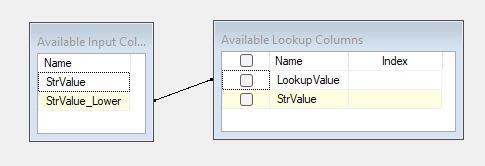
This will result in a case insensitive match whilst still retaining the performance benefits of a Full Cache lookup.
Lookup transformation (partial or no cache)
We’ll continue with the lookup transformation, but this time when using a Partial or No Cache. In this mode the lookup may be case sensitive.
The reason for this is that in the Partial or No Cache modes, the lookup transformation will honour the collation of the lookup field for case sensitivity.
Let’s consider 3 sample values – Test, test, tesT, and a partial cache. In this mode, the lookup can be cached and reused.
When looking up to a value which is case insensitive, we’ll only see one lookup to the database:

The first value will be looked up, and the second and third values won’t return to the database as the existing lookup matches.
The result is all 3 of the values matching the lookup:
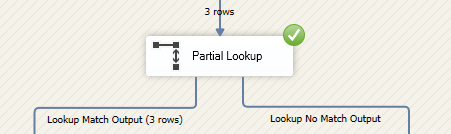
Performing the same against a field which is case sensitive will see 3 queries. The package will understand the case sensitive collation and issue additional lookups for the variations.
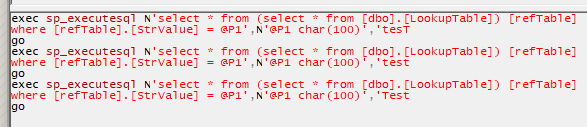
The result of this will be a case sensitive lookup so only 1 of the 3 values will match:

To perform a case insensitive lookup in this instance we could follow the same approach as with the Full Cache lookup above. Additionally we could change the collation for only the lookup column if it wasn’t relevant for that field.
Wrap up
Case sensitivity can be a subtle but significant challenges in solutions where they are prevalent. In this post we’ve looked at how case sensitivity is handled in different elements of an Integration Services package.
In most instances, text comparisons will be case sensitive. This is the case for expressions, and also in the lookup transformation due to Full Cache mode being default.
If you need to perform case insensitive comparisons in your package you’ll want to adjust the text values to have consistent casing by converting both sides of the comparison to either be upper or lower case.
Partial or No Cache lookups may be an option to perform case insensitive lookups, however you should consider the additional load on the database as a result.
 Andy Brownsword
One reply on “Case Sensitivity in Integration Services”
[…] Andy Brownsword has a list: […]