
When ingesting files in SSIS via Flat File Connections, a consistent format is key. Sometimes that isn’t the case. Here we’ll look at an example where the carriage return (CR, \r) may or may not be included in the file.
The problem
A file format can change as easy as tweaking the file in an editor and re-saving it (looking at you, Excel 👀). Let’s see the impact of this.
If we expect a line feed (LF) but receive a carriage return plus line feed (CRLF), the file will appear to import correctly:


But:
SELECT *
FROM dbo.LineFeeds
WHERE [Name] = 'Andrew';

Why? It’s because the text actually includes the carriage return (CR) character:

So let’s look at the alternative. If we expect the carriage return plus the line feed (CRLF) but only receive a line feed (LF), we’ll see a warning in SSIS:

Warning: The end of the data file was reached while reading header rows. Make sure the header row delimiter and the number of header rows to skip are correct.
Information: The total number of data rows processed for file “C:\Data\Import.csv” is 0.
A carriage return won’t be found in the file, so the import can’t make it past the header record.
Both of these issues present themselves in odd ways – not being able to find the data which was clearly imported, or nothing being read when there are obviously records in the file.
Now that we’ve seen the symptoms, let’s get to fixing them both.
The solution
Both scenarios here have very different results, but we can use a single solution to handle both of them.
We’ll start with the one thing in common – the Line Feed. That will be our line terminator:
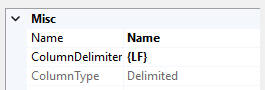
This will split the records for both scenarios. The issue is if we have carriage returns present too. We can handle those within the data flow.
Inside the flow we’ll add a Derived Column transformation to replace the carriage returns present in the text:
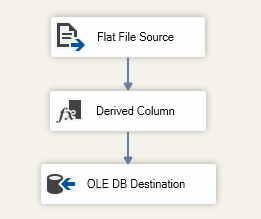

With that in place, we now solve both issues:
- If we receive a file containing only line feeds (
LF) the Flat File Connection will read all rows, and the Derived Column transform won’t alter the data - If we see a carriage return along with the line feed (
CRLF) we’ll still import the records – based on theLFterminator – and the Derived Column transform will remove the trailingCRcharacter
The result is consistent data, whichever way it’s presented:
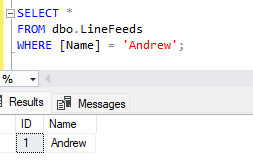
Wrap up
In this post we’ve looked at an issue I saw recently where files were being presented with inconsistent line terminators as they were sometimes being manipulated upstream.
We like to have data which is consistent but realistically that’s not always the case for one reason or another.
Using the approach outlined here means you can easily support both sets of terminators in a single connection and Data Flow.
If you come across this issue, here’s your solution. If you haven’t hit this issue – yet – then it might be a good template where there’s a reasonable chance you might be receiving data which has had some massaging before being delivered.
 Andy Brownsword
One reply on “Handling Optional Carriage Returns in Flat Files”
[…] Andy Brownsword has fun with file formats: […]