
Package configuration allows us to retrieve variable values from a variety of sources. We recently looked at storing the values in a SQL database.
We can elevate the database configuration a step further by using system level Environment Variables. In this post we’ll walk through that process.
Using environment variables
Where we previously looked at storing configuration in the database, we can also store values in Windows’ system environment variables. These can be accessed through the OS under System Properties > Environment Variables. Let’s set one up for the SSIS environment:

Within a SSIS package we go through the Package Configuration process and choose the configuration as ‘Environment variable’ and select the new variable:

The environment variable is only a single value so can only map to one attribute within our package. We’ll assign it to an EnvironmentName package variable:

With that in place if we close and re-open the package, the variable will be reloaded, and we’ll see the value has updated with the configured value:

Ok that’s cool, and?
Let’s look at using the system variables alongside database configuration to take it to the next level.
Elevating database configuration
When using multiple SSIS environments we need to ensure each are configured correctly. For database configuration this means deploying the correct values to the table and also ensuring that the packages point to the correct database for its configuration.
We can use system variables to remove this headache as each machine hosting SSIS can have its own configuration baked right into the OS. We’ll use the system variables to change which database where configuration is retrieved from.
We’ll begin with a regular package configuration. A database connection points to the configuration database, and package config is used to populate the EnvironmentName variable:

Now to elevate.
To demonstrate we’ll have two databases side-by-side to repreresnt development and production configuration:

First up let’s create a new system variable with the connection string for our development database:

Now we’ll use package configuration to retrieve this value and use it to populate the Connection String property for our configuration database connection:
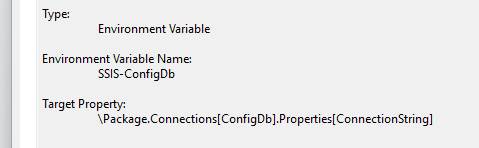
So now, when the package runs:
- The system environment variable provides the connection string
- The database connection uses the connection string to target the correct database
- The config in the database provides the
EnvironmentNameproperty
If we update the variable system level variable to point to the ‘production’ data and restart Visual Studio and our solution (as the values are cached), we’ll see the EnvironmentName variable has updated correctly:

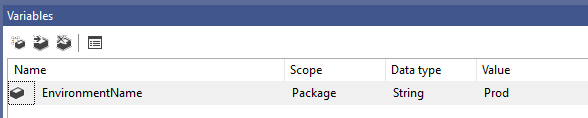
There we have it, the relevant database for the environment is defined by the system. All we need to make sure is the variables have been set in the configuration database.
Wrap up
In this post we’ve looked at using a system level environment variable to make configuration across environments much easier. By using the system variable to configure the database connection it removes the hassle – or potential for issues – when deploying new packages.
Using this approach consistently can greatly simplify deployments and migrations between environments. The only configuration which needs to be deployed alongside a package is for the entries to the configuration table.
 Andy Brownsword
One reply on “Elevating SSIS Package Configuration with Environment Variables”
[…] Andy Brownsword stores some context: […]