When restoring a database in different environments we may stumble across orphan users. This typically manifests through failed connections to the database.
Here we’ll have a quick look at what the issue is and 3 ways to fix it.
What are orphaned users
When users are created in a database they’re mapped to the login on the server. This is based on a SID which is unique to a login and should be consistent between the two to provide access.
Orphan users are created when the SIDs for database users and server logins no longer match, for example after restoring a database in a different environment.
A SID is generated when creating a login (if not explicitly supplied) and is random, so creating the same account with identical details – even on the same environment – will produce different SIDs.
We can replicate an orphan user as follows:
USE [master]
GO

/* Create an initial SID */
CREATE LOGIN [bloguser]
WITH PASSWORD = N'Pa55w0rd';
GO

USE [blog]
GO

/* Create user based on first SID */
CREATE USER [bloguser]
FOR LOGIN [bloguser];
GO

USE [master]
GO

DROP LOGIN [bloguser];
GO

/* Recreate the user with *NEW* SID */
CREATE LOGIN [bloguser]
WITH PASSWORD = N'Pa55w0rd';
GO
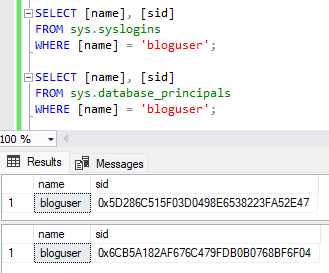
When the user is created, the SID will match the login. However when we drop and recreate the login it’ll have a new SID, so they will be out of sync. The server will show the login and database will show the user so it appears fine.
The login will work to the server, but when trying to access the database we see an exception:

We can see that the SID values don’t match between the two by using the DMVs:
Let’s look at a few ways to resolve them:
Solution #1 – Old school
One solution can be to use the legacy stored procedure sp_change_users_login. I say legacy as this feature will be removed in the future. But for now you can use it to identify issues:
EXEC sp_change_users_login
	@action = 'report';
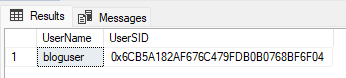
With the impacted login confirmed you can use the same procedure with different parameters to resolve:
EXEC sp_change_users_login
	@action = 'auto_fix',
	@usernamepattern = 'bloguser';

This will update the SID for the database user to match the SID for the login which has the same name.
Solution #2 – Do it yourself
As the first option is old and on its way to deprecation, its worth looking at how to identify and resolve these mismatches yourself.
The script below will help to find the orphan users:
SELECT OrphanUser = p.[name],
	OrphanSID = p.[sid],
	PotentialLogin = x.[name],
	PotentialSID = x.[sid]
FROM sys.database_principals p
	LEFT JOIN sys.syslogins l ON p.[sid] = l.[sid]
	LEFT JOIN sys.syslogins x ON p.[name] = x.[name] AND p.[sid] <> x.[sid]
WHERE p.[type] IN ('S', 'U', 'G')		/* SQL User, Windows User, Windows Group */
	AND p.authentication_type <> 0		/* No authentication, system */
	AND l.[name] IS NULL;				/* Not matching */
This will look for any users in the database which don’t have a matching SID in the server logins. It checks SQL users plus Windows users and groups, and will return the orphaned user along with any logins with the same name but different SID.
With the users identified, we can use the ALTER USER statement to remap the user (read: update the SID). Just like this:
ALTER USER [bloguser]
WITH LOGIN = [bloguser];
Once ran the SID of the database user will match the server login.
If you want to do this in bulk, add this column onto the script above to grab the pre-made statements:
Fix = IIF(x.[name] IS NOT NULL,
	'ALTER USER ' + QUOTENAME(p.[name]) +
	' WITH LOGIN = ' + QUOTENAME(x.[name]),
	NULL)		/* NULL if no matching name found */
Solution #3 – DbaTools
Now we’re a bit more serious. But we’re not using T-SQL for this – we’re talking PowerShell, specifically the dbatools module.
Within the vastness of functionality available in the module are a selection of commands which help us with orphan users. We know what we’re doing by now so let’s jump into the details.
Firstly we use the Get-DbaDbOrphanUser command to identify the orphans:
Get-DbaDbOrphanUser `
	-SqlInstance localhost\sql2022 `
	-Database blog

Here its spotted our orphan, so we can now use the Repair-DbaDbOrphanUser command to fix the orphans:
Repair-DbaDbOrphanUser `
	-SqlInstance localhost\sql2022 `
	-Database blog

Unlike the first two options, the fix in this case will resolve all the orphans users with matching logins.
Another benefit of the PowerShell commands is that these come with additional switches. For example the repair command can remove any users which don’t have matching logins with the -RemoveNotExisting switch.
When it comes to PowerShell, it’s usually worth reviewing the documentation before putting these into action as there can be helpful functionality just a switch or two away.
Wrap up
In this post we’ve looked at the issue of orphan users. We’ve covered what they are and why we see them, then 3 different ways we can identify and resolve them.
If there’s a specific orphan which I know about and needs fixing I’d quickly go for solution #2. If however you’re looking at a wider issue or approaching a new environment, the dbatools route would be much more thorough and efficient.
Orphan users are an age old challenge which pop up from time to time and they can be particularly annoying if not spotted. Thankfully due to their maturity there are plenty of ways to handle them, and more options and scripts than outlined here. This is simply my take on them after a recent tussle.
 Andy Brownsword