
The UNION and UNION ALL operators allow us to combine results, but there’s no guarantee that each set of results uses the same data types. So what data types are returned?
For the longest time I thought the data types from the first set of results were used for the final results. That’s not the case.
Understanding how this magic works can be key to avoiding potential issues as well as anticipating the shape of the data we’ll be left with.
Here we’ll look at the 3 steps which make the magic happen.
Implicit conversion
For data sets to be combined, the data types for related columns must be converted to the a singular data type for the result set. This is done silently by the database engine and is called implicit conversion.
Implicit conversion happens as the database engine knows how it can convert one data type to align with another. For example a DATE type can be converted to a DATETIME by simply adding a time component for midnight. Similarly an INT can become a BIGINT as it’ll be the same number, just stored in a larger field.
As you’d expect, different flavours of numeric data types are generally interchangeable. However when you have data types which can hold vastly different information, you could struggle.
For example you can’t convert an INT to a DATE or vice versa:
SELECT 123
UNION
SELECT CAST('2025-01-01' AS DATE);

You can however convert an INT to a DATETIME:
SELECT 123
UNION
SELECT CAST('2025-01-01' AS DATETIME);
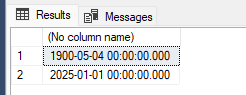
There are a lot of data types in SQL Server so if you want to check out which combinations support implicit conversion check out the documentation here as a reference.
As long as the data types can be converted we’re good to move onto the next step.
Data type selection
Now that we understand implicit conversion, how do we know what the resulting data types will be? Why did the INT above get converted to a DATETIME and not the other way?
This is due to data type precedence which is a hierarchy of data types. When performing implicit conversion the lower data type is converted to the higher data type.
Below is a selection of the hierarchy with some common data types (full list is available here):
DATETIMEDATEDECIMALMONEYBIGINTINTVARCHARCHAR
So using our example above, we can see that DATETIME is higher in the hierarchy than INT, so the number is being converted to the date/time.
The selection above also demonstrates how INT values can become BIGINT and DATE can be converted to DATETIME values. This is due to BIGINT and DATETIME being further up in the hierarchy.
If we know the data types for corresponding columns in each result set, we can infer what the resulting data type will be.
With the data type for the column defined, there’s one last piece of the puzzle.
Focus on precision
The final point is specific to data types data types where we can specify sizing attributes. The resulting data type must also choose an appropriate size too.
The simplest example is for text such as VARCHAR where we can provide the length for the strings. If we’re combining longer and shorter strings, the resulting data type will have the length of the largest data type.
In the example below the result is a VARCHAR(10) field:
SELECT Val = 'Hello'
UNION ALL
SELECT 'Hello Andy';
It gets a little more complex when we’re dealing with precision and scale, such as DECIMAL data types.
In these cases, the scale is simply the largest scale value across combined data types. For precision, the engine uses the sum of the largest number of digits on each side of the decimal for the precision.
For example combining a DECIMAL(10, 2) with a DECIMAL(7, 4) with the logic above results in DECIMAL(12, 4). Details of the calculation are shown in the documentation
And with that, we know exactly what data type will be generated for any columns in our UNION query.
Wrap up
In this post we’ve looked at how data types are defined for the results of a UNION or UNION ALL operation. We’ve looked at the 3 steps to derive the data type:
- Check data types be converted implicitly
- Select the data type with the highest precedence
- Set the sizing for the data type based on original types
Based on these 3 steps we can derive the data types which will result from UNION operations when building solutions. This will help avoid issues like the type clash where implicit conversion isn’t supported, and understand what the resulting data type will look like.
When needed we can also avoid these steps by using CAST or CONVERT within the result sets to ensure data types align and there’s no conversion required.
 Andy Brownsword
One reply on “Resulting Data Types from Union Operations”
[…] Andy Brownsword puts on the lab coat and performs some experiments: […]