
Sometimes you want to segment records. It may be splitting a customer base for marketing purposes, or segmenting a user base for a new feature. Good segmentation makes clean divisions in the data.
In this post we’ll see a way to achieve that with a great deal of help from Window Functions.
This post was inspired by something I spotted in the wild which looked a little like this:
SELECT TOP (10) PERCENT RecordID
INTO #GroupA
FROM #SourceRecords
ORDER BY NEWID() ASC;

SELECT TOP (90) PERCENT RecordID
INTO #GroupB
FROM #SourceRecords
ORDER BY NEWID() DESC;
These two sets of data will overlap. If you remove the overlapping entries you’ll end up with <100% of the records. Scary.
So that looks bad. What about the good stuff?
Requirement
The requirement is to segment a set of data – represented here by a temp table #SourceRecords which can have any number of records within. The contents of the table should not matter, the segmentation should be random.
The records in here need to be segmented into different groups. There may be varying numbers of groups, and they may be different sizes too. The groups should be configurable.
So that’s quite a bit more complex than where we started from, but we might as well do something better if we’re going to fix it, eh.
Setup
First up I want to cater for different numbers of segments with different weightings. For that we’ll create and populate a temporary table with those parameters:
CREATE TABLE #Segments (
	SegmentOrder INT PRIMARY KEY,
	SegmentPercentage FLOAT,
	SegmentName VARCHAR(50)
);

INSERT INTO #Segments
VALUES (1, 0.1, 'Group A'),
	(2, 0.5, 'Group B'),
	(3, 0.25, 'Group C');
We have an ordering for the segments, the volume they should contain, and a name purely for identification. Note the percentage is represented decimally and that the total here is only for 85% of the records. We’ll come back to both of these points.
Building blocks
Now to start building the requirements. First up, we’re going to order the source records and with this we can achieve a few things:
- Order the records ready to segment
- Order the records randomly (we’ll borrow the
NEWID()approach above) - Assign a relative percentage value to each record (to align to a segment later)
All with one window function:
SELECT *, Ordering = PERCENT_RANK() OVER (ORDER BY NEWID())
FROM #SourceRecords s
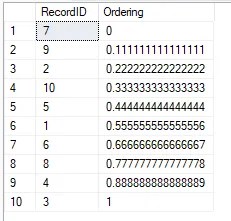
Notice that the PERCENT_RANK function returns the percentage as a decimal representation which is why our segments follow that approach.
We need to join those records to the segments. However currently the segments don’t have boundaries. We know Group B should have around 50% of the records, but that should ignore the first 10% for Group A and then take the next portion up to 60% within the data.
We can again use those helpful window functions to define the segment ranges:
SELECT s.SegmentOrder,
    s.SegmentName,
    s.SegmentPercentage,
    StartRange = ISNULL(SUM(s.SegmentPercentage) OVER (o
        ROWS BETWEEN UNBOUNDED PRECEDING AND 1 PRECEDING), 0),
    EndRange = SUM(s.SegmentPercentage) OVER o
FROM #Segments s
WINDOW o AS (ORDER BY s.SegmentOrder)

I really enjoy window functions, they’re very powerful. We’ve previously looked at aggregate window function, grouping with them, optimising them and the WINDOW clause if you want to know more about these excellent functions.
All together
We can see things are taking shape between those two result sets. What we need now is to pop them together. In this case we’ll use CTEs:
WITH Ranking AS (

	/* Provide a random order to records */
	SELECT *, Ordering = PERCENT_RANK() OVER (ORDER BY NEWID())
	FROM #SourceRecords s

), SegmentRanges AS (

	/* Define bounds for the segments */
	SELECT s.SegmentOrder,
		s.SegmentName,
		s.SegmentPercentage,
		StartRange = ISNULL(SUM(s.SegmentPercentage) OVER (o
			ROWS BETWEEN UNBOUNDED PRECEDING AND 1 PRECEDING), 0),
		EndRange = SUM(s.SegmentPercentage) OVER o
	FROM #Segments s
	WINDOW o AS (ORDER BY s.SegmentOrder)

)
SELECT r.RecordID, sr.SegmentName
FROM Ranking r
	LEFT JOIN SegmentRanges sr ON r.Ordering >= sr.StartRange AND r.Ordering < sr.EndRange
ORDER BY RecordID;

Et voila. Gloriously segmented results.
Remember how our segments didn’t cover 100% of data? It’s not an issue here, we can see which records weren’t included which can also be important to demonstrate we’ve applied the segmentation consistently.
Rerunning the query will provide different groups for the records each time due to the use of NEWID(). What will remain consistent is the number of records being assigned to each group.
If we swap out the SELECT portion of the above query with the snippet below we will see consistent volumes:
SELECT sr.SegmentName,
	Records = COUNT(1),
	[%Total] = COUNT(1) / CAST(SUM(COUNT(1)) OVER () AS DECIMAL(5, 2)),
	[%Target] = sr.SegmentPercentage
FROM Ranking r
	LEFT JOIN SegmentRanges sr ON r.Ordering >= sr.StartRange AND r.Ordering < sr.EndRange
GROUP BY sr.SegmentName, sr.SegmentPercentage;

With only 10 records in this sample, we can’t get 25% for Group C so we end up with only a 20% contribution. However it will be consistent, every time this is ran it will always have 20% of the records associated, although the specific records will differ.
Wrap up
Here we’ve looked at performing consistent and accurate segmentation of data. This is made simpler with the use of Window Functions which are key to this approach.
As we saw with the initial example, accurate segmentation may be a challenge if its not designed well and can lead to records being inconsistently missed. This can be hard to retrospectively identify if you’re using a random order for selection.
Using the approach designed here, you should be able to dynamically cater for whatever combination of segments are needed with results that are consistent. Window functions again save the day and help avoid additional CTEs or recursion which would be needed in legacy versions of SQL Server.
 Andy Brownsword
One reply on “Data Segmentation in SQL using Window Functions”
[…] Andy Brownsword breaks things up: […]