In the previous introduction post we covered how to add a computed column to a table and that by default this becomes part of the table metadata when its created. Here we’re going to look at benefits we can get with the performance of these columns when applying an index to them. We’ll use the example table like before to demonstrate these even though its of a small size:
CREATE TABLE #ComputedColumns
(
    SalesDate DATE,
    ProductID INT,
    Quantity INT,
    Cost DECIMAL(6, 2),
	TotalCost AS Quantity * Cost,
	IsRecentSale AS CASE
		WHEN DATEDIFF(MONTH, SalesDate, GETDATE()) < 3
		THEN 1 ELSE 0 END
);

INSERT INTO #ComputedColumns (
    SalesDate, ProductID, Quantity, Cost
)
VALUES ('2021-01-01', 1, 2, 1.99), ('2021-04-01', 2, 9, 128.50),
    ('2021-07-01', 3, 19, 1.00), ('2021-10-01', 3, 26, 18.50),
    ('2021-12-01', 2, 102, 1050.00), ('2022-01-01', 3, 11, 1.10);
Where we may start to see performance degradation with the computed columns is on large tables. As an example if we wanted to filter a query based on the TotalCost column we could do something like this:
SELECT COUNT(1)
FROM #ComputedColumns
WHERE TotalCost > 1000;
Of course it’ll be nice and quick with our tiny dataset but what if we take a look at the execution plan behind it and see what’s going on. In the snip below we’ll see that the engine needed to do a full scan of the table as the column is only metadata and none of the resulting values are persisted so it needs to go through every record in the table to calculate the value and determine if they match before returning them. You can see this calculation in the predicate for the scan:
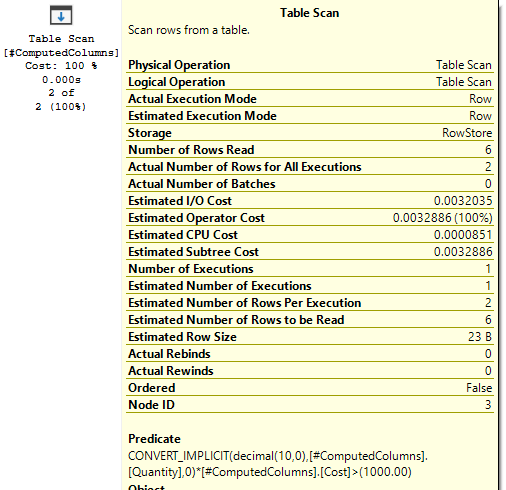
What you may notice however is that SQL estimated that only 2 of the records would be returned. How could it possibly know if none of the values are persisted? Well, even though its not an actual column within the table, the engine will still create statistics for it when the field is used so that it can try and better estimate the action to take downstream. We can see these details using the queries below:
SELECT
	OBJECT_NAME(s.object_id, DB_ID('tempdb')) [Table],
	s.[name] [Statistic],
	s.auto_created,
	c.[name] [Column]
FROM tempdb.sys.stats s
	INNER JOIN tempdb.sys.stats_columns sc
		ON s.object_id = sc.object_id
		AND s.stats_id = sc.stats_id
	INNER JOIN tempdb.sys.columns c
		ON sc.object_id = c.object_id
		AND sc.column_id = c.column_id
WHERE OBJECT_NAME(s.object_id, DB_ID('tempdb'))
	LIKE '#ComputedColumns%';

/* You can view the contents, replace your table/stats names as needed: */
DBCC SHOW_STATISTICS(
    'tempdb..#ComputedColumns_____000000000012',
    [_WA_Sys_00000005_BF78C417]);
Whilst having the statistics is great for the engine to help build a query plan the issue still remains that a table scan is needed to allow us to return all of the relevant records. Fortunately as the title for the post foreshadowed, we can index computed columns!
By indexing a computed column we’ll create a persistent copy of it on disk and just like with a regular index it’ll allow us to scan or preferably seek into the records which we’re looking for. Adding the index will require extra storage for the data, it’ll add time to maintenance jobs such as backups or index rebuilds, and like a regular index it’ll need to be updated when the contents of the table changes. Ultimately this adds overhead to your table which will partially offset the benefit of the index so should be considered.
With our sample table lets try to add an index and see how the plan looks when re-running the query:
CREATE INDEX TotalCost
ON #ComputedColumns (TotalCost);

SELECT COUNT(1)
FROM #ComputedColumns
WHERE TotalCost > 1000;
Now we’ve got the index in place this allows the execution plan to perform a seek right into the records which it needs, fantastic.
We need to bear in mind however that as indexing the column also persists it, we’re only able to apply the index to deterministic values – that is to say that the resulting value will always be returned based on its calculation. For example if the calculation makes use of the GETDATE() function then its non-deterministic as each time the query is ran a different value may be returned. In our sample table we have the IsRecentSale column which uses this so we aren’t able to index that:
CREATE INDEX IsRecentSale
ON #ComputedColumns (IsRecentSale);
Column 'IsRecentSale' in table '#ComputedColumns' cannot be used in an index or statistics or as a partition key because it is non-deterministic.
It’s also worth noting at this point that computed columns cannot be used as part of a Columnstore index regardless of whether the calculation is deterministic or not:
CREATE NONCLUSTERED COLUMNSTORE INDEX
	ncci_ComputedColumns
ON #ComputedColumns (
	SalesDate,
    ProductID,
    Quantity,
    Cost,
	TotalCost
);
The statement failed because column 'TotalCost' on table '#ComputedColumns...' is a computed column. Columnstore index cannot include a computed column implicitly or explicitly.
To provide an alternative, we could have implemented the column as being persisted. This would need the entire table to be rewritten much like adding a standard column, so this would be very expensive for large tables. Additionally just persisting the value wouldn’t provide the ability to seek directly based on its value so we’d need an index to support that – at which point we’d be storing a second copy of the data.
The benefit of the indexed column extend further to the removal of the column. Whereas a persisted column would need to reshuffle the pages of the entire table again to free up the storage, the index could simply be dropped to return the column to its metadata form which could then easily be removed – both of which very fast operations with minimal impact or blocking on the table.
Grab a copy of your own data and try out a computed column, persisting it, indexing it, and querying it. I really like them, particularly in an indexed form, lets see what you think!
 Andy Brownsword