Last time out we looked at referencing tables across databases. While we of course have the option of using three-part naming to address the table, we also considered views and synonyms as two alternative options.
Both of these can be used to achieve similar results. There are elements which they have in common and others which differ between them, and so I wanted to follow up looking at some of those.
We’ll start off with a compilation of what we produced last time, a sample table and a view and synonym to be comparing:
USE DbOne
GO

/* Create the table */
CREATE TABLE dbo.CrossDbTable (
    ID INT IDENTITY(1, 1) PRIMARY KEY,
    NumberField INT,
    ModulusTen INT,
    ModulusThou INT
);
GO

/* Add some records */
INSERT INTO dbo.CrossDbTable (
    NumberField,
    ModulusTen,
    ModulusThou
)
SELECT
    CHECKSUM(NEWID()),
    CHECKSUM(NEWID()) % 10,
    CHECKSUM(NEWID()) % 1000;
GO 10000

/* Now create a view and synonym in another database */
USE DbTwo
GO

CREATE VIEW dbo.vw_CrossDbTable AS
SELECT * FROM DbOne.dbo.CrossDbTable
GO

CREATE SYNONYM dbo.sy_CrossDbTable
FOR DbOne.dbo.CrossDbTable;
GO
Querying
Using these objects in a query is about as straight forward as it gets. We can refer to them in a the same way as we would reference a table directly, for example:
SELECT *
FROM DbOne.dbo.CrossDbTable
WHERE ModulusTen = 0;

SELECT *
FROM DbTwo.dbo.vw_CrossDbTable
WHERE ModulusTen = 0;

SELECT *
FROM DbTwo.dbo.sy_CrossDbTable
WHERE ModulusTen = 0;
All three of these queries produce the same results, same execution plan, same estimated costs, same number of reads, etc. They’re effectively identical. So far so good.
Table hints
Extending these queries a little we may want to consider using hints against the objects. Table hints aren’t something you should need frequently if the schema is well defined but they may be used from time to time so I wanted to point out a couple of them here.
So that we can see them in action we’ll add a simple index to our table as follows:
CREATE INDEX ModulusTen
ON DbOne.dbo.CrossDbTable (ModulusTen);
When we ran our queries last time we were scanning the clustered index and this time we want to make sure that we can use this index to seek to the records which we’re looking for so we’ll use the FORCESEEK hint like so:
SELECT *
FROM DbOne.dbo.CrossDbTable WITH (FORCESEEK)
WHERE ModulusTen = 0;

SELECT *
FROM DbTwo.dbo.vw_CrossDbTable WITH (FORCESEEK)
WHERE ModulusTen = 0;

SELECT *
FROM DbTwo.dbo.sy_CrossDbTable WITH (FORCESEEK)
WHERE ModulusTen = 0;
With that hint in place we get the same plan produced for all of our queries where we’ll use our new index to perform a seek followed by a key lookup:

Another hint we see all too often is the NOLOCK hint so let’s try that one out too. We’ll set up some blocking by running an update in a separate session to lock some of the records:
BEGIN TRAN
INSERT INTO DbOne.dbo.CrossDbTable (
	NumberField, ModulusTen, ModulusThou)
VALUES (1, 1, 1)

/* Run this once we're done
ROLLBACK TRAN
GO */
With that in place we’ll run those original queries again with the NOLOCK hint to see if all of them can complete successfully:
SELECT *
FROM DbOne.dbo.CrossDbTable WITH (NOLOCK)
WHERE ModulusTen = 0;

SELECT *
FROM DbTwo.dbo.vw_CrossDbTable WITH (NOLOCK)
WHERE ModulusTen = 0;

SELECT *
FROM DbTwo.dbo.sy_CrossDbTable WITH (NOLOCK)
WHERE ModulusTen = 0;
As hoped all of them would run through and return the results as all of these approaches will honour a NOLOCKhint.
But not all hints
With all of that said, not quite everything is equal with the table hints. Below we’ll try a similar query to our FORCESEEK but this time rather than requesting the seek we’ll just indicate which index we’d like the query to use and see how it operates with that:
SELECT *
FROM DbOne.dbo.CrossDbTable WITH (INDEX = ModulusTen)
WHERE ModulusTen = 0;

SELECT *
FROM DbTwo.dbo.vw_CrossDbTable WITH (INDEX = ModulusTen)
WHERE ModulusTen = 0;

SELECT *
FROM DbTwo.dbo.sy_CrossDbTable WITH (INDEX = ModulusTen)
WHERE ModulusTen = 0;

So, that happened.
We’ve got all the results back as we’d expect, however the query plan from the view isn’t quite what we’d asked for is it. Views don’t take kindly to index hints and they’ll just flat out ignore them and stick with whatever plan the engine fancies.
I will note here that a slight exception to this would be indexed views as they allow you to specify the index on the view, but still not referencing the source table.
Schema changes
Another area which can differentiate these options would be how they handle schema changes. To show this we’ll add another field onto our table and put some data in there:
/* Add a new field */
ALTER TABLE DbOne.dbo.CrossDbTable
ADD NewField VARCHAR(10);

/* Pop some text into there */
UPDATE DbOne.dbo.CrossDbTable
SET NewField =  DATENAME(WEEKDAY, DATEADD(DAY, ModulusTen, '2020-01-01'));
With that done we can try to pull a few records out from the different objects to see how they look now:
SELECT TOP 5 *
FROM DbOne.dbo.CrossDbTable;

SELECT TOP 5 *
FROM DbTwo.dbo.vw_CrossDbTable;

SELECT TOP 5 *
FROM DbTwo.dbo.sy_CrossDbTable;
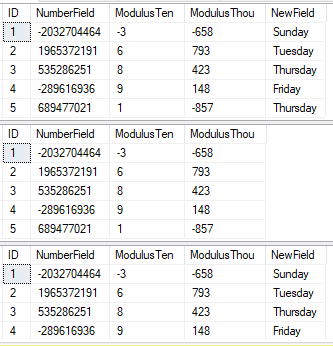
That was unexpected, where’s our new field!?
When we change the schema for our table a view will not update the fields it references automatically. To update the list of fields for a view we need to run the following command:
sp_refreshview @viewname = 'DbTwo.dbo.vw_CrossDbTable';
Once that’s complete the view will be synchronised with the main table schema and will return the right number of columns.
It’s worth noting here that if we were to drop a column instead of adding one, this will force an refresh of the schema for the view automatically rather than being a change which could break the view.
Wrap up
Here we’ve had a run down of some similarities and differences between views and synonyms. I’ve typically seen views more commonly used as developers are more familiar with them. To a point they’re almost the same and there are just a few edge cases we’ve seen where they can differ.
Of course with that said, views can also contain joins or more complex logic which isn’t possible within a synonym. If this is what you need then you’ll still be able to achieve that with a view but bear in mind there are some restrictions you may come across such as trying to use index hints or changing the underlying table schema – both of which may cause challenges.
Coming back to where we concluded last time, the key here is abstraction of our database objects to allow us more flexibility to change things in the future. Both of these approaches can help achieve that goal, although personally I’d tend to prefer the synonyms due to some of the benefits we’ve seen here.
 Andy Brownsword
One reply on “Comparing Views and Synonyms in SQL Server”
[…] I want to change the View to a Synonym. I’ve compared views and synonyms previously and I really like what synonyms […]