When joining data in SQL we have a number of options to us including INNER and OUTER joins, but one of the ones I tend to use less frequently is the APPLY operator, specifically the CROSS APPLY and OUTER APPLY operators. As with other types of joins they operate slightly differently and have considerations which should be taken into account when deciding on the output which we’re looking for.
Here we’ll take a look at what it can do for us and then the CROSS and OUTER variations individually with some examples to try and visualise how they can be used.
What can they do
When using an APPLY we have functionality available to us which we aren’t able to use with a regular JOIN operator. One of the reasons for this is that the data we’re joining to with the APPLY can access the fields from other tables in our query.
When we use an APPLY operator, the set of data we’re linking to would be evaluated for each record that needs to join to that data and so the joining portion of the query is done within the target of the APPLY. This can allow us to return different and specific sets of data for each row being returned.
The first example of this would be to call a function to return data where we’d usually be joining to a table. The parameters to be used for the function can come from other tables in the query as that function will be called for each record. This means that the results will be specific to each record in the source data. Being able to join to a function in this way allows results to be available for use in the SELECT or WHERE clauses just like a regular table.
Another example of what this can do for us is through the use of sub-queries. You can use sub-queries with regular JOIN operators, however in those cases you’d return a data set and you then apply the join predicates to determine what data to return. By having fields from other tables available when evaluating the APPLY the joining and filtering will be done within the sub-query. This allows for a different sub-query to be generated for each record to help avoid the need for more complex joins inside the main query.
Ok that’s enough with the explanations, lets look at the different types of APPLY operator in action along with samples to visualise the details above.
Outer Apply
The OUTER APPLY operator can be thought of similar to a LEFT OUTER JOIN whereby we’ll have all records returned from our tables to the left of the join, and we’ll return some data from the APPLY if it’s present. This could be one or multiple records for each of our records on the left side.
Below is an example using system data where we’re taking the indexes and using a function to get operational data for them where I want to pull out the count of row locks:
SELECT
	TOP 100
	TableName = OBJECT_NAME(i.[object_id]),
	IndexName = i.[name],
	RowLockCount = s.row_lock_count
FROM
	sys.indexes i
	OUTER APPLY sys.dm_db_index_operational_stats(
		DB_ID(), i.[object_id], i.index_id, NULL) s;
In this example you can see how we can use the APPLY to allow us to call a function referencing the fields from our indexes table. This isn’t something we’d be able to achieve with a regular LEFT OUTER JOIN. The results for this query ran against msdb look as follows:

We can see that there are NULL values being returned for the RowLockCount due to this being an OUTER APPLY so the function may not be returning data for all of these indexes.
Cross Apply
In contrast to the OUTER APPLY, the CROSS APPLY operator can be thought of as an INNER JOIN where records from the left-hand tables will only be kept if there are rows returned from the right-hand side of the APPLY. Again this may return a single or multiple records from the right hand side.
Below is an example using system data again to interrogate each table and use a sub-query to tell us how many columns are in the table and if there are any computed columns:
SELECT
	TOP 100
	TableName = t.[name],
	c.*
FROM
	sys.tables t
	CROSS APPLY (
		SELECT
			NumberOfColumns = COUNT(1),
			HasComputedColumn = MAX(CAST(c.is_computed AS INT))
		FROM
			sys.columns c
		WHERE
			c.[object_id] = t.[object_id]
		) c;
Here we can see that we’re using a sub-query which, unlike a regular JOIN sub-query, can use data outside of its scope – in this example t.[object_id] from the tables table. This allows the results for each record to be unique to them. As this filtering is being done inside the sub-query you can also see there are no fields listed to join the data.
The results for this query again ran against msdb return as follows:
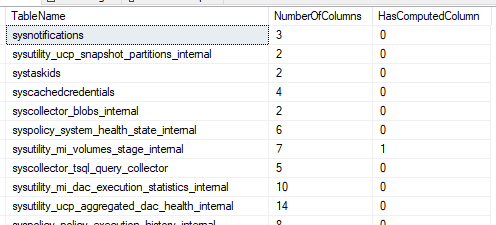
Unlike the previous example we know that all records from our source table would have data populated from the APPLY as we’re using a CROSS APPLY similar to an INNER JOIN.
Wrap up
The CROSS APPLY and OUTER APPLY operators are powerful tools for joining a table to a function or sub-query. The main difference between them is how they handle the case when the function returns no rows, where the CROSS APPLY returns only the rows for which the function returns at least one row, while OUTER APPLY returns all rows from the left table, even if the function returns no rows.
Whilst these both add additional flexibility to our queries and how we can join sets of data, there are also drawbacks which using them can have on our results, particularly for larger result sets. Next time out we’ll take a look into those impacts in more detail.
 Andy Brownsword