When executing stored procedures it may appear simple enough to infer the data types which are being returned. However if those data types aren’t what you’d expect this could have downstream implications for the apps which are consuming the data.
If we want to look at data in a table or view we can use Management Studio to expand the object and see the fields which will be returned and their data types, for example:

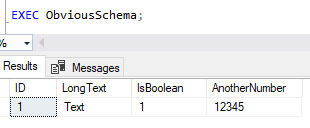
When we come to stored procedures we don’t have that functionality available to us. We can see the parameters and data types for those, but that is all. How could we know what types of data are being returned below?
How can we do it?
Whilst we may not have an easy UI to see this through Management Studio there is a function we can use to help us out. This is with the use of the aptly named – albeit very long winded to remember – dynamic management function:
sys.dm_exec_describe_first_result_set_for_object
We can call this function and provide the object_id (via the name) of a stored procedure and we’ll receive a set of results detailing what the schema of returned data will look like.
The results from this function will tell us the column names, their ordering, data types, field lengths, collation, and much more. If we took a look at this for our test procedure above the output looks as follows:

We can see here that in fact our expected-boolean value is in fact an integer number, and we now know the field length for our text data to plan accordingly for that. This information should provide us with sufficient details to write some code to consume the procedure effectively, whether that’s a .net class or a SQL table.
We can now understand the data better and to a finer degree than we’d get by simply looking at the results or scanning over the code line by line.
So why aren’t these details already exposed via Management Studio? Well, that’s due to some of the features of stored procedures which means their output isn’t always consistent.
How about these drawbacks?
Stored procedures have great flexibility for us to integrate complex logic. This unfortunately leads to complications when trying to anticipate what the results from that procedure may look like.
The first of these would be that the results from a procedure can change at run time. We could have branching logic or dynamic SQL within our procedure which could call different queries or child procedures to return data. We may receive different outputs depending on our input parameters.
Additionally the procedure could return multiple sets of results unlike a table or view which would have the single set of data being returned. As we can see from the name of the function this describes the first result set for the procedure and doesn’t support multiple result sets.
If we have procedures which are designed specifically for a single purpose and to return a single result set this function may operate fine. If your procedures are increasingly complex or ‘jack of all trades’ with the complexities above then this function may not be what you’re looking for.
Wrap up
It’s rarely I’ve needed to use this approach to see what data is being returned from procedures. It can be useful when talking with application developers around building up corresponding objects in their code. It can also be used when comparing older and newer versions of procedures to ensure they’re forwards and backwards compatible if you were to switch them out.
As we said there are some drawbacks with this approach however with this function we can get an idea of the data being returned without walking through the code and checking temp tables, CTEs, casts etc. within the queries. Very handy indeed in the right situations.
 Andy Brownsword