We recently looked at implementing vertical partitioning on a set of data. In an earlier introduction post we also mentioned the benefits which can be seen as a result of the partitioning in both our maintenance and querying of the data.
Here we’ll take a look at those benefits with a little more evidence. We’ll be using the data as we left it after our previous post if you’d like to follow along.
Maintenance
By vertically partitioning our data into multiple tables this allows them to be maintained independently. Therefore if you chose to put them into separate file groups or have individual partition schemes applied we can perform tasks isolated to just one section of the data. You could also choose to compress one set of the data which may be used less frequently whilst not impacting the remaining fragments.
Another example of this would be maintaining an index on our data which we can easily demonstrate here. If I were to add an index on the same field both before or after the data has been partitioned we should see a benefit as we only need to read the section of data where that field resides.
Creating an index on the ReportingPeriod field before the table is partitioned results in 1,834 logical reads from scanning the whole table:

If we went to create this on the table once it’s been partitioned there’s less data in the table which stores the ReportingPeriod which means less pages to be scanned to complete the same operation:
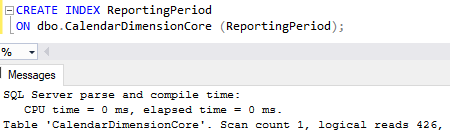
That’s reduced the reads down by over 75% all the way down to 426. Over much larger tables where we’d consider vertical partitioning like this, those savings could be massive in our maintenance routines.
Whilst we see improvements in areas where we only need to operate on a single slice of our data it is true that the overall volume of data we’re dealing with is still the same (well, a little larger as we’re duplicating IDs). When we need to maintain all of it – for example performing backups – we may not see the same benefit.
Querying
When we look at the benefits, querying is my favourite part of vertical partitioning. With our data split the way that the engine approaches the queries will change. Let’s see an example of how this can be seen.
Firstly we’ll take a simple query to return all of the data for March 2023:
SELECT *
FROM dbo.CalendarDimension
WHERE CalendarDate >= '2023-03-01'
	AND CalendarDate < '2023-04-01';
We haven’t got any indexes impacting the plan here so our original set of data will perform a scan over the whole table. This results in 1,834 reads like creating the index above:
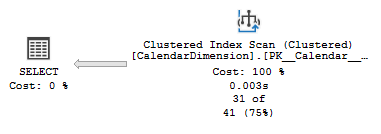
However once the data is partitioned the plan for the same query changes. It can use the core data set to check the dates followed by simply grabbing the strings it needs rather than reading that whole table. This results in an Index Scan plus Index Seek operation:
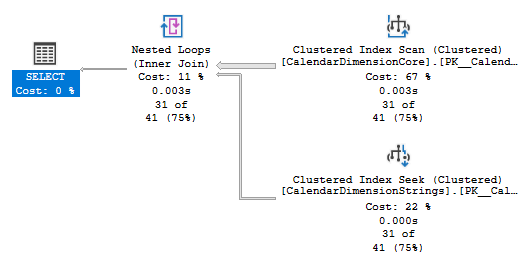
As we saw with the index scanning the core table only requires a fraction of the reads – 427 in this case, and then a further 103 reads to perform the Seek operations into the string data. Again an impressive saving of 70%. There will be some additional processing overhead due to our join operation, the amount of which would depend on the volumes of data needing to be joined.
Wrap up
Here we’ve looked at benefits we can realise following on from our previous implementation of vertical partitioning. We’ve focused on two particular areas where we’ll see the most benefit:
There are improvements to the day to day running and maintenance of our systems by having the data in two separate locations. There are similar benefits for our query performance by being able to isolate specific sets of data to filter our results followed by using our common IDs across each slice to provide efficient lookups.
There’s one final area I want to look at with vertical partitioning next time, where we can consider changes to our schema to provide even more performance throughput, particularly when it comes to separating over a large number of tables.
In the meantime have I tempted you to start considering a vertical partitioning strategy for any of your own data?
 Andy Brownsword
2 replies on “Benefits of Vertical Partitioning”
[…] previously looked at how to implement vertical partitioning and the benefits it can bring within our data. Here I’d like to dive a little further into improving the performance even […]
[…] others via vertical partitioning. More details about vertical partitioning, how to implement it, the benefits, and performance improvements can be found in previous posts for […]