Last time out we looked at implementing DDL triggers in SQL Server and today we’re going to look at the other commonly used trigger – DML.
What are DML triggers
DML triggers are used to react to events caused by data manipulation language (DML) statements. These events are targeted to a specific table or view and so are very defined in their scope.
Unlike the DDL triggers which have an extensive list of events to react to, DML triggers have a very small range as they’re concerned with changes in the data. These type of triggers react to statements indicating INSERT, UPDATE or DELETE actions.
Creating a DML trigger
When building a DML trigger we need to define the trigger and events it will react to, and then have some code to execute based on those changes. We could use this to update related tables or audit changes for example.
As DML triggers belong to a table our example will create a table and then a trigger to react to the events on it. We’ll start with the script and then break it down in more detail:
CREATE TABLE dbo.DMLTable (
	ID INT IDENTITY(1, 1) PRIMARY KEY,
	SomeDate DATE NOT NULL,
	SomeText VARCHAR(50)
);
GO

CREATE TRIGGER DMLEvents
ON dbo.DMLTable
AFTER INSERT, UPDATE, DELETE AS
BEGIN

	DECLARE @ChangeType CHAR(1);

	SELECT @ChangeType = CASE
		WHEN EXISTS (SELECT 'exists' FROM inserted)
			AND EXISTS (SELECT 'exists' FROM deleted)
			THEN 'U'
		WHEN EXISTS (SELECT 'exists' FROM inserted)
			THEN 'I'
		WHEN EXISTS (SELECT 'exists' FROM deleted)
			THEN 'D'
		ELSE 'X' END;	/* No records affected */

	SELECT @ChangeType;

END
GO
Focussing on the trigger above we’ll work through how this is constructed top down:
CREATE TRIGGER– we’re creating a trigger with relevant name. Optionally we can specify a schema, however it must align with the table schema so is typically not includedON dbo.DMLTable– this is where we specify which table we want to watch for events onAFTER INSERT, UPDATE, DELETE– here we’re indicating which of the events we want to monitor for, in our case all of the relevant events for the table and this trigger should fire after the changes are madeAS BEGIN ... END– this is our block of code to do what we need with the information which is being inserted, updated or deleted
In this example the trigger covers INSERT, UPDATE and DELETE events in a single trigger however you can create multiple triggers for the table so may choose to create an individual one for each type of event. You can also specify multiple triggers for the same event if needed.
I also wanted to note that when specifying the events we have used AFTER which means that the trigger will only file after the event is complete (including data type validation, check constraints, foreign keys, etc.) so we know the data is valid.
An alternative to the above is to use INSTEAD OF which will stop the engine from completing the change and the script within the trigger will need to perform the insert/update/delete as required. If the trigger above was changed to INSTEAD OF then no data would get modified in the table. We’ll look into this further in an subsequent post.
Accessing event data
When we looked at the DDL triggers previously we were presented with an XML representation of the event data detailing what had fired our trigger. When using DML triggers this is handled differently as you may have spotted above.
In a DML trigger we have two specific tables which the engine creates for us which are named inserted and deleted. These contain copies of data which was inserted or deleted as part of the operation which caused our event to trigger. The schema for these tables mirrors that of the table the trigger is applied against.
That covers insertions and deletions, but what about updated records? – well, for UPDATE events you’ll find records in both tables. The inserted table will show the details for the new copy of the data whilst the deleted table shows the details of the old copy of the data so you can compare and identify what has changed.
In this example I’ve done nothing more than ascertain if we’ve had an INSERT, UPDATE, or DELETE event fire the trigger and then return that. You’ll see there’s also an ‘X’ option being returned to indicate no action as it’s possible that a delete may not have removed any records for example, so we may not want to proceed with our script in that case.
Where are DML triggers stored
As we saw with the DDL triggers we can find the triggers we create in a couple of different places and the same is applicable to DML ones too.
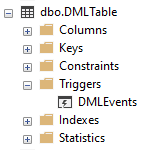
Firstly within Object Explorer in Management Studio we can see the triggers against our tables. Under the node for a table there is a Triggers section which will contain any triggers associated with that table:
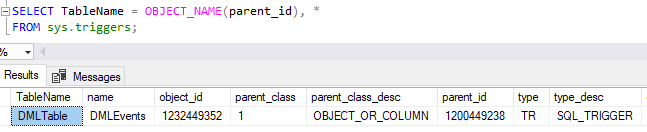
In addition to that we can use the DMV sys.triggers to see details of all DML triggers in the database along with a parent_id which can be used to reference the table it belongs to, for example:
Removing a DML trigger
When we create a DML trigger it is targeted at a specific table or view, however the trigger object we create is scoped at a schema level. Therefore when we want to remove a trigger we won’t need to specify a specific table as the trigger’s name must be unique within the database schema.
The statement to drop a trigger from a database is therefore very straightforward:
DROP TRIGGER dbo.DMLEvents;
The addition of the schema in this case is to indicate which schema the table belongs to on which the trigger is applied as the object is schema scoped. This can be omitted and will default to dbo.
Wrap up
Here we’ve looked at DML triggers, what they are and various aspects of utilising them. This has followed a similar format to the previous DDL triggers post to help contrast the two different types.
These are the types of triggers I see implemented most often as they can intercept data flowing through tables and use that to drive additional functionality such as auditing, selective replication, or data validation.
We’ll come back to these to look at a practical implementation of them along with looking a little more at the inserted and deleted tables that can be utilised within the trigger.
 Andy Brownsword
One reply on “Implementing DML Triggers”
[…] we’ve looked at how to use DML triggers against a view to allow us to manage the data presented as if it were an actual table. A very […]