A couple of weeks back we looked at how to implement DDL triggers in a database and briefly created a couple as examples. This time we’ll put that into use with a particular purpose: to audit modifications to our database schema.
Storing the audit
Before we get to the trigger we want to create a table to store our audit. This trigger will be scoped to a single database so we’ll create a table in that database which will contain the details we require.
In the previous post we looked at an example of the event data which could be returned. This information will differ depending on the event that has fired. The full schema for the EVENTDATA object can be found in the online SQL Server XML Schema documents, specifically the SQL Server Event Data Schema. This document is large, however you can search for specific event names to narrow the schema down.
Below is the table we’ll create for our needs which contains a set of fields which are quite common across a number of DDL events:
CREATE TABLE dbo.DDLAudit (
	ID INT IDENTITY(1, 1),
	EventTimestamp DATETIME2(2),
	EventType SYSNAME,
	LoginName SYSNAME,
	ObjectType SYSNAME,
	ObjectName SYSNAME,
	SqlCommand NVARCHAR(MAX),
	PRIMARY KEY CLUSTERED (ID)
);
GO
Creating the trigger
Now that we know which parts of the event data we want to capture and we’ve got somewhere to store them let’s look at creating a trigger to capture those events.
We’ll get started by capturing table events to validate the workings of our trigger. To do this we’ll use the event group DDL_TABLE_EVENTS which will capture CREATE, ALTER and DROP events against a database. As we mentioned previously you can find more details about events and event groups in the online documentation.
Within the trigger we’ll capture the EVENTDATA XML object and proceed with some basic XPath queries against it to get the details we’re looking to audit. For completeness we’ll also be storing the command which was executed if we wanted to interrogate the specifics of the event further.
The completed trigger for this is below:
CREATE TRIGGER AuditTableEvents
ON DATABASE
FOR DDL_TABLE_EVENTS AS
BEGIN

	DECLARE @EventData XML = EVENTDATA();

	INSERT INTO dbo.DDLAudit (
		EventTimestamp,
		EventType,
		LoginName,
		ObjectType,
		ObjectName,
		SqlCommand
	)
	SELECT
		@EventData.value('(/EVENT_INSTANCE/PostTime)[1]', 'DATETIME'),
		@EventData.value('(/EVENT_INSTANCE/EventType)[1]', 'SYSNAME'),
		@EventData.value('(/EVENT_INSTANCE/LoginName)[1]', 'SYSNAME'),
		@EventData.value('(/EVENT_INSTANCE/ObjectType)[1]', 'SYSNAME'),
		@EventData.value('(/EVENT_INSTANCE/ObjectName)[1]', 'SYSNAME'),
		@EventData.value('(/EVENT_INSTANCE/TSQLCommand/CommandText)[1]', 'NVARCHAR(MAX)')

END
GO
That’s all there is to it, nothing fancy. Let’s take it for a spin with some simple commands:
CREATE TABLE dbo.TestTable (
	ID INT IDENTITY(1, 1)
);

ALTER TABLE dbo.TestTable
ADD SomeText VARCHAR(20);

ALTER TABLE dbo.TestTable
ALTER COLUMN SomeText VARCHAR(50) NOT NULL;

ALTER TABLE dbo.TestTable
DROP COLUMN SomeText;

DROP TABLE TestTable;
When you run those commands now you may notice instead of the standard message of the regular ‘Commands completed successfully’ message you’ll see multiple messages indicating ‘(1 row affected)’. This is due to our trigger firing and inserting data into our audit table.
With some data collected we can query our table to see what event details we’ve stored:

Great start, let’s keep going!
Extending the trigger
With the trigger in place and tested we can now look at extending the scope for the trigger. Previously we were only looking for changes to tables but theres a lot more which could change with a schema. If we’re looking to capture all DDL events in a database we have a singular solution for this, the event group DDL_DATABASE_LEVEL_EVENTS.
If we recreate our trigger with a slight change to it’s definition we can start to capture a wider scope of events:
/* Clean up previous examples */
DROP TRIGGER AuditTableEvents ON DATABASE;
TRUNCATE TABLE dbo.DDLAudit;
GO

/* Recreate the trigger */
CREATE TRIGGER AuditAllDDLEvents
ON DATABASE
FOR DDL_DATABASE_LEVEL_EVENTS AS
BEGIN

	DECLARE @EventData XML = EVENTDATA();

	INSERT INTO dbo.DDLAudit (
		EventTimestamp,
		EventType,
		LoginName,
		ObjectType,
		ObjectName,
		SqlCommand
	)
	SELECT
		@EventData.value('(/EVENT_INSTANCE/PostTime)[1]', 'DATETIME'),
		@EventData.value('(/EVENT_INSTANCE/EventType)[1]', 'SYSNAME'),
		@EventData.value('(/EVENT_INSTANCE/LoginName)[1]', 'SYSNAME'),
		@EventData.value('(/EVENT_INSTANCE/ObjectType)[1]', 'SYSNAME'),
		@EventData.value('(/EVENT_INSTANCE/ObjectName)[1]', 'SYSNAME'),
		@EventData.value('(/EVENT_INSTANCE/TSQLCommand/CommandText)[1]', 'NVARCHAR(MAX)')

END
GO
As we can see the body of the trigger is unchanged, it’s still capturing the same details for the events in the same way. We’ve only changed which events it’s being triggered for. Let’s try firing off a few more DDL events and see what the results in the audit look like:
CREATE SCHEMA TestSchema AUTHORIZATION dbo;
GO

CREATE TABLE TestSchema.TestTable (
	ID INT IDENTITY(1, 1)
);
GO

CREATE VIEW dbo.TestView
AS
	SELECT *
	FROM TestSchema.TestTable;
GO

CREATE TRIGGER TestTrigger
ON DATABASE
FOR CREATE_TABLE AS
BEGIN
	DECLARE @Variable INT;
END
GO
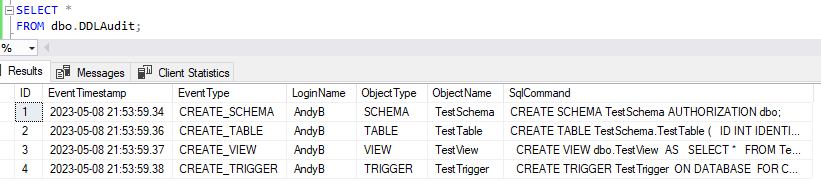
Great, now we’ve got our trigger in place to capture a much broader set of schema events. I’ll admit that these tests clearly aren’t exhaustive so be sure to pull together some tests if you have any specific or more obscure events you’d like to capture.
Wrap up
In this post we’ve taken the DDL triggers we covered previously and applied it into a real world example of capturing events as a way to audit changes to our database schema. We’ve created a table to store the results and a trigger to collect them followed by testing some examples.
The example we’ve created here could be extended to capture more fields, it could be condensed to more specific events, raised to a server level for higher level auditing, or the audit table could be moved into a separate database to obscure it from those who may be making schema changes.
This was written for those who may want a springboard into where you could start to build some simple and effective auditing for your database. Is this something you have a case for in your own environments and looking to try?
 Andy Brownsword
One reply on “Auditing Schema Changes with DDL Triggers”
[…] Auditing Schema Changes with DDL Triggers […]