Last time out we looked at modifying data in a view, but this only worked when we had a view referencing a single table. Here we’ll look at how we can achieve the same result for a view which references multiple tables.
This one will require a little more work for us in the form of some extra supporting code, but we’ll work through it together and hopefully you’ll agree it’s worth it.
We’ll start out with our sample schema – that’ll be two related tables with a foreign key and a view which joins then together to present the data:
CREATE TABLE AnimalTypes (
	AnimalTypeID INT IDENTITY(1, 1) PRIMARY KEY,
	AnimalTypeName VARCHAR(50)
);

CREATE TABLE AnimalsCore (
	AnimalID INT IDENTITY(1, 1) PRIMARY KEY,
	AnimalName VARCHAR(50),
	AnimalTypeID INT,
	CONSTRAINT FK_AnimalTypeID
        FOREIGN KEY (AnimalTypeID)
        REFERENCES AnimalTypes (AnimalTypeID)
);
GO

CREATE VIEW dbo.Animals
AS
	SELECT c.AnimalID, c.AnimalName, t.AnimalTypeName
	FROM AnimalsCore c
		INNER JOIN AnimalTypes t ON c.AnimalTypeID = t.AnimalTypeID;
GO
How can we update multiple tables?
When we looked at updating a view containing a single table this was all taken care of by the database engine. Unfortunately if we want to do the same for multiple tables we’re going to need to do some of the plumbing ourselves but that’s ok.
The tool that we’re using for this comes in the form of a trigger, specifically a set of triggers to capture the DML events against the view which will then perform the changes on the underlying tables. We looked at DML triggers recently if you wanted a refresher.
One of the options we have when creating a DML trigger is the INSTEAD OF option which intercepts the event which can then be handled within the trigger. This is how we’ll take the modifications and split them up to modify both of the tables.
Let’s get to it!
Adding data to the table
We’ll start with the trigger needed to intercept the insertion of data into our ‘table’. We need to be mindful that an INSERT could be for a single record or multiple so this will need to be set based.
The resulting trigger would be as follows:
CREATE TRIGGER InsertTrigger
ON dbo.Animals
INSTEAD OF INSERT AS
BEGIN

	/* Add any new animal types */
	INSERT INTO dbo.AnimalTypes (
		AnimalTypeName
	)
	SELECT DISTINCT i.AnimalTypeName
	FROM inserted i
		LEFT JOIN AnimalTypes t ON i.AnimalTypeName = t.AnimalTypeName
	WHERE t.AnimalTypeID IS NULL;

	/* Now add into the Core table */
	INSERT INTO dbo.AnimalsCore (
		AnimalName,
		AnimalTypeID
	)
	SELECT
		i.AnimalName,
		t.AnimalTypeID
	FROM
		inserted i
		LEFT JOIN dbo.AnimalTypes t ON i.AnimalTypeName = t.AnimalTypeName;

END
GO
As mentioned we’ve created an INSTEAD OF trigger to capture the insert and split it across our two tables.
The first statement looks for missing Animal Types in our reference table. We do this by joining the two sets and checking for entries which don’t already have an ID associated. We insert these using a DISTINCT, remembering that the inserted data contains a set of data to be inserted and not always a singular record.
Next up we do a pretty straight forward insert into our core table and join across to our reference table to populate the foreign key. Again we’re mindful that this could be a set based insert into our tables.
When linking to tables which are used as foreign keys I personally like to LEFT JOIN to these tables as using an INNER JOIN could lose some records if the preceding reference table update had missed some reference data. By using an outer join it would force the statement to fail if the reference data was missing so we’d be aware of and could resolve the issue.
Updating existing records
Now that we’re familiar with the process let’s jump into the trigger to handle the UPDATE statements. This has a lot of similarities to the INSERT trigger:
CREATE TRIGGER UpdateTrigger
ON dbo.Animals
INSTEAD OF UPDATE AS
BEGIN

	/* Add any new animal types */
	INSERT INTO dbo.AnimalTypes (
		AnimalTypeName
	)
	SELECT DISTINCT i.AnimalTypeName
	FROM inserted i
		LEFT JOIN AnimalTypes t ON i.AnimalTypeName = t.AnimalTypeName
	WHERE t.AnimalTypeID IS NULL;

	/* Update the existing data */
	UPDATE c
	SET c.AnimalName = i.AnimalName,
		c.AnimalTypeID = t.AnimalTypeID
	FROM dbo.AnimalsCore c
		INNER JOIN inserted i ON c.AnimalID = i.AnimalID
		LEFT JOIN dbo.AnimalTypes t ON i.AnimalTypeName = t.AnimalTypeName;

END
GO
The creation statement is almost identical besides the INSTEAD OF UPDATE section, and you’ll also see that we start in the same way by adding any new Animal Types which are required too. The reference data will always need to be checked before we can go ahead and update the core data.
The changes to the core table are slightly different as we’re performing an update to mirror the type of event we’re responding to. It’s very similar to our previous INSERT statement where we’re again performing a LEFT JOIN to our Animal Types and this time we’re joining the existing core data to our inserted data to ensure the relevant records are updated.
Removing records
Finally we come to our trigger to handle the DELETE statements against our view. I guess you know what’s coming by now:
CREATE TRIGGER DeleteTrigger
ON dbo.Animals
INSTEAD OF DELETE AS
BEGIN

	/* Remove the data */
	DELETE c
	FROM dbo.AnimalsCore c
		INNER JOIN deleted d ON c.AnimalID = d.AnimalID;

END
GO
Here we aren’t concerned with adding missing Animal Types we just want to remove the data. We’ve got a DELETE statement which joins to existing data similar to our UPDATE trigger above, and this time we simply remove it rather than changing it.
With that trigger in place we’ve finally got everything together so let’s see it all in action.
Testing the changes
We’ll start testing the triggers with some simple changes and see how the data looks as we go along. First up let’s insert a single record:
INSERT INTO dbo.Animals (AnimalName, AnimalTypeName)
VALUES ('Buggs', 'Bunny');

SELECT * FROM dbo.Animals;
SELECT * FROM dbo.AnimalsCore;
SELECT * FROM dbo.AnimalTypes;
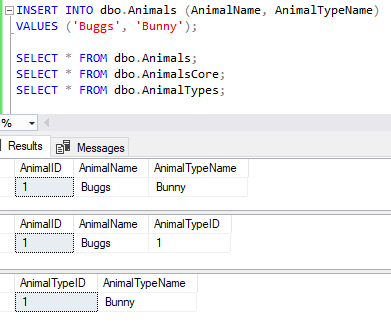
Great, our view is showing the record as we’d inserted and more importantly we have both of our tables updated and correctly aligned.
Next up let’s update to correct the spelling mistake in the name:
UPDATE dbo.Animals
SET AnimalName = 'Bugs'
WHERE AnimalID = 1;

SELECT * FROM dbo.Animals;
SELECT * FROM dbo.AnimalsCore;
SELECT * FROM dbo.AnimalTypes;
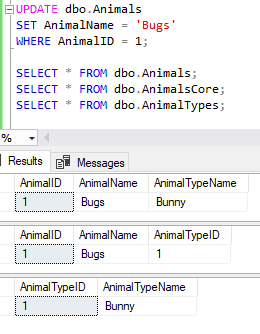
Just as we’d hoped the record has been updated and we don’t have any extra records appearing unnecessarily in our data.
Let’s round this simple test out by removing the record from the data:
DELETE FROM dbo.Animals
WHERE AnimalName = 'Bugs'
	AND AnimalTypeName = 'Bunny';

SELECT * FROM dbo.Animals;
SELECT * FROM dbo.AnimalsCore;
SELECT * FROM dbo.AnimalTypes;
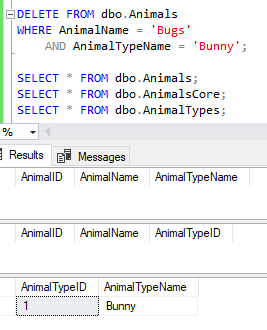
Just like that it’s gone. We’ve still got our reference table populated but that’s fine, those records can be reused for any other bunnies which get added into the data.
Let’s try a few more complex statements – specifically set based – and see if those turn out as we’d expect:
INSERT INTO dbo.Animals (AnimalName, AnimalTypeName)
VALUES ('Donald', 'Duck'),
	('Daffy', 'Duck');

UPDATE dbo.Animals
SET AnimalTypeName = 'McDuck'
WHERE AnimalTypeName = 'Duck';

DELETE FROM dbo.Animals
WHERE AnimalID > 99;

SELECT * FROM dbo.Animals;
SELECT * FROM dbo.AnimalsCore;
SELECT * FROM dbo.AnimalTypes;

That’s multiple records being inserted, updated and potentially (but not) deleted from the data. The data returned from the view is exactly as we’d have expected and you can see that the tables which comprise the data have been populated accordingly.
Wrap up
Here we’ve looked at how to use DML triggers against a view to allow us to manage the data presented as if it were an actual table. A very effective use of triggers I hope you’d agree.
What we’ve done here could be extended to provide more resilience through a unique constraint on the AnimalTypeName or triggers modified to remove any Animal Types that are no longer referenced in the data. You can make them as complex and thorough as you require. The only point to be mindful of is the potential impact to data throughput for busy data.
This type of pattern can be useful if you decide to split a single table out across multiple others via vertical partitioning. More details about vertical partitioning, how to implement it, the benefits, and performance improvements can be found in previous posts for reference.
Did you know that this type of behavior was possible with a view, have you had experiences with this (positive or negative), or is this something you might try out yourself?
 Andy Brownsword
One reply on “Modifying Data in Multi Table Views”
[…] Modifying Data in Multi Table Views […]