Last time out we looked at how data can be persisted even with a ROLLBACK being executed. Here we’re going to take that and look at an example of using it in action.
We’ll generate some data – which may be good or bad – and try to add it to a table. If there’s any bad data in there we’ll roll that back and push it into another table recording the errors.
Let’s begin by creating a table to store some customer details, and another which will record the errors produced from our import:
CREATE TABLE dbo.Customers (
	CustomerID INT PRIMARY KEY,
	Balance INT NOT NULL,
	CONSTRAINT CK_PositiveBalance CHECK (Balance > 0)
);

CREATE TABLE dbo.CustomerErrors (
	CustomerID INT,
	Balance INT,
	ErrorMessage NVARCHAR(4000)
);
GO
In the Customers table we’ve got a PRIMARY KEY on the Customer’s ID field so we won’t be able to insert any duplicates in there. We’ve also added a CONSTRAINT to the Balance to ensure that the figure is always positive.
We’ll generate data designed to potentially fail on those two checks. This will be done through random number generation. The process will be placed into a loop to simulate a potential real-world scenario where records are being imported or processed before getting inserted into our database.
We’ll store our data into a table variable when it’s generated so we know it won’t be impacted by the rollbacks. The table and data we’re generating will look something like below:
DECLARE @GeneratedData TABLE (
	CustomerID INT,
	Balance INT
);

...

INSERT INTO @GeneratedData (CustomerID, Balance)
SELECT CAST(RAND() * ABS(CHECKSUM(NEWID())) AS INT) % 50000,
	CAST(RAND() * ABS(CHECKSUM(NEWID())) AS INT) % 1000;
By generating it in this way we’ll have potentially 50,000 different Customer IDs which could be generated, however as that field is our PRIMARY KEY and unique we’ll have a higher proportion of collisions from this field.
In addition we’ve got the Balance field which has a small chance of being a zero value regardless of any other values in the data set. In this instance the check constraint will fail and we’ll have an error thrown.
To handle the errors being thrown when trying to add the records we’ll use a TRY ... CATCH block. If the INSERT fails then we’ll record the error which was thrown followed by rolling the transaction back. Once the rollback is complete we can log the details of the record and error and go on to the next record. The setup looks something like this:
BEGIN TRANSACTION

/* Generate data beforehand */

BEGIN TRY

	/* Try to INSERT data then commit */
	COMMIT TRANSACTION;

END TRY
BEGIN CATCH

	/* Catch the error and roll back */
	SET @ErrorMessage = ERROR_MESSAGE();
	ROLLBACK TRAN;

	/* Log the error record and message */

END CATCH
So, with all of that said, let’s take a look at what the completed script looks like for this:
DECLARE @BatchCounter INT = 1,
	@NumberOfBatches INT = 1000,
	@ErrorMessage NVARCHAR(4000);

DECLARE @GeneratedData TABLE (
	CustomerID INT,
	Balance INT
);

/* Not indenting for readability */
WHILE (@BatchCounter <= @NumberOfBatches)
BEGIN

BEGIN TRANSACTION

/* Create some data which could break rules */
INSERT INTO @GeneratedData (CustomerID, Balance)
SELECT CAST(RAND() * ABS(CHECKSUM(NEWID())) AS INT) % 50000,
		CAST(RAND() * ABS(CHECKSUM(NEWID())) AS INT) % 1000;

BEGIN TRY

	/* Generate data into table variable */
	INSERT INTO dbo.Customers (CustomerID, Balance)
	SELECT CustomerID, Balance
	FROM @GeneratedData;

	COMMIT TRANSACTION;

END TRY
BEGIN CATCH

	/* Grab the error before we roll back and lose it */
	SET @ErrorMessage = ERROR_MESSAGE();
	ROLLBACK TRAN;

	/* Variable won't be rolled back so can log it */
	INSERT INTO dbo.CustomerErrors
		(CustomerID, Balance, ErrorMessage)
	SELECT CustomerID, Balance, @ErrorMessage
	FROM @GeneratedData;

END CATCH

/* Clear any data and go again */
DELETE FROM @GeneratedData;
SET @ErrorMessage = NULL;
SET @BatchCounter = @BatchCounter + 1;

END
Due to the random nature of the data generation this will produce different results on each run. Here we’ve set the number of records to be generated (batches) at 1000. Below are a sample of the error details recorded from a single execution:

As expected we’ve got both primary key violations and check constraint failures which have caused the records to be rejected and logged. More importantly though have we caught the details for all of the records which were rejected?
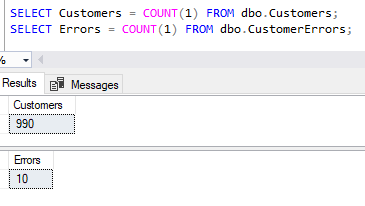
We’ve had the 10 records fail as per the previous screenshot and we can see that the remaining 990 records successfully inserted into our Customers table.
Wrap up
Here we’ve looked at being able to successfully roll back erroneous transactions whilst still retaining about the offending records and associated error detail through the use of regular and table variables.
Depending on the type of data or process you’re dealing with using this approach to catch errors and log them may be preferable than having processes which simply fail on when an exception occurs. In this case we can make use of the variables which aren’t impacted by a rollback as we saw previously.
Have you used this technique or something similar previously to catch exceptions in your SQL processes? Is it something you instead handle in the application layer? Or do you just let things fail and check the logs after the fact? – all valid options in the right circumstances!
 Andy Brownsword