When developing database solutions we’ll typically spend some time considering security requirements, which will result (in part) with database roles being assigned to users or groups of users.
Whilst security considerations will likely be focused on what folks can do in our databases, there’s a separate impact on what they can see in them too. I’ve had more than a few occasions where a developer would ask:
Hey Andy, I can’t see that stored procedure xxx in the database, are you sure that’s the right one?
In all honesty, I fell fowl of this recently myself too so thought it was worth sharing in case anyone stumbles upon a similar issue.
Lets set things up
To demonstrate some perspectives on this we’ll create a new database which will contain a few objects. We can then create an account and use this database to see what we can or can’t see with differing permissions applied:
CREATE DATABASE PermissionTest;
GO

USE PermissionTest;
GO

CREATE TABLE dbo.TestTable (
	ID INT PRIMARY KEY,
	Num1 INT,
	Num2 INT
);
GO

CREATE VIEW dbo.TestView
AS
	SELECT *
	FROM dbo.TestTable;
GO

CREATE FUNCTION dbo.AddTwo (
	@a INT,
	@b INT
) RETURNS INT AS
BEGIN
	RETURN ISNULL(@a, 0) + ISNULL(@b, 0);
END
GO

CREATE PROC dbo.TestProc AS
BEGIN
	SELECT Num1, Num2, Total = dbo.AddTwo(Num1, Num2)
	FROM dbo.TestTable;
END
GO
With the focus here being on when security restrictions have been applied, we’ll look for reader-type access to the data so no modification or full blown ownership permissions. So let’s get started!
Creating the user
So for our example we’ll have a user – Gavin – who will be our guinea pig for validating our security settings. Gavin wants to be able to see existing data and code which is deployed to validate new versions against during development.
Initially we’ll create a login for Gavin with no access to our database whatsoever. This should be pretty plain to see that we’ve got no access to the objects inside:
USE master;
GO

CREATE LOGIN [Gavin]
WITH PASSWORD = N'ChangeMe';
GO
With that account in place we’ll connect to the environment and try to access our database:
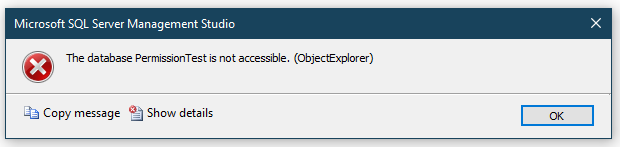
This is pretty self explanatory. The database is showing in Object Explorer but we aren’t able to access it. We need to create a user in the database before we can provide access to any of the objects inside.
Adding the user to the database
We’ll now create a user within our database to map to Gavin’s login. This will avoid the error we saw above.
USE [PermissionTest]
GO

CREATE USER [Gavin]
FOR LOGIN [Gavin]
GO
With the user created based on the server login access will now be available. However when we look inside what objects will we see?
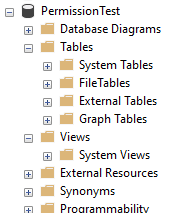
Nothing, nada.
That doesn’t look right, what are the chances of having a database with no tables or views inside.
As we haven’t assigned any roles or permissions to this user yet, they have no access to the objects inside. Let’s go ahead and provide a role for them.
Assigning db_datareader
We know that Gavin doesn’t want to make any changes to the data so we’ll look to providing data reader access through the built in role. This will allow access to view and query some of the objects inside:
USE [PermissionTest]
GO

ALTER ROLE [db_datareader]
ADD MEMBER [Gavin]
GO
With that in place let’s see how our database looks in Object Explorer now:
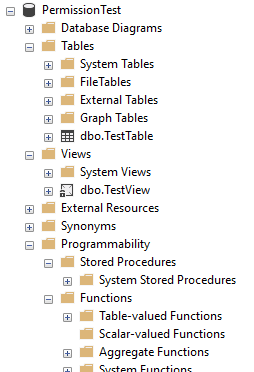
Now we’re getting somewhere. We can see the table and view which we created – as we’ve provided read access to these objects through the database role. We still can’t see any stored procedures in the database though, not quite right just yet.
Viewing object definitions
At this point it can appear like the user has access to view the objects in the database but we can see there’s clearly nothing showing up under Stored Procedures or any of the Functions so we need to grant some additional permissions.
We’ll grant Gavin the ability to view object definitions in the database:
USE [PermissionTest]
GO

GRANT VIEW DEFINITION
TO [Gavin]
GO
With the view definition permission granted, Gavin can now happily see the programmability objects in the database:
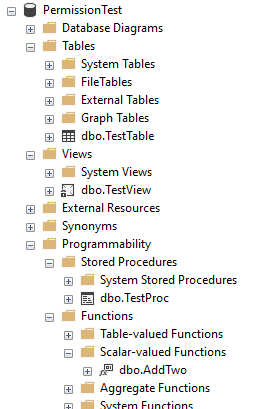
Wrap up
Providing access to database environments has multiple layers to consider. These layers can combine to provide powerful controls around our data.
Here we’ve looked at a relatively simple use case and explored the layers needed to achieve a typical developer’s read only access into a database. Even in it’s simple form we’ve needed to ensure that the login is correctly mapped to a user, the user belongs to a relevant role, and we’ve still needed to grant more fine grained privileges on top.
As I mentioned in the introduction, this is a situation I’ve seen on multiple occasions with different developers and even fallen fowl of myself more than once. How about you, is this something you’ve come across? Would you like to dive into security any deeper?
 Andy Brownsword