
When writing functions within SQL Server we sometimes have need to repeat an action multiple times until a given condition is met – also known as Recursion. There are a couple of common ways which this can be implemented which also have their different limitations.
A little about recursion
Firstly, why do we need recursion? Unlike iterating over a set of data where we may want to perform the same action multiple times, recursion is about iterating over the same data multiple times.
We can use the analogy of cleaning cars. You’ll start by cleaning a bit, and a bit more, and you keep going until it’s all clean. That’s recursion. If you move onto another car, that’s iteration.
Why are there limitations on recursion? Well, how long do you want to be cleaning that car for – are you just doing the outside, the inside too, what about under the wheel arches, etc.? You could be there for a while, and so could SQL Server if we aren’t careful, so there are limitations in place to help manage the workload we’re creating.
Recursive functions
For our examples here we’re going to use a pretty common function of removing leading and trailing spaces from a string (let’s forget about TRIM for now).
If we wanted a recursive function it may look something like this:
CREATE OR ALTER FUNCTION dbo.TrimSpaces (
	@StringToTrim VARCHAR(100)
) RETURNS VARCHAR(200) AS
BEGIN

	/* Trim from the left if present */
	IF (LEFT(@StringToTrim, 1) = ' ')
		RETURN dbo.TrimSpaces(RIGHT(@StringToTrim, DATALENGTH(@StringToTrim) - 1));

	/* Trim from the right if present */
	IF (RIGHT(@StringToTrim, 1) = ' ')
		RETURN dbo.TrimSpaces(LEFT(@StringToTrim, DATALENGTH(@StringToTrim) - 1));

	/* Must already be trimmed, return */
	RETURN @StringToTrim;

END
We can see the recursion in this function where we’re checking if we have a leading or trailing space and then calling the same function again but with that character removed from our string.
We can see that function in action by passing it some test data to trim:
DECLARE @TestString VARCHAR(200) = '   Testing   ';
SELECT Trimmed = CONCAT('>', dbo.TrimSpaces(@TestString), '<');
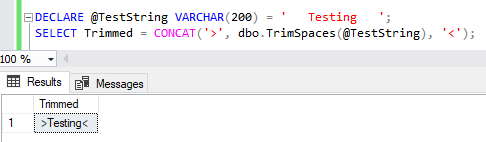
Exactly as we’d expect, all well and good.
Now let’s push that a bit further, what if we used a longer string which needs much more trimming to be done with it?
DECLARE @TestString VARCHAR(200) = '                Testing                ';
SELECT Trimmed = CONCAT('>', dbo.TrimSpaces(@TestString), '<');
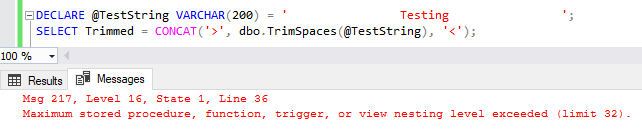
We’ve hit our first limitation here.
When performing recursion in this way the SQL engine needs to remember every function call it’s making. If the first function calls itself a second time, and that calls itself for a third time, then the first one can’t return a result until the third has returned to the second function and that has returned to the first one. This is referred to as a call stack.
As you’ll see from the error message, this limitation is common across stored procedures, functions, triggers and views. This is also a hard limit and not configurable. You can see this limitation listed in the Maximum Capacity Specifications for SQL Server under the Nested objects. There are more details available in an old article for Nesting Stored Procedures too.
Recursive CTEs
Due to the hard limit we saw above, a more popular option for recursion is by using a Recursive Common Table Expression (CTE).
Very similar to the concept above we will call the same piece of code multiple times, however this will all be done within a CTE. Using similar logic which we had previously to trim the string, we can craft a CTE around this which will reference the CTE for recursion rather than making a call to the same function again. There are more details and guidelines for recursive CTEs available online.
Here’s the logic applied into the recursive CTE pattern:
CREATE OR ALTER FUNCTION dbo.TrimSpaces (
	@StringToTrim VARCHAR(200)
) RETURNS VARCHAR(200) AS
BEGIN

	DECLARE @TrimmedString VARCHAR(200);

	WITH cte AS (

		/* Feed in the initial values to start with */
		SELECT StringVal = @StringToTrim, RowNum = 1
		UNION ALL
		/* Each recursion will execute below */
		SELECT StringVal = CASE
            /* Trim left or right if needed */
			WHEN LEFT(StringVal, 1) = ' ' THEN RIGHT(StringVal, DATALENGTH(StringVal) - 1)
			WHEN RIGHT(StringVal, 1) = ' ' THEN LEFT(StringVal, DATALENGTH(StringVal) - 1)
			ELSE StringVal END,
			RowNum = RowNum + 1
		FROM cte
        /* Trim until there is nothing more to remove */
		WHERE LEFT(StringVal, 1) = ' '
			OR RIGHT(StringVal, 1) = ' '

	)
	SELECT TOP (1) @TrimmedString = StringVal
	FROM cte
	ORDER BY RowNum DESC;

	RETURN @TrimmedString;

END
The pattern for a recursive CTE will append data on subsequent recursions – in our case using a UNION ALL operator. Due to this we’ve also added a row counter so we can use a TOP and ORDER BY to get the final row returned.
Let’s take the longer string which pushed our limit with recursive functions and see how that runs in the recursive CTE example:

That’s what we’d prefer to see. How about we try something even longer still? (specifically this is 55 spaces either side)

Now we have a new limitation to contend with. Recursive CTEs are limited to 100 recursions ordinarily, so with us having 110 spaces to strip from our string we’re over that limit.
Thankfully when it comes to this type of recursion we are able to use query hints to increase that limit. We can use the MAXRECURSION hint to specify the maximum number of recursions to allow for that statement. This can be a number up to 32,767, or alternatively use 0 for no limit.
For example if we didn’t want to limit this function we could change the end of our CTE query to be as below:
...
)
SELECT TOP (1) @TrimmedString = StringVal
FROM cte
ORDER BY RowNum DESC
OPTION (MAXRECURSION 0);
… and with that our very long test string will work just fine:

Wrap up
Here we’ve looked at two approaches for recursion within functions and their limitations.
We first considered a recursive function where we would call the same function from within itself. This is a more typical pattern you’d see with software development however we have a very hard and low limit within SQL Server which can prohibit this approach.
We then looked at using a recursive CTE within the function where we applied the same logic in a different pattern. We had a higher limit here which we hit but then were able to override the limits to define one which was appropriate for our use case.
I personally like the clarity provided by a recursive function however the use case for these is restricted due to the nesting limit which is imposed. This is why it’s generally more common to see the recursive CTE approach as we have flexibility with those limits.
How about folks out there, have you used either or both of these approaches, and how have you handled the limits imposed by them? – I’m sure we don’t all just MAXRECURSION 0 and never look back…
 Andy Brownsword
One reply on “Recursive Functions and Limitations”
[…] to check the length of a string is the DATALENGTH function which you may have seen me use in last week’s post for recursive functions since we were dealing with trailing […]