
When developing application code we may be familiar with exchanging data and objects through the application. This practice is much less common in SQL due to being transactional when we consider application / OLTP workloads.
There are however some times when exchanging values between code in the same session which is what we’ll start to look at today.
The SQL engine takes multiple statements together to process as a batch. Similarly stored procedures also execute as a single unit. These are referred to as scopes which you can think of as a boundary which data can exist in.
An example would be a regular variable (e.g. DECLARE @ID INT) which would only be accessible within the same batch or procedure it’s declared within. They have a relatively small scope, so if we want to access this data in another batch or procedure then we need to look at another strategy.
In this post we’ll look at smaller values and individual variables, and in a future post we’ll look at larger sets of data.
Solving with parameters
Starting with a very common option, we can use parameters for passing values into stored procedures. This allows both flexibility and clarity on the data passed in as the parameters are explicitly declared.
I’m sure we’ve all used parameters on our procedures before but for completeness here’s a short example:
CREATE OR ALTER PROC dbo.Step1 AS
BEGIN
	DECLARE @MyVar INT = 1;

	EXEC dbo.Step2
		@SomeVar = @MyVar;
END
GO

CREATE OR ALTER PROC dbo.Step2 (
	@SomeVar INT
) AS
BEGIN
	SELECT VarValue = @SomeVar;
END
GO

EXEC dbo.Step1;
That’s the most common and straight forward of these out of the way, let’s take a look at a couple more options.
Solving with Context Info
Parameters will generally work for exchanging between procedures however if we’re looking at batches across a session then another option would be the CONTEXT_INFO value. This can be set and retrieved for the current session.
The downside of this approach is that the data stored via this method is a VARBINARY(128) so there’s a limitation on quite how much we can pack into this value. Here’s an example in action:
DECLARE @TextDataString VARCHAR(128) = 'Hey there folks!';
DECLARE @BinaryData VARBINARY(128);

SET @BinaryData =  CONVERT(VARBINARY(128), @TextDataString);
SET CONTEXT_INFO @BinaryData;
GO

SELECT ContextInfo = CONVERT(VARCHAR(128), CONTEXT_INFO());
It’s simply binary data in here so we can stuff text, numbers, or even multiple values if we format them accordingly. We just need to bear in mind the limitation of 128 bytes for whatever we’re storing.
Solving it better with Session Context
Ok, so the CONTEXT_INFO section was just a primer. As of SQL Server 2016 the function was superseded by a more superior option: SESSION_CONTEXT.
Compared to the previous solution this one provides us with a number of benefits:
- It’s a key-value store so can contain multiple variables
- Individual value size increases from 128b up to 8,000b
- Total storage across all pairs is 1MB (8,000x increase!)
- Ability to flag values as read-only
So let’s dive into this with an example and some results so you can see how it works:
DECLARE @Message VARCHAR(50) = 'Hey there folks!';

EXEC sys.sp_set_session_context
	@key = 'Message',
	@value = @Message;
GO

SELECT SessionVar = SESSION_CONTEXT(N'Message');
For this function we call a stored procedure passing in the key and value to be used. Then in a separate batch we’re able to use the function similar to the context to retrieve the value.
This is a much more elegant approach as we don’t need to be converting the values to and from binary to store and retrieve them. Additionally as it stores key-value pairs we can pass multiple values – which can be differentiated – rather than just a single one.
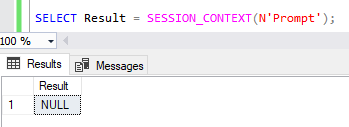
Another of the nice aspects of using this is that if the key hasn’t been set already we’ll just have a NULL value returned rather than any error being thrown up:
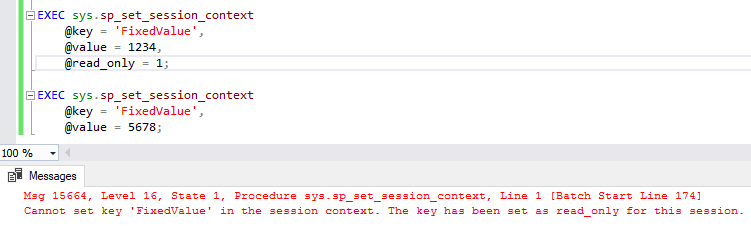
We also have the ability to store the read-only values too, so once that’s set we can only retrieve it and any attempt to overwrite it will throw an exception. That looks a little something like this:
Due to the wider range of features and simplicity for implementing, the session context is much more flexible and powerful option than the legacy context function.
Wrap up
Here we’ve take a look at a few different approaches for sharing values within a session.
Parmeterising our procedures is the most typical way we see this done however in some circumstances the SESSION_CONTEXT may also prove a useful option. Unless you’re on a pre-2016 version of SQL Server I’d recommend avoiding the CONTEXT_INFO option due to the vast limitations compared to alternatives.
Sharing data within a session isn’t only limited to values as we sometimes need to share sets of data too. There are other approaches to achieving this and we’ll look at a few of these in a future post.
 Andy Brownsword
One reply on “Sharing is Caring: Exchanging Values within Sessions”
[…] Last week we looked at being able to share individual values within a session and options for that. This week we’re scaling that up to whole datasets and what we may be able to leverage with the increased volume of data. […]