
Deploying database changes are relatively easy. Where things get complicated is the rollback. Sure, it’s easy to script out and revert a procedure to a previous version, but what about destructive changes?
In this post we’ll look at how we can use Database Snapshots to remove some of the headache that comes with rolling back changes.
What are database snapshots?
Database Snapshots are a feature in SQL Server which allow us to maintain a copy of a database from a specific point in time. A snapshot 📸
Rather than snapshots storing the database in its current state similar to a backup, a snapshot instead stores changes which have occurred since it was taken. By using the live database and overlaying previous changes, it can provide a consistent version of the database from when it was taken.
As only changes are stored, snapshots can be lightweight where the database isn’t performing a high volume of changes.
Note that they can be lightweight. For databases with frequent data changes the snapshot can grow quickly. This should be factored when deciding if they’re appropriate as a rollback mechanism.
Creating a snapshots
A database snapshot is created with a CREATE DATABASE command. We define each of the data files and where their snapshot file should reside. Finally we indicate which database this is a snapshot of.
We’ll demonstrate with a database which has a table containing ~1m records:
CREATE DATABASE blog_snapshot
ON (
	NAME = blog,
	FILENAME = 'C:\Program Files\Microsoft SQL Server\MSSQL16.SQL2022\MSSQL\DATA\blog_snapshot.snap'
)
AS SNAPSHOT OF blog;
The created snapshot appears to be the same size as the main data file, but we said above it’s lightweight:

This is a sparse file so although it may appear to be large, the storage allocated to it is rather minimal. We can see this in the file properties:
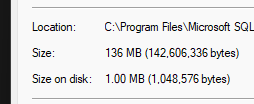
This file will only need storage when the original data changes and it needs to keep a copy of the previous pages.
Querying snapshots
Database snapshots behave like a regular database for querying. They’re read only, but that’s what we’re looking for, a static snapshot. This can help us compare current and previous versions of data.
For example if we update a record in our table:
UPDATE dbo.SnapshotTable
SET StrField = 'Record One'
WHERE ID = 1;
We can go and query the live and snapshotted version of that record to see the difference:
SELECT *
FROM blog.dbo.SnapshotTable
WHERE ID = 1;

SELECT *
FROM blog_snapshot.dbo.SnapshotTable
WHERE ID = 1;
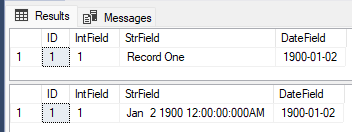
Those type of changes aren’t an issue to script a rollback for. Let’s get a bit more destructive:
ALTER TABLE dbo.SnapshotTable
DROP COLUMN DateField;
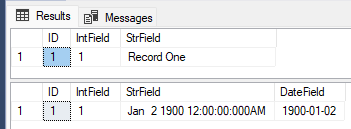
This is one of those situations it can be a challenge to roll back. We’ve just erased the data for over 1m records. Typically this could require restoring of a backup or taking a copy of the data before performing the upgrade.
But we don’t need to do either, we have a snapshot.
Reverting to a snapshot
To revert a database to a snapshot we can use a restore command. We restore the database from a specific snapshot, for example:
RESTORE DATABASE blog
FROM DATABASE_SNAPSHOT = 'blog_snapshot';
This process restores the database back to the point the snapshot was taken by reloading the changes from the snapshot back into the original database.
Once restored we can check the data to confirm it is now back in line:
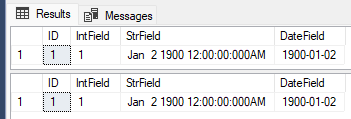
That’s all there is to it. We’ve got our schema and data back into the state before any changes were made.
The snapshot remains after being restored. This is handy as it lets us use them to perform rerun and revert changes, for example debugging a deployment issue in a test environment.
Wrap up
In this post we’ve covered the basics of database snapshots – what they are, their benefits, and how we can create and restore them.
Snapshots can be a lightweight way to provide rollback capabilities during an upgrade. They can be especially useful with destructive upgrades where they can remove the need to take a copy of existing data or require restoring a database from a backup.
Snapshots may not be well suited if they are taken on a database which has a large volume of change, for example a data warehouse which may truncate and reload each evening. It should also be noted that a snapshot is not a substitute for a backup.
I don’t use database snapshots too often. Most updates aren’t destructive enough to need the ability to revert quickly. When I have needed them though, they have been lifesavers.
This post has been a primer to demonstrate the basics of the feature. There are a couple of other areas to touch on around them. Until then, smile and say cheese for your snapshots 📸
 Andy Brownsword
3 replies on “Using Database Snapshots for Peace of Mind Upgrades”
[…] Andy Brownsword hits upon an underrated feature in SQL Server: […]
[…] week we looked at using Database Snapshots to help with rolling back upgrades. The snapshot maintained a point in time copy of the database which could be later […]
[…] enjoyed looking at more obscure topics – application locks, the Halloween problem, database snapshots, linked servers into Azure, and obscure implicit conversion […]