
In Management Studio we can view object details by hitting F7 in Object Explorer. It gives us basic metrics but I find it very slow to load for the details I typically need.
For that reason I though I’d share a script to turn to for metrics I commonly need. This query returns:
- The table details (schema, name, created date)
- The primary storage (Heap, Clustered, or Columnstore)
- The numbmer of Nonclustered / Columnstore Indexes
- The number of records and rough size for data / indexes
WITH ColumnstoreIndexes AS (
	SELECT [object_id], index_id,
		IsClustered = CASE WHEN index_id IN (0, 1) THEN 1 ELSE 0 END,
		SizeKb = SUM(size_in_bytes) / 1024.0
	FROM sys.column_store_row_groups
	GROUP BY [object_id], index_id
)
SELECT
	SchemaName = s.[name],
	TableName = t.[name],
	Created = t.create_date,
	Storage = CASE
		WHEN MIN(i.index_id) = 0 THEN 'Heap'
		WHEN MAX(ci.IsClustered) = 1 THEN 'Clustered Columnstore'
		WHEN MIN(i.index_id) = 1 THEN 'Clustered'
		WHEN MIN(i.index_id) = 0 THEN 'Heap'
		ELSE '???' END,
	NCI = COUNT(CASE WHEN i.[type_desc] = 'NONCLUSTERED' THEN i.index_id ELSE NULL END),
	NCCI = COUNT(CASE WHEN i.[type_desc] = 'NONCLUSTERED COLUMNSTORE' THEN i.index_id ELSE NULL END),
	Records = SUM(CASE WHEN i.index_id IN (0, 1) THEN ps.row_count ELSE NULL END),
	DataSizeMb = CONVERT(DECIMAL(9, 2), ISNULL(SUM(CASE WHEN i.index_id IN (0, 1) THEN ps.used_page_count ELSE 0 END) * 8 / 1024.0, 0))	,
	IndexSizeMb = CONVERT(DECIMAL(9, 2), ISNULL(SUM(CASE WHEN i.index_id NOT IN (0, 1) THEN COALESCE(ci.SizeKb, ps.used_page_count * 8) ELSE 0 END) / 1024.0, 0))
FROM
	sys.tables t
	INNER JOIN sys.schemas s ON t.[schema_id] = s.[schema_id]
	INNER JOIN sys.indexes i ON t.[object_id] = i.[object_id]
	INNER JOIN sys.dm_db_partition_stats ps ON i.[object_id] = ps.[object_id] AND i.index_id = ps.index_id
	LEFT JOIN ColumnstoreIndexes ci ON i.[object_id] = ci.[object_id] AND i.index_id = ci.index_id
WHERE
	t.is_ms_shipped = 0
GROUP BY
	s.[name],
	t.[name],
	t.create_date
ORDER BY
	s.[name],
	t.[name];
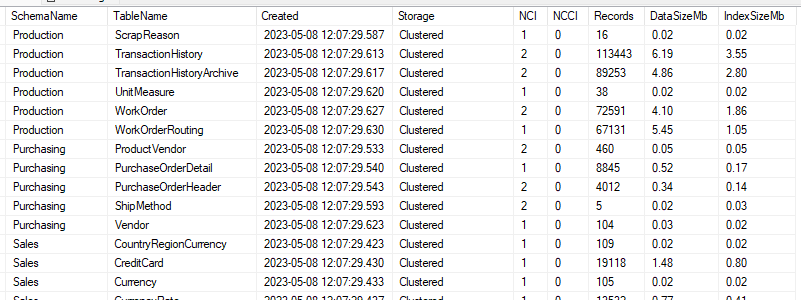
Results for the AdventureWorks2022 database will look a little like this:
This has been extended over time such as the inclusion of columnstore indexes. I know there are elements not catered for such as XML indexes which aren’t handled in the DMV used here.
I’m sure there will be other limitations or omissions too. This is simply what I use for a quick view of a database. Maybe I’ll revisit some time to find and fix some of those oddities.
 Andy Brownsword
3 replies on “Basic Table Metrics”
[…] Andy Brownsword has a script for us: […]
[…] you find this handy and you’re after slightly more details about your tables, here’s another larger option to consider which I compiled last […]
[…] one I still refer back to – one of my go-to scripts to get basic details when diving into a new […]