
We may associate consuming data from Azure Storage with tools like Data Factory or even SSIS as we saw recently. We don’t always need the middle man though.
Here we’ll demonstrate how to use an External Data Source to perform the ingestion directly into SQL Server.
Firstly we need the credential to authenticate against the storage. In this instance we’ll be using a SAS token. You’ll also need to have a database master key before you’re able to create it:
CREATE DATABASE SCOPED CREDENTIAL BlobStorageCreds
WITH IDENTITY = 'SHARED ACCESS SIGNATURE',
SECRET = '[Insert SASsy Key Here]';
With the credential available we can now create an External Data Source to point to the Azure Storage account. This will need to be in the database where the credential was created:
CREATE EXTERNAL DATA SOURCE BlobStorage
WITH (
	TYPE = BLOB_STORAGE,
	LOCATION = 'https://blogstorage.blob.core.windows.net/import-export',
	CREDENTIAL = BlobStorageCreds
);
Note that the LOCATION includes both the storage account name (blogstorage) as well as the container within (import-export).
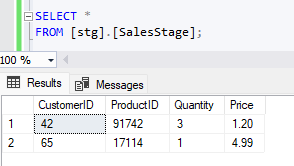
With a data source configured we can now perform a bulk insert from a file within the container:
BULK INSERT [stg].[SalesStage]
FROM 'import/sales.csv'
WITH (DATA_SOURCE = 'BlobStorage',
	FIELDTERMINATOR = ',',
	FIRSTROW = 2
);
If and when the token expires or needs to be updated in the future then simply ALTER the credential:
ALTER DATABASE SCOPED CREDENTIAL BlobStorageCreds
WITH IDENTITY = 'SHARED ACCESS SIGNATURE',
SECRET = '[More SASsy Key Here]';
Wrap up
Having data stored in Azure doesn’t require another tool for integration. Here we’ve looked at how we can use an existing SQL Server database to connect and process the data directly.
Using this approach removes the need for external tooling either due to low complexity, or to avoid introducing new technology. It can also benefit DBAs who are more comfortable managing code within a database rather orchestration through Integration Services or Data Factory.
This solution may be suitable for smaller pockets of ingestion work, however at scale or where there’s additional complexity you’d likely want to leverage other tooling such as Data Factory.
 Andy Brownsword
One reply on “Ingesting Azure Blob Data Directly to SQL Server”
[…] Andy Brownsword brings in some data: […]