
Package configuration for SSIS packages allows us to store configuration for the packages in a variety of locations. One of those which can be particularly beneficial – database configuration.
Here we’ll look at 3 benefits to leverage when using database configuration:
- Changing the configuration with TSQL
- Sharing the configuration across packages
- Managing multiple environment configuration
If you wanted a quick refresh, I’ve previously looked at Package Configuration and how we set it up, including the SQL Server option.
So let’s jump into the meat of this.
Configuration changes
With configuration stored in a database table we’ve got the data in a familiar medium to interrogate or manipulate.
While most configuration may be static, there are situations where we might want to modify the values. For example when performing an incremental extract we may want to record a LastExtractDate which is updated at the end of the package.
For example a simple package like below:
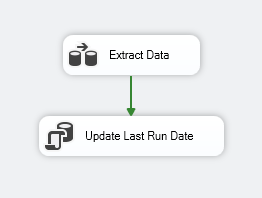
We have the LastExtractDate variable used for a parameter in the query to retrieve the data:
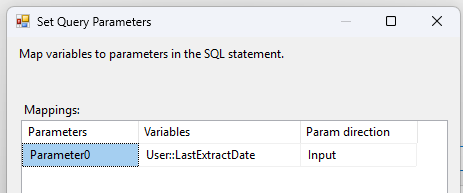
Once that’s complete we then want to update the configuration value in the database. We can do this with a simple update to our configuration table:
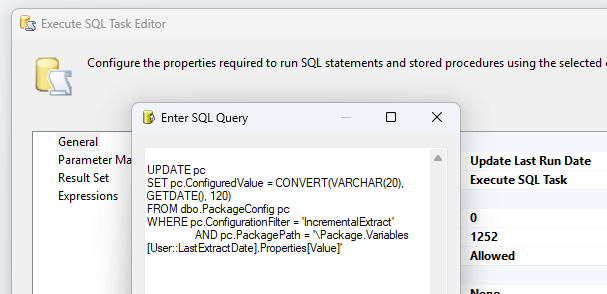
UPDATE pc
SET pc.ConfiguredValue = CONVERT(VARCHAR(20), GETDATE(), 120)
FROM dbo.PackageConfig pc
WHERE pc.ConfigurationFilter = 'IncrementalExtract'
	AND pc.PackagePath = '\Package.Variables[User::LastExtractDate].Properties[Value]';
That’s all there is to it. A very powerful way to modify the execution of a package dynamically. This could also be used as a way to exchanging information across packages, for example a ShouldIRunToday type of parameter.
Shared configuration
Next up we have the ability to share configuration, similar to how we would with Project configuration across multiple package. This is more potent however.
We can use shared configuration across different packages, projects, and even environments as we’re pointing to a table, wherever that be local or remote.
Most configuration may be specific to the package which it belongs, for example a directory to load files. There are some values which are common across multiple packages however. A great example is a mail server for notifications.
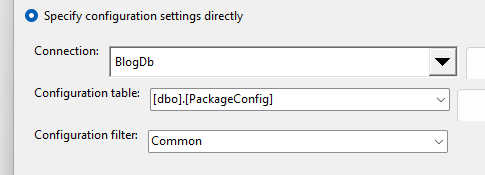
First up we’ll create a configuration to store the common configuration (creatively named ‘Common’). In here we’ll store the SMTP server value:
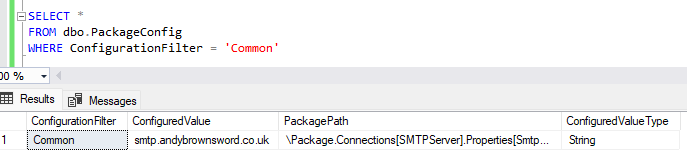
Once we’ve got that in place we can head over to another package and we’ll want to recreate an object of the same type with the same name – so the PackagePath in the configuration aligns:
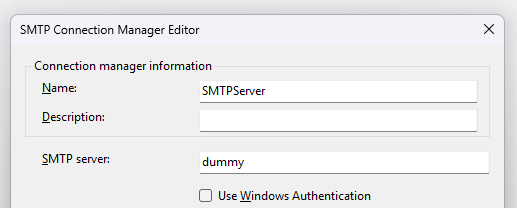
With the connection created we can now add a configuration with the same configuration filter in this package and we’ll get a prompt to Reuse Existing config:

Bingo.
If we choose to reuse the config we’ll inherit the existing settings in this package. By reloading the package we’ll see the SMTP server has now been updated:
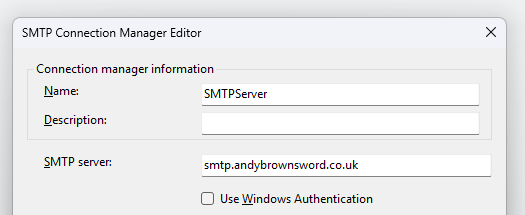
The ability to share common configuration across multiple packages, projects, and even deployments is very appealing. This centralises the configuration which greatly simplifies the management of the values. Elements to consider for this would include names of servers, databases, batch sizes, or directories for example.
Managing multiple environments
Deploying and managing configuration across multiple environments can be a challenge which database configuration can aid with. By having the configuration stored in a database table, it’s easier to manage and deploy the configuration.
By storing the configuration in a table we can have a SQL script bundled with the deployment to create and populate the config table with values relevant for the specific environment.
A simple example for a post deployment script could set the shared SMTP configuration above like this:
IF (@@SERVERNAME = 'Sql-Prod')
BEGIN
	INSERT INTO dbo.PackageConfig
	VALUES ('Common', 'smtp.andybrownsword.co.uk', '\Package.Connections[SMTPServer].Properties[SmtpServer]', 'String');
END
ELSE /* Assume local dev */
BEGIN
	INSERT INTO dbo.PackageConfig
	VALUES ('Common', 'localhost', '\Package.Connections[SMTPServer].Properties[SmtpServer]', 'String');
END
With this approach the only configuration needed is to point the packages to the correct database for configuration. All configuration will be localised to its own environment at the point of deployment.
If you fancy some bonus points, you could use an environment variable to set the configuration database connection as part of the environment build.
Wrap up
Database configuration provides a number of benefits for managing your package configuration. We’ve outlined 3 powerful ones above:
- Changing the configuration with TSQL
- Sharing the configuration across packages
- Managing multiple environment configuration
Each of these individually help to solve specific pain points for managing SSIS package configuration. Together though, they provide a compelling reason that database configuration may be the technique you want to use at scale.
As with most decisions, consistency is key to their implementation. In isolation, database configuration is simply an alternative to other configuration approaches. When used consistently though, we can leverage the benefits outlined here in combination to ease development and maintenance of packages.
 Andy Brownsword
One reply on “Harnessing SQL Server Package Configuration for SSIS Packages”
[…] Package configuration allows us to retrieve variable values from a variety of sources. We recently looked at storing the values in a SQL database. […]