
When looking to increase performance for a database it can be the smaller and faster queries which can be improved easier and more effectively than their slower counterparts.
We can be drawn to tuning long running and complex queries, but these can be a challenge due to their size and complexity. Sometimes though we can reclaim just as much performance by fixing simple queries which are ran very frequently.
Papercuts
These ‘papercuts’ are queries which are small but ran often. They typically use reference data – i.e. fixed or very slowly changing – such as populating dropdowns or fixed lists. These queries also help with the snappiness of a UI on the front end. Every 0.1s saved here is noticeable.
A simple way to find these is with the Query Store. Use the Execution Count metric to help identify those.
What you want to look for would be a query and plan like this:
SELECT CityID, CityName, LatestRecordedPopulation
FROM [Application].[Cities]
WHERE StateProvinceID = @StateProvinceID
ORDER BY CityName;
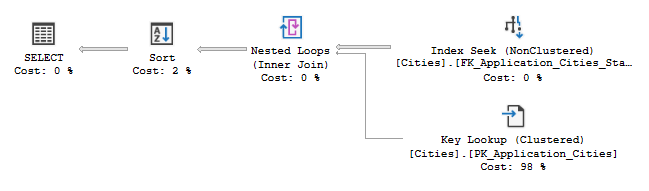
This is an example from the WorldWideImporters database. It’s a small, simple search against a list of Cities and should need to be updated very infrequently.
Its quick too. In fact it the statistics report 0ms CPU time.
So why would we want to optimise this query further? Let me show you.
Covering up
This query is really simple. It uses a single table. It has equality filters. And a sort. A great candidate for a covering index.
A covering index is typically referred to as an index which contains every column needed to completely fulfil the requirements for a specific query. Whilst that is true, effective indexing also improves performance by simplifying execution plans and I think this is also key for covering indexes.
So, what’s the plan?
The index will lead with the StateProvinceID to match the equality filter and allow effective seeking into the index. Next we’ll have the CityName as a key value so it will be sorted and mirror the ORDER BY clause, and remove the Sort operator from the plan. Finally we’ll include the other two fields from the SELECT so we won’t need to look those up.
CREATE INDEX IX_Covering
ON [Application].[Cities] (StateProvinceID, CityName)
INCLUDE (LatestRecordedPopulation);
The result is the following execution plan:
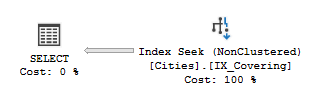
With this plan we have a few benefits:
- No lookup needed from the clustered index (less reads)
- No sort operation needed (less CPU and memory)
- No blocking from the sort operator (faster response)
Plenty of wins there. But does it provide much improvement over the original plan? Could we possibly get less than no CPU?
Well, no. But remember we’re not tuning a large unwieldy query. Let’s turn up the volume.
Scaling up
Remember we’re dealing with papercuts here. Its the volume of them which makes them painful, not singular executions. Let’s put it to the test with SQLQueryStress and push some volume through.
We’ll set the test up for 8 threads and 10,000 iterations, with the average completion time across multiple runs. The tests are ran with 3 different parameters based on returning different volumes of records.
Onto the results:
| Volume | Original Plan | w/ Covering Index | Reduction |
|---|---|---|---|
| Low (1 record) | 26s | 19s | 27% |
| Medium (1% of table) | 51s | 23s | 55% |
| High (6% of table) | 165s | 35s | 79% |
Now we can see the benefit clearer. As a result of the benefits outlined above, we’ve been able to increase throughput by at least 27%.
Sometimes its the (very) small wins which can add up.
Wrap up
In this post we’ve taken a small, fast query and made it even faster by adding a covering index. The key point is that even smaller queries – if ran very frequently – can provide dramatic improvements when seen at scale.
Plus, they’re likely easier to tune.
A perfect use case for covering indexes is reference data which rarely changes. Here we’ve removed lookup and sort operators which leads to reduced reads, CPU, and memory needed from the query.
However these indexes aren’t always the right choice as they can impact DML operations more than a regular index due to additional columns being included.
A better approach to solve performance issues with reference data could be a form of caching closer to the application. In lieu of that, and given we’re focussed on the database here, this should provide a sizable increase in performance with one simple index.
 Andy Brownsword
3 replies on “Solving Performance Papercuts with Covering Indexes”
[…] is a covering index. Whilst these can be very useful in the right conditions – even for very small queries – you typically want to be selective with where they’re used. A lot of indexes […]
[…] Apply covering indexes which are very beneficial in the right conditions […]
[…] If you spot these in your query plan – good news. If you’re seeing unoptimised joins and your data has potential for bad estimates due to predicates or data skew, consider splitting the query, or remove the need for additional lookups with a covering index. […]