
When reviewing our execution plans we’ll see joins executed using different operators. The type of operator is chosen based on the data that’s available to join and how the optimiser wants to execute it.
In this post we’ll take a look at what the operators are, when they are used, and how they work. These are the operators we’ll cover:
- Nested Loop Joins
- Merge Joins
- Hash Match Joins
- (Bonus) Adaptive Joins
Nested loop join
The Nested Loop Join is one of the most common joins you’d see in an execution plan. These are used when one set of data is relatively small, and the other is indexed on the join column.
This is a common join as it’s used to support the typical Index Seek > Key Lookup pattern. They can also be used when searching from reference tables back to transactional records, such as “for users who live in England, find all of their comments”. This is one reason why I like to have indexes on foreign key columns:
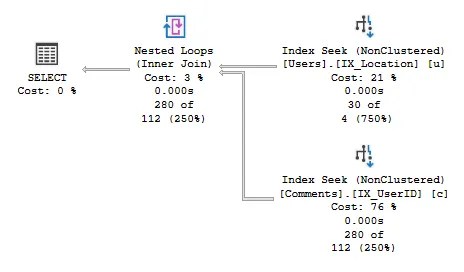
This join is essentially a loop which takes each input record and performs a seek against the index to identify matching values. Where our Users table provided 30 records above, we see 30 ‘scans’ completed against the Comments table, one for each lookup:

Nested Loop Joins can be thought of as how you’d find numbers given a list of names and the Yellow Pages. Each would be taken in turn and looked up individually.
Nested Loop Joins are chosen when one input is selective, and the other has an index on the join key. The combination of these results in fewer reads and less comparisons taking place than other join types, which typically makes them the fastest. However the way in which they operate doesn’t scale well which is why we have two other types to cover.
Merge join
Merge Join operators are up next as they cater for larger data volumes compared to nested loops. Both sets of data need to be sorted to make these viable, which is key to their performance.
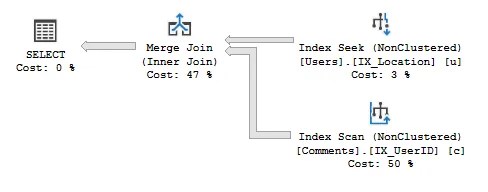
With two sets of sorted data, the Merge Join process effectively walks through both of them comparing the values. Based on results of the comparison and type of join, the records can be returned or rejected as needed.
The process of a Merge Join is similar to how you’d compare an order and invoice. Take them side by side and proceed through each list, matching items as you go.
As data volumes grow past what is optimal for Nested Loop Joins, we’ll see Merge Joins take their place. In some instances the Merge Join operator can take unsorted data and add a sort operation prior to the join.
If both tables are large and sorted, the Merge Join may perform similarly to our next operator: the Hash Match Join.
Hash match join
A Hash Match Join is the go-to for very large join operations. They don’t require any sorting like the other two types, however they only cater for equality conditions. This operator hashes the join columns (hence the name) and compares them to perform the join.

Functionally, the operator takes the smaller input and hashes the join fields to create a bucket per key. These buckets are filled with input rows which have the same key. Then each record from the other input is taken, hashed in the same way, and compared to the buckets to provide results based on the type of join.
By default the smaller input is taken to build the buckets, to reduce memory impact. However if the buckets are too large to fit into memory, the operation can spill to tempdb.
Whilst the operator has the flexibility to deal with very large and unsorted data, this comes with the trade-off of resource utilisation. The hashing process can impact CPU usage and managing the buckets can be very memory intensive too.
Hash match operators have other uses which use the same approach of creating buckets. However these may only require one input, for example aggregates:

Hash Match Joins are a fallback when we need to deal with large and unsorted data which the other joins aren’t well equipped to deal with. However this comes at the expense of them being more resource intensive due to the hashing process.
Adaptive join
Introduced in SQL Server 2017, Adaptive Joins are not a type of join themselves. Instead, they allow the optimiser to delay the decision of which join to use until execution time.
Baking a particular join into an execution plan can become an issue if data volumes can differ drastically between executions, such as parameterised queries.
Adaptive Joins help solve this by providing a plan which includes both a Nested Loop Join and a Hash Match Join. At execution time, the engine can then determine which of the joins is appropriate for the volume of data provided.
Here’s an example of it in action:
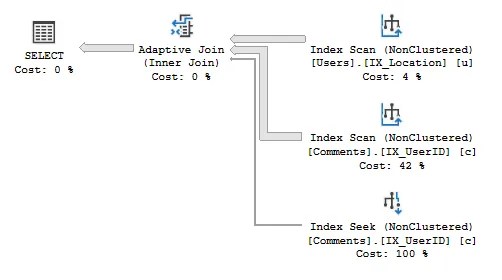
The operator monitors the volume of records fed from the input (the Users table), and if an internal threshold is exceeded it will perform a Hash Match Join (with the Index Scan on Comments). If the threshold is not reached a Nested Loop Join will take place (using the Index Seek on Comments).
An Adaptive Join requires a larger memory footprint to cater for the potential Hash Match Join, however it provides potential for faster execution when a Nested Loop Join is optimal.
Wrap up
SQL Server has a collection of join operators at its disposal to handle whatever we throw at it. In this post we’ve looked at each of them, when they may be used, and how they work. In summary:
- Nested Loop Joins: the fastest option when joining a smaller volume of data against an indexed join key
- Merge Joins: are great for data volumes larger than Nested Loop Joins but require both inputs to be sorted
- Hash Match Joins: are powerful enough to handle large volumes of unsorted data – at the cost of resource utilisation
- Adaptive Joins: defer the choice between Nested Loop vs. Hash Match joins to execution time to provide flexibility and good performance for varying data volumes
Whilst we see these different joins in execution plans, we don’t explicitly define which to use when declaring joins. We let SQL Server do its thing and select an optimal join for our query. We can, however, influence them through indexing to provide sorted sets of data more appropriate for Nested Loop or Merge joins.
 Andy Brownsword
2 replies on “SQL Server Join Operators Explained”
[…] the previous post I explained Join Operators in SQL Server. Whilst compiling that I dug a little deeper and came across a few interesting points I thought […]
[…] are always interesting to dig into – join operators are common but the internals are […]