
This month’s invitation from Steve asks us about our favourite string parsing routines. It conveniently popped up as I was trying out the new Regular Expression (Regex) functions in SQL Server 2025. I adore them for handling string validation and parsing, which I’ve historically done in .Net or PowerShell.
Now that we’re on the cusp of adoption within SQL Server, it’ll be a valuable tool there too. However, after trying it out last week, one omission stood out – one of my favourite features for string parsing: Named Groups.
Where a usual expression can be used to match a string, Named Groups can also be used to extract details from the string. Using an example from Steve’s invitation where a PO number 20260720321433 begins with a year/month and then a number, this could be split with named groups:
(?<year>\d{4})(?<month>\d{2})(?<number>\d+)
With this pattern you can see the capturing groups ((...)) begin with a name (?<name>). Each of these can then be extracted if the match is successful. But not in SQL Server. Yet.
So, I thought it would be a good opportunity to see what I could build with SQL CLR, Regex, and a bit of free time. Here’s what I ended up with:
SELECT *
FROM dbo.RegexNamedGroups(
    '20260720321433',
    '(?<year>\d{4})(?<month>\d{2})(?<number>\d+)');
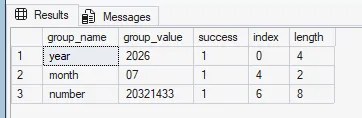
Now, I gather CLR is generally frowned upon across the community, and I’d certainly rather have native implementations. In lieu of that – and having never injected a CLR binary before – it felt like a safe, contained use case to try. After implementing the function, I can see how poorly written code could cripple performance. For tight, focused functionality such as Regex or hashing (both of which can be done in a few lines of C#), I can see potential.
With that first experience under my belt, I’ll completely avoid either endorsing or condoning its usage. What I will say is that it’s very cool to write your own SQL function 🤠
As a first-timer, I won’t embarrass myself by sharing the C# here. Your favourite AI will certainly build you something usable and be able to fill in all the gaps – such as hashing and loading the assembly.
Coming back to Steve’s post, he had a slightly more complex use case of extracting surnames where folks might have added other parts of their name. Not a problem with the named groups:
SELECT n.Surname,
    RealSurname = x.group_value
FROM @Names n
    OUTER APPLY dbo.RegexNamedGroups(
        n.Surname,
        '^(?<other>.* )?(?<surname>\w+)') x
WHERE x.group_name = 'surname';

So that works great, but it only works for what I’ve planned for. If you pop a hyphenated name in there, it won’t return what you expect. This is where using a tool which can quickly react and iterate can be valuable – for example AI as Steve mentioned.
And that nicely ties back to Steve’s point – parsing strings is an age-old problem for which there’s no one-size-fits-all solution. The tools we have keep improving and making the task simpler, only for us to be challenged with more complex data, new features to arrive, and more gaps to be filled by the community. The art of the parsable is a moving target.
I love me some Regex, and I really like what I’ve seen in SQL Server 2025 as a starting point, hopefully with more to come. I sorely miss having named groups available, but it was a good excuse to try out SQL CLR. Whilst CLR isn’t for everyone, it was good to see how we can extend the engine until official releases catch up.
 Andy Brownsword
3 replies on “T-SQL Tuesday #191 – Art of the Parsable”
[…] Andy Brownsword digs into a nice capability around using regular expressions: […]
[…] Brownsword tries out the new RegEx functions in SQL Server […]
[…] Regular Expressions are my jam from my C# days – great to see the functionality in SQL Server 2025 and then went SQL CLR for T-SQL Tuesday #191 – Art of the Parsable […]