Most SQL Server environments have more jobs, schedules, and hidden complexities than you realise. It’s only when you arrive at a migration and peek under the hood that the scale is clear.
Here we’ll pull out details from msdb to give a clear snapshot of what you’ll actually be dealing with. If you don’t understand the effort upfront, the migration will expose it.
Auditing the jobs
The query itself is rather meaty so I won’t embed directly – check out this Gist. The result will look similar to this (minus obfuscation):
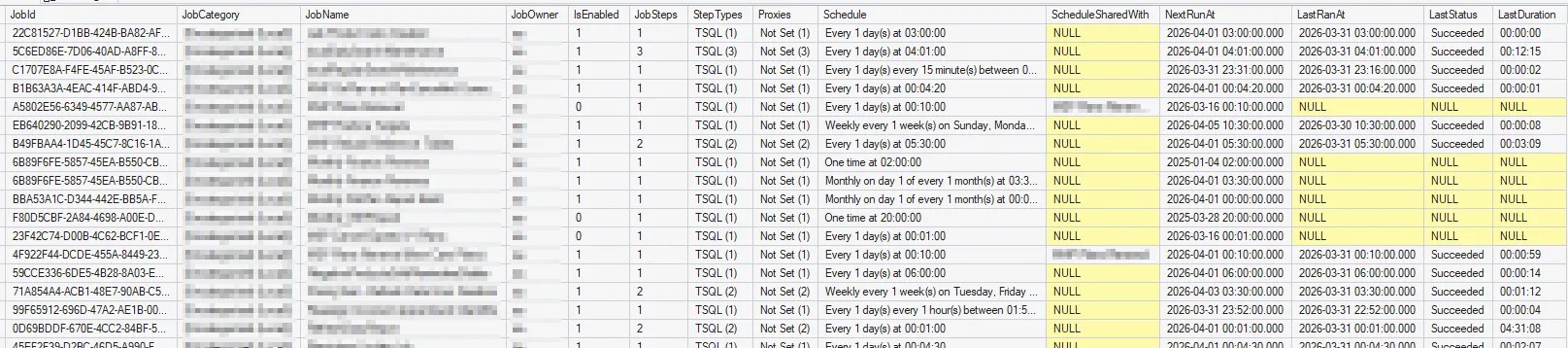
Note the script uses the STRING_AGG function. If you’re running anything prior to SQL Server 2017, switch to FOR XML PATH instead (or ask your AI companion to). Also if you have a lot of jobs or frequent execution, you might have active schedules but the last execution is missing from the history (like the monthly schedules above) – keep an eye out for that false indicator they’re not used.
In this query we’ve made use of the following tables:
sysjobsandsysjobstepsas the meat of the work and what it’s doingsysschedulesandsysjobschedulesfor the timings of what will run and whensysproxiesfor accounts which jobs will execute assysjobhistoryfor run history and performance metrics (step 0 is the whole run)
Schedules are unintuitive and execution history is messy, so we’ve got various CTEs in use here to simplify, format, and organise the outputs before combining it all. There’s a lot of formatting and tidying here. The logic for these is based on documentation, such as dbo.sysschedules if you’d like to dive into any more details.
Running the query is the easy part. What can we glean from these results?
Insights and actions
If you’re in a fortunate position with a small number of trivial jobs, or having identical capabilities on both sides of your migration, using DbaTools Copy-DbaAgentJob command might be an easy win.
For the rest of us mortals, these results are only the start.
Mismanaged jobs can be a trojan horse in migrations, understanding these results is key. I’ve seen jobs take +10x performance hit with comparable cores and memory simply due to the on-prem VM having flash storage and the cloud having USB-like IOPs. Thorough planning – including testing – is crucial to success.
Here’s what to look for in the results, and actions to take:
- Jobs which aren’t enabled – get rid of them
- Jobs which aren’t scheduled – get rid of them too
- Review categories, owners, and proxies – if anything is out of line, get those corrected to simplify the migration beforehand
- Review step types – any unusual or tucked away steps like CmdExec or PowerShell may need bespoke migration strategies
- Check for shared schedules – they’re risks if changes are made without understanding the impact. If they shouldn’t be, get the schedules split
- Long durations – run tests on new environment to ensure performance is acceptable or within tolerance
You could argue some of these points aren’t migration specific (and you’d be correct), but this type of activity gives the time to take a step back and do some housekeeping which could be long overdue.
There’s plenty of work there to get a finalised list of what needs to be migrated. That’s a relatively small portion of the work, particularly if you’re dealing with migrating a full-fat installation – the SQL engine, Reporting Services, Analysis Services, and Integration Services – from on-premises to another stack in Azure or another vendor.
But that’s your challenge, friend. I’ve done the easy part here.
Wrap up
SQL Agent jobs aren’t ‘leftovers’ to tidy up after a migration. Some jobs can drive core business processes, so understanding and factoring into a migration is crucial.
Here we’ve looked at a script which draws out key details and metrics from msdb to feed into a migration plan. You’ll know what subsystems are used (SSIS, PowerShell), what the longest running processes are (to validate performance parity), and which are unused and can be cleaned up (great time for housekeeping).
Listing the jobs is simple, but the reality is a lot of effort can be needed to migrate jobs. Undertaking a migration to an identical environment, or trivial TSQL jobs may be simple. If you’re refactoring your tech stack too – moving from SSRS > Power BI or SSIS > Data Factory – this is merely the start of the journey.
If we can’t explain how our jobs are running today, even a simple migration can unravel fast. Next steps are over to you.
 Andy Brownsword