I recently saw an Office Hours (at sea) Q&A from Brent where he was asked if statistics were rolled back along with a transaction. It’s a great question which I’d never come across so thought it would be worth looking into.
TL;DR: They aren’t, but they may need to be updated when the data is next queried.
For a more comprehensive answer, let’s get a table and throw a selection of data in there:
/* Create a table and index */
CREATE TABLE dbo.StatsTable (
	ID INT IDENTITY(1, 1) PRIMARY KEY,
	SomeNumber INT NOT NULL
);

CREATE NONCLUSTERED INDEX IX_SomeNumber
ON dbo.StatsTable (SomeNumber);

/* Add some random sample data (1-10) */
WITH Numbers AS (
	SELECT Number = CAST(RAND() * 10 AS INT) + 1, Ctr = 1
	UNION ALL
	SELECT CAST(RAND(CHECKSUM(NEWID())) * 10 AS INT) + 1, Ctr + 1
	FROM Numbers
	WHERE Ctr < 1000	/* Counter to stop at 1000 */
)
INSERT INTO dbo.StatsTable (SomeNumber)
SELECT Number
FROM Numbers
OPTION (MAXRECURSION 1000);

/* Generate some stats */
SELECT SomeNumber, COUNT(1)
FROM StatsTable
GROUP BY SomeNumber
ORDER BY SomeNumber;
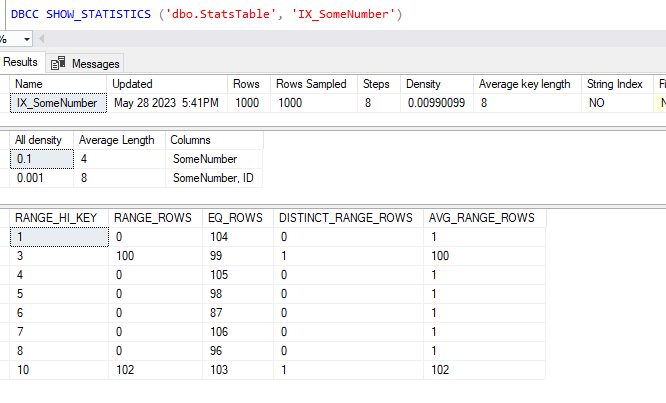
Now we’ve queried the data we’ve got statistics generated on our index which shows 1000 records evenly-ish distributed into 10 buckets:
Let’s make some changes
To get our statistics to update we’ll add another 1000 records into our data covering the range 11-20. This will add a few more buckets into our statistics so we’ll be able to differentiate between the previous and new figures.
We’ll start a transaction, add the new data and then query the table which should force the statistics to update:
/* Start a transaction */
BEGIN TRAN;

/* Add another 1000 records (11-20) */
WITH Numbers AS (
	SELECT Number = CAST(RAND() * 10 AS INT) + 11, Ctr = 1
	UNION ALL
	SELECT CAST(RAND(CHECKSUM(NEWID())) * 10 AS INT) + 11, Ctr + 1
	FROM Numbers
	WHERE Ctr < 1000	/* Counter to stop at 1000 */
)
INSERT INTO dbo.StatsTable (SomeNumber)
SELECT Number
FROM Numbers
OPTION (MAXRECURSION 1000);

/* Query the data to update statistics */
SELECT SomeNumber, COUNT(1)
FROM StatsTable
GROUP BY SomeNumber
ORDER BY SomeNumber;
With that done we’ll go ahead and check the statistics:

We can see those new figures added into the statistics so let’s roll back the transaction and recheck the figures again:
/* Rollback the transaction */
ROLLBACK;

/* Check the statistics after rollback */
DBCC SHOW_STATISTICS ('dbo.StatsTable', 'IX_SomeNumber');

Huh, we’ve rolled back our data but got the same statistics?
The thing with statistics is that they’re only going to get updated when you want to query the data and if sufficient changes have been made. We can see more about this in the system DMV sys.dm_db_stats_properties:
SELECT s.[name], p.rows, p.steps, p.modification_counter
FROM sys.stats s
	CROSS APPLY sys.dm_db_stats_properties(s.[object_id], s.stats_id) p
WHERE s.[object_id] = OBJECT_ID('dbo.StatsTable')
	AND s.[name] = 'IX_SomeNumber';

As we can see here our statistics were based on 2000 records being present however there have been 1000 changes since they were generated – the 1000 records we’ve just rolled back. So if we query the data again now the statistics should get updated:
/* Query the data again */
SELECT SomeNumber, COUNT(1)
FROM StatsTable
GROUP BY SomeNumber
ORDER BY SomeNumber;

/* Check if statistics have been updated */
DBCC SHOW_STATISTICS ('dbo.StatsTable', 'IX_SomeNumber');
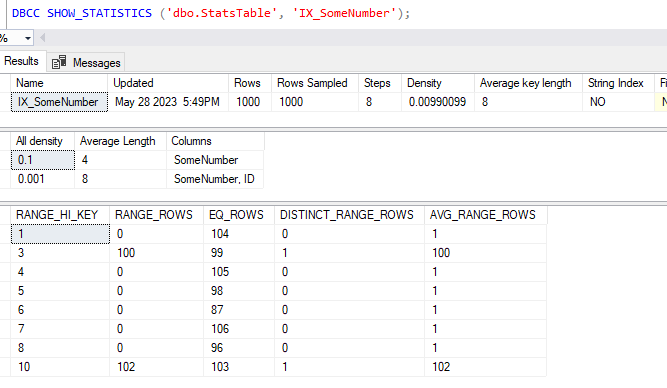
There we have it, the statistics have been updated again and we’re back to something which resembles what we started with before our transaction was started.
Testing a small change
Now we’re just going to do the same type of thing again but this time we’ll only change a single record in our data. As this won’t be enough to trigger a statistics update automatically we’ll also manually do that:
/* Start a transaction */
BEGIN TRAN

/* Add a new record */
INSERT INTO StatsTable (SomeNumber) VALUES (11);

/* Force statistics to update */
UPDATE STATISTICS dbo.StatsTable (IX_SomeNumber);

/* Check the new statistics */
DBCC SHOW_STATISTICS ('dbo.StatsTable', 'IX_SomeNumber');
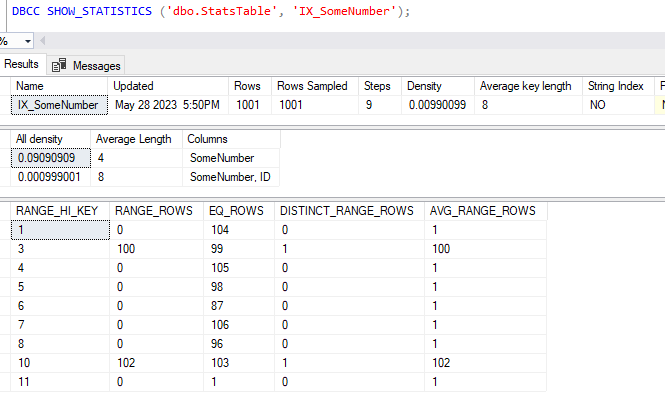
We’ve got our 11th key present in our statistics so we’ll again rollback the data change followed by querying the data and checking if the statistics have updated again:
/* Rollback the transaction */
ROLLBACK;

/* Query the data again */
SELECT SomeNumber, COUNT(1)
FROM StatsTable
GROUP BY SomeNumber
ORDER BY SomeNumber;

/* Check the statistics after rollback */
DBCC SHOW_STATISTICS ('dbo.StatsTable', 'IX_SomeNumber');
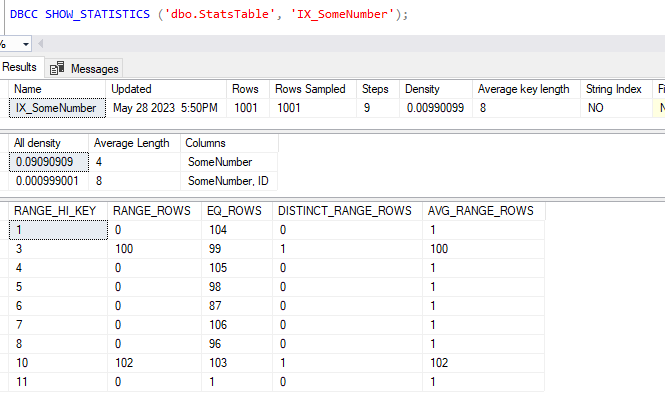
Now this is a little more interesting, our statistics haven’t changed this time, the engine still believes we may have that 11th value present.
A check on the DMV for the statistics show that it was sampled from 1001 records and there has been 1 modification since that time (our rollback):
SELECT s.[name], p.rows, p.steps, p.modification_counter
FROM sys.stats s
	CROSS APPLY sys.dm_db_stats_properties(s.[object_id], s.stats_id) p
WHERE s.[object_id] = OBJECT_ID('dbo.StatsTable')
	AND s.[name] = 'IX_SomeNumber';
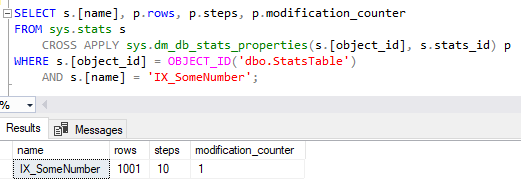
We can see that these statistics are being used when querying the data too, if we look at the estimated plan for our grouping query the number of rows expected to be returned are 11:
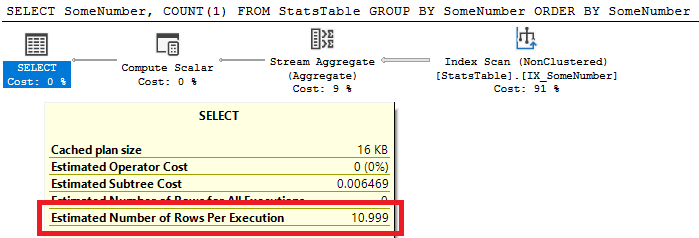
In this instance we did’t get the statistics rolled back as the updating isn’t specifically tied to the transaction but number of modifications to the data.
Wrap up
Here we’ve looked at examples to show how statistics can behave when we have transactions modifying larger and smaller sets of data, and them being rolled back.
The reason that our statistics were regenerated when we rolled back the larger data set was due to the volume of modifications. The cost of updating statistics following a rollback would likely be outweighed by queries using stale data for row estimation, however this could also lead to execution plans becoming invalid and needing to be recompiled too.
When we’re only dealing with a small number of changes, and even if statistics are updated within a transaction, there’s no guarantee that they’ll also be updated again when the transaction is rolled back. This could lead to plans being generated based on data which no longer exists.
This isn’t a situation which I’ve seen impact a live workload however I thought it was an interesting question to pose and look into. Have you seen this issue within your own workloads?
 Andy Brownsword
2 replies on “Impact on Statistics of Rolling Back Transactions”
[…] recently looked at the impact of rolling back transactions on statistics and I thought it would be worth following this up to look at some other objects to see how they […]
[…] Impact on Statistics of Rolling Back Transactions […]