Data integrity helps give us assurance that our data is accurate, complete, and free from errors or inconsistencies. Some of this comes from making sure that data is correct before it enters are databases, but there are some tools we have in our databases which can help with this too – Constraints!
Before we jump into the specifics, let’s take a step back to understand the concept of constraints and their role in maintaining data integrity. In simple terms, constraints are rules that define and enforce the properties and relationships of data within a database. These help protect us from erroneous data, and can also help SQL Server to understand our data better to make more informed decisions in how to query it.
There are a number of constraint options available to us, and some of these are more heavily used than others. I thought it was worth having an overview of each of them and seeing how they can be implemented. We’ll start with a few of them in this post and complete the list in a follow-up post.
Primary Key constraints
A primary key constraint is the most common one we’ll likely see as the vast majority of tables will have one of these. A primary key is a unique identifier for each record in our data. This could come from a natural key field within the table or we could create a surrogate through an IDENTITY column for example.
These can be created as a constraint within the table definition which will allow a primary key to be created comprising of multiple columns, or can be declared inline as part of the column definition in cases where the key is made from a single column. Examples of the two different approaches to the syntax are below:
CREATE TABLE dbo.PrimaryKeyTable (
	ID INT IDENTITY(1, 1),
	CONSTRAINT PK_PrimaryKeyTable PRIMARY KEY (ID)
);

CREATE TABLE dbo.PrimaryKeyTwo (
	ID INT IDENTITY(1, 1) PRIMARY KEY
);
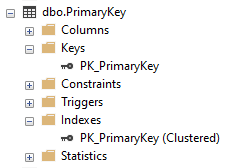
When creating a primary key the engine will also create an index of the same name. By default this will be a clustered index however you can specify NONCLUSTERED in the definition if required.
Once created you can find the elements for your Primary Key under the Keys and Indexes node for your table:
Unique constraints
In a similar vein to our PRIMARY KEY constraints above we have UNIQUE constraints. These ensure that a field (or combination of them) is unique across our table. They can also be created inline or as specific constraints, and when created they will automatically create an index too.
Sounds familiar? Let’s take a look:
CREATE TABLE dbo.UniqueUsers (
	UserID INT IDENTITY(1, 1) PRIMARY KEY,
	Username VARCHAR(50),
	EmailAddress VARCHAR(100) UNIQUE,
	CONSTRAINT UQ_Username UNIQUE (Username)
);
These are in fact very similar to Primary Key constraints, however there are a few differences which are very notable:
- A table can only have one Primary Key however can have multiple Unique Constraints
- Unique Constraints can contain a
NULLvalue which Primary Key cannot - The index created by default for a Primary Key is clustered whereas a Unique Constraint will be non-clustered
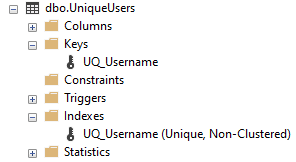
Like with a Primary Key, when a Unique Constraint is in place you’ll find it’s elements present under the Keys and Indexes nodes for your table – not the Constraints:
Foreign Key constraints
This is where things start to get interesting. Foreign keys are a core part of data integrity as they aren’t isolated to a single table like our Primary Keys and Unique Constraints – these define relationships between our tables.
A Foreign Key will define that the data in our table exists in another table. This is done by referencing the data in our table against a unique set of data in another table. The unique set of data is typically a Primary Key but can also be a Unique Constraint. For example:
CREATE TABLE dbo.Orders (
	OrderID INT IDENTITY(1, 1),
	UserID INT,
	CONSTRAINT PK_Orders PRIMARY KEY (OrderID),
	CONSTRAINT FK_UserID FOREIGN KEY (UserID)
		REFERENCES dbo.UniqueUsers (UserID)
);
This Foreign Key dictates that any UserID which is inserted into the Orders table must be present in the UniqueUsers table. If this isn’t then an exception will be thrown and the update will be disallowed:
The INSERT statement conflicted with the FOREIGN KEY constraint “FK_UserID”. The conflict occurred in database “Blog”, table “dbo.UniqueUsers”, column ‘UserID’.
This is enforced in both directions too, so if a User is referenced against an Order and you attempt to delete a User record you would also receive an exception:
The DELETE statement conflicted with the REFERENCE constraint “FK_UserID”. The conflict occurred in database “Blog”, table “dbo.Orders”, column ‘UserID’.
For more complex scenarios, foreign keys can also be created over multiple columns where the Primary Key or Unique Constraint referenced is also comprised of multiple columns.
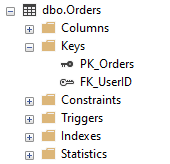
Foreign Keys don’t create any indexes automatically during creation so they are only visible under the Keys node for your tables:
Wrap up
Here we’ve started to look at a few of the most popular constraints which we can use to build data integrity into our databases. These constraints can help safeguard our data quality whilst also describing our data to other developers or even to SQL Server so it can handle our data more effectively.
There’s still a few more types of constraints which we need to cover in an upcoming post so we can have a full picture of the options available to us. Until then I’ll pose this question:
Could you add any of these constraints to your database to help tell SQL Server something about your data which it doesn’t already know? – if so why not give it a try and see if you notice any difference in it’s behaviour?


One reply on “Data Integrity Foundations with Constraints (Part 1)”
[…] Last week we started to at the use of constraints to support with data integrity in our databases. As a refresher on our introduction from last time: […]