
Failover Groups for Managed Instances are a great option to replicate data, but they don’t replicate key instance elements – one of which is logins that live in the master database. If left unchecked, failovers leave systems unable to connect and panic ensues.
To alleviate this we’ll look at a script to synchronise logins and permissions across replicas.
Sync script
Let’s jump into it: here’s a gist which contains the tables and procedures to support the synchronisation. These were originally taken from this article and I’ve added some fixes, improvements, and safety checks.
These scripts will do the following:
- Backup logins and permissions on the primary replica
- Create logins which don’t exist on the secondary
- Disable logins on the secondary which don’t exist on the primary
- Replicate login changes including passwords and default language or database
- Add and replicate membership for Server Roles
Note that changes are made based on login name, so this script won’t correct existing SID mismatches. Any new logins created via the scripts will have consistent SIDs. I’d recommend reviewing or removing prior logins on the secondary before the first synchronisation.
These objects can reside wherever needed, as long as the database is replicated to a failover instance (i.e. don’t use master).
Note that although Failover Groups have similarities to Availability Groups, there’s a different DMV to determine primary or secondary replica. If you want an AG-ready version, you’d need to make changes to the Sync_LoginsRolesPermissions proc.
In action
To run the sync, it’s simply this command:
EXEC [dbo].[Sync_LoginsRolesPermissions]
    @ApplyUpdatesOnSecondary = 1;
The same call works on all replicas and behaviour changes dynamically based on its role in the failover group. On the primary, login details will be written to the tables, or on the secondary, logins and security settings will be replicated.
The secondary will only be updated if @ApplyUpdatesOnSecondary is set to 1. If zero or omitted, it’ll simply output the changes to the Results tab. They’ll look something like this:
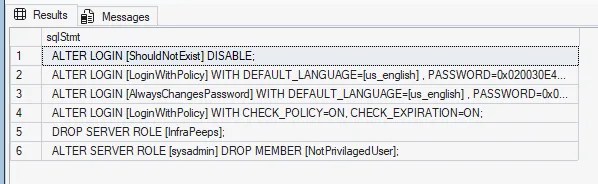
I’d recommend running the proc manually to start with. Once on the primary to populate the tables, and then again on the secondary (with @ApplyUpdatesOnSecondary set to 0) to see what changes it thinks need to be made. I’ve tested this with some dummy scenarios which work fine but you may have a combination which hasn’t been validated.
Once you’re happy with the functionality, schedule this to keep your logins in sync. It’s exactly the same call on each replica – including the parameter on all instances to support synchronisation when the primary becomes a secondary.
With a regular job in place, you’re a step closer to a DR-ready failover group.
Alternatives
Whilst we’re looking at the sync approach I thought it was worth noting a few other methods if this doesn’t seem right for you.
First up there’s the age old sp_help_revlogin script from Microsoft. This is a good option for a one-off transfer of logins, but won’t maintain that over time.
The team at dbatools have some fantastic commands available to support this type of synchronisation, for example Copy-DbaLogin for most purposes, or if you’re looking for only the security side, options like the sync command for permissions. These could be used for a one-off manual synchronisation, or regular maintenance through an Azure Automation Runbook for example.
Outside of Managed Instances, if you’re running SQL Server 2022 and Availability Groups, you could consider Contained Availability Groups. These include portions of the master database inside the AG which include the logins. This isn’t available for Managed Instances, but for on-premises or IaaS configurations, this would make login synchronisation redundant.
Wrap up
Failover groups for Managed Instances provide resilience through failover. Unfortunately only the data is synchronised so failover can lead to failed logins and disruptions. The script here resolves that by providing a method to consistently maintain logins across all replicas in a failover group.
Failover only works when you can rely on your logins. For Managed Instances, this script works well by being easily repeatable and keeping the synchronisation within the data infrastructure. If your situation differs, I’ve touched on other approaches including sp_help_revlogin, dbatools, and Contained Availability Groups which may be appropriate for your environment.
Whilst we’re focussed on logins here, the original scripts also have support for synchronisation of SQL Agent Jobs. That process is more destructive than the logins, as jobs are dropped and recreated. There are valid cases for different jobs on different instances, but this could be a good place to start if you have a requirement for Jobs too.
Failing over is the easy part, now make sure your logins do too. And, if you stumble upon any scenarios not covered by this script, drop a comment and let me know!


3 replies on “Syncing Logins Across Managed Instance Failover Groups”
[…] Andy Brownsword gets replicating: […]
Great Article. Does this only work for sql logins though ?
Thanks, and great question!
The examples here use SQL logins as they’re quicker to set up for demonstration.
This script handles SQL logins, plus external users and groups as well – I’ve personally used this for Azure AD accounts without issue.