
Large data solutions can span multiple databases. I’ve recently shared how amazing Database Projects can be but objects which reference across database boundaries can throw up warnings. Is the code solid or have you picked the wrong table and column combination? – you won’t know, and the code is fragile.
This is where References come into play. They make our projects aware of other databases so objects can reference them without unnecessary warnings. Plus intellisense is a nice bonus.
There are a few ways to handle these dependencies depending on how your projects are organised and what tooling you’re using, so let’s jump into the problem and check out the different options.
Cross database warnings
Let’s take an example with a CRM database containing our customers and a Warehouse database which contains orders. We might have a simple proc in the Warehouse database which does a cross database join and we’ll get warnings like this:
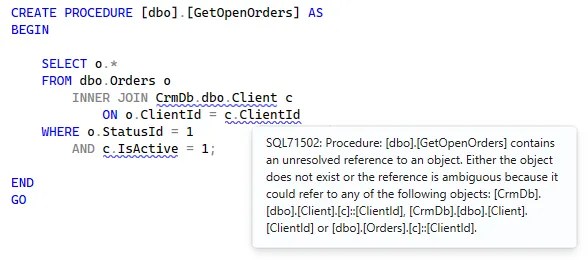
Without a reference to the CrmDb database, we can’t validate that the Client table is correct, or if the ClientId or IsActive fields exist. This is a risk which can be rectified.
Let’s look at the options.
Adding a project reference
The simplest form of reference is the Project Reference. A typical solution would contain all the databases needed, and a Project Reference allows us to reference another project in the same solution.
When adding a reference through Visual Studio we’ll see the dialog below.
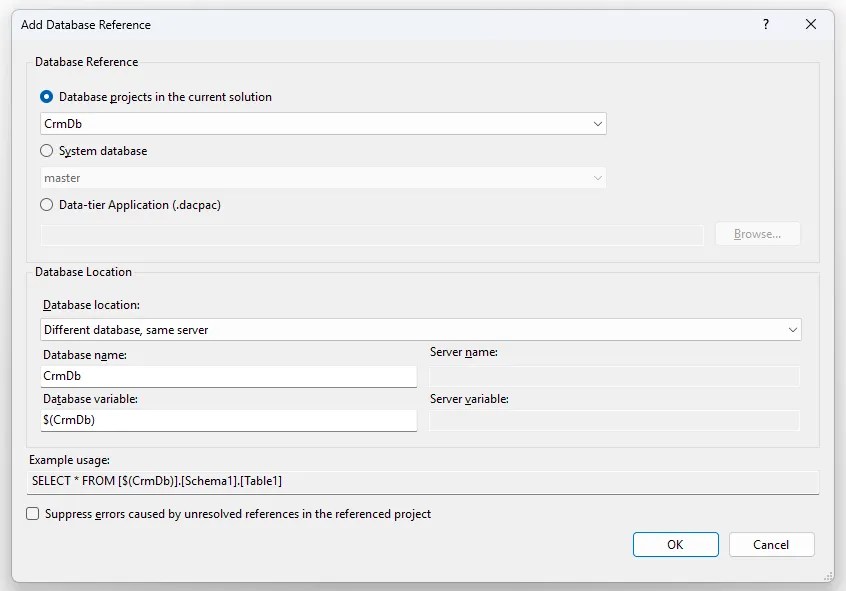
We’ll come back to the other reference types below.
For the database location we have a few options:
- Same database – if you split your databases into multiple projects, so each schema has its own project for example
- Different database, same server – the more typical scenario of another database in the same instance, sitting side-by-side
- Different database, different server – where we’ll use four-part naming for objects, e.g.
VM-DATA2.MyDb.dbo.Table
The option here shows the Database Name and Database Variable options. The variable is used in scripts (as per the example) to reference the database, and it can be set as part of the publish profile, so it can differ between environments – if CrmDb becomes CrmDbDev for example.
The same options are available for the server name if the ‘different server’ option is selected.
The proc can now be adjusted as below to remove the warning:
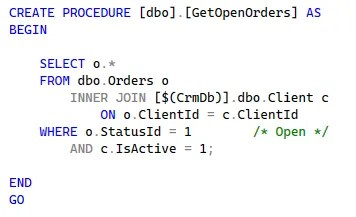
I’ve demonstrated here in Visual Studio as its my preferred environment, but project references are available through either SSDT or SDK-based Database Projects, so you can achieve the same in VS Code or SSMS too.
Whilst this is the approach to referencing that I feel most would use, there are other options available.
Alternative reference approaches
There are other options depending on your chosen environment and how your source code is organised.
Using a Data-tier Application (.dacpac) option (in the screenshot above) allows schemas outside of the current solution to be referenced via a DACPAC. This could be built as part of a separate solution and imported, or it could have simply been extracted from a deployment of the database. This has the same database location options as the project reference, and is supported across either flavour of Database Projects.
With the new SDK-style projects like in VS Code and SSMS, we’re able to use Package References. These build on the DACPAC model but distribute as a versioned Nuget package, so we have the same options as above. However as there’s no UI for references in the VS Code and SSMS tooling, you’ll need to hand-craft these options if needed.
Finally, a handy feature is the ability to reference System databases, as the team has bundled those in. The options are a little different to other reference types as you only have a fixed choice of either master or msdb, and you won’t have variables for the database names either since they’re fixed. This is the answer if you want to reference an object like your dbmail items. This is available in all tooling – with SSDT delivering via DACPAC and SDK solutions using Nuget packages.
You can read more about DACPAC references, package references, and system database references if you’d like more details.
Wrap up
Cross-database operations are common in real-world solutions, and Database Projects give us a clear way to validate those dependencies via references.
Project References will cover the typical scenario of a solution with multiple database projects. If we have separate repositories for each database, DACPACs would be a better solution. Finally, we also have Package References via Nuget which is Microsoft’s recommended approach. However, these are only available in SDK-style projects which are exclusive to VS Code and SSMS.
With SSDT being well established, Project References and DACPAC are the go-to options. They provide great coverage, and are really easy to manage through the GUI and publish profiles within Visual Studio.
Database DevOps has typically trailed behind application code in its adoption. With all the great Database Project features, alongside consistent, structured deployments, and cross-database support we’ve shown here, there’s little reason to continue treating database development as an afterthought within engineering teams.
 Andy Brownsword
One reply on “Solving Cross Database References in Database Projects”
[…] Andy Brownsword creates a reference: […]