
Whilst we have front-end code which requires faster response times, there are also times we build code with the purpose of running for extended periods of time. Examples of this could be maintenance routine, or custom built queuing mechanisms.
The way in which we design longer running processes like this can be key when it comes to the ability to maintain them in the future.
For our example we’ll look at a table where a value is updated each iteration and we want to modify the value being set within a procedure. Let’s start with the setup:
CREATE TABLE dbo.SomeDataTable (
	LastChange INT
);

INSERT INTO dbo.SomeDataTable (LastChange)
VALUES (0);
Creating the process
Our starting point is a procedure which is used to set the value in the table. This is a looped operation to perform whatever function we require within our long-running process:
CREATE PROCEDURE dbo.UpdateLastChangeValue
AS
BEGIN

	DECLARE @ChangeValue INT = 1

	WHILE (1 = 1)
	BEGIN

		UPDATE dbo.SomeDataTable
		SET LastChange = @ChangeValue;

		WAITFOR DELAY '00:00:05'

	END

END
GO
Great with that in place let’s run the procedure in one session…
/* Session 1 */
EXEC dbo.UpdateLastChangeValue;
…and then check the table contents in another:
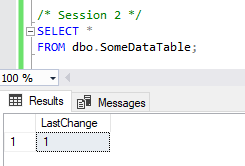
That’s all well and good, but we want to look at maintainability here so we’ll update our procedure to set the change value to be 2 rather than 1:
ALTER PROCEDURE dbo.UpdateLastChangeValue
AS
BEGIN

	DECLARE @ChangeValue INT = 2

	WHILE (1 = 1)
	BEGIN

		UPDATE dbo.SomeDataTable
		SET LastChange = @ChangeValue;

		WAITFOR DELAY '00:00:05'

	END

END
GO
We’ll give it a few seconds for the next loop to work through in our first session and then check the data again in our second:

So we’ve updated our process but the code being executed is unchanged, how come?
Running procedures can’t change
When we call a procedure the query engine will build or reuse an execution plan for that procedure. Once it’s started to run it’s the execution plan which is being processed continually so modifications we make to the underlying code aren’t reflected in our executing process.
If we design a process in this way we will need to ensure that the process is gracefully stopped and restarted whenever we deploy changes to that area of the system.
Since we can’t change code which is in-flight we need to readdress how we design the process. This is another option which we’ll look at that would allow these types of changes to be made during execution…
Using multiple procedures
If we want to make the code more maintainable we can look to break our long running procedure into logical chunks which can be packaged into their own procedures.
By splitting the logic up we can then call these sub-procedures from our top level long-running process. This will mean that each time a child procedure is called we can see changes in those since they’ll be re-executed fresh each time and build a new execution plan when the code is modified.
In our example we’ve only got a very simple piece of functionality to update the value in our table. Let’s encapsulate that into a procedure of it’s own:
CREATE PROCEDURE dbo.UpdateLastChangeValueSubProc
AS
BEGIN

	DECLARE @ChangeValue INT = 2

	UPDATE dbo.SomeDataTable
	SET LastChange = @ChangeValue;

END
GO
We’ll now modify the top level procedure to strip out that portion of logic and replace it with a call to the sub procedure. The responsibility will be removed from the procedure which will be running indefinitely and moved to our function piece of code which will be called when needed:
ALTER PROCEDURE dbo.UpdateLastChangeValue
AS
BEGIN

	WHILE (1 = 1)
	BEGIN

		EXEC dbo.UpdateLastChangeValueSubProc;

		WAITFOR DELAY '00:00:05'

	END

END
GO
Now, we know that the existing procedure won’t refresh so we’ll need to stop and restart the procedure executing in our first session and then restart it. We’ll know it’s running as we’ll see the value 2 in our table if we re-check it:

So now for the moment of truth, let’s go and update our child proc to a different value:
ALTER PROCEDURE dbo.UpdateLastChangeValueSubProc
AS
BEGIN

	DECLARE @ChangeValue INT = 3

	UPDATE dbo.SomeDataTable
	SET LastChange = @ChangeValue;

END
GO
…and a few seconds later if we check the table again:

Once the top level proc was restarted to rebuild the execution plan to include the child proc like above, we will no longer need to make any changes at the top level when modifying the value. This can be completely controlled from the sub procedure.
Wrap up
That’s a lot of code and images to show this concept – essentially if you’re trying to modify code which is already executing it won’t be reflected until the procedure is freshly called, either through stopping and restarting the process, or by having your logic distributed across multiple procedures which will be re-called when required.
This approach isn’t required for smaller fast-executing code as it may be called so frequently that changes will be reflected almost immediately. This situation is problematic with long running processes such as maintenance routines.
Carefully designing those processes with logical separation can help not only maintainability but also cater for examples like this post where a functional change is needed to the executing code.
 Andy Brownsword