
Our SQL Server environments are home to many workloads. In these situations one size doesn’t always fit all when it comes to configuration. Let’s take an example. On one hand we want small, high performance, transactional processing during the day. Through the evening this could change to larger, batch processing tasks.
I’ve seen the configuration below support transaction throughput as a priority:
EXEC sys.sp_configure
	@configname = 'cost threshold for parallelism',
	@configvalue = 32767;

EXEC sys.sp_configure
	@configname = N'max degree of parallelism',
	@configvalue = 1;
The threshold means that barring a complex query we won’t consider parallel execution. Even if the query exceeds the threshold we have parallelism fixed at one too. These settings will force single threaded execution.
This would hold back some overnight jobs which would benefit being parallel. We could use a MAXDOP hint to override that particular setting but what do we have to combat the cost threshold?
Sometimes we do bad things for good reasons. Generally I don’t like to lean on query hints but in this specific scenario they can help us.
Here’s our query to use as a starting point. It’s based on AdventureWorks2019 data and gives us a simple table scan:
SELECT COUNT(1)
FROM Sales.SalesOrderDetail d
WHERE d.LineTotal > 20;
Our execution plan shows no parallel execution as we’d expect:

So what can we do to get this thing parallel?
Hinting our preference
The solution we’ll be looking at here is to use query hints, particularly the hint ENABLE_PARALLEL_PLAN_PREFERENCE. This tells the engine that if a parallel plan is available we’d prefer that (please).
Using that in isolation doesn’t quite do the trick:
SELECT COUNT(1)
FROM Sales.SalesOrderDetail d
WHERE d.LineTotal > 20
OPTION (USE HINT('ENABLE_PARALLEL_PLAN_PREFERENCE'));
The execution plan for this query will still be single threaded. The plan will tell us that it’s not parallel due to the MAXDOP being set at one:

Our new hint helps to ignore the cost threshold. We also need to hint MAXDOP to override the number of threads to use:
SELECT COUNT(1)
FROM Sales.SalesOrderDetail d
WHERE d.LineTotal > 20
OPTION (MAXDOP 2, USE HINT('ENABLE_PARALLEL_PLAN_PREFERENCE'));

Voila!
Gotchas
Whilst these hints may get us out of one hole they can leave us in another. Having the ability to be parallel doesn’t always mean we are executing in parallel.
A different example below shows this:
SELECT COUNT(1)
FROM Sales.SalesPerson p
WHERE p.Bonus > 0
OPTION (MAXDOP 2, USE HINT('ENABLE_PARALLEL_PLAN_PREFERENCE'));
The options are set the same as before yet the execution plan tells a different story:
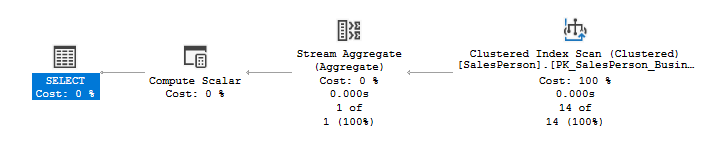
Why did the plan not go parallel? It’s too trivial:

A trivial plan won’t consider parallel execution even with the hints we’ve used. We’re stuck single threaded without the full optimisation to include our hints.
Even when we get a parallel plan that doesn’t mean our query is making use of those threads. We could still see unbalanced or skewed parallelism at play. The presence of parallelism doesn’t mean it’s effective parallelism.
We may come back to the points above in later posts. The takeaway here is that our hints only remove barriers to parallelism. We’re still at the mercy of the engine and how it chooses to proceed.
Wrap up
In this post we’ve looked at how query hints can help us to persuade the engine to choose a parallel plan. The hints can override both the cost threshold and degree of parallelism.
Unlocking the parallelism was our original goal. That isn’t without it’s gotchas though. We also looked at how asking for parallelism doesn’t mean we will use it, or use it well.
The real advice here would be to set limits to ones which are applicable to all workloads. Monitor your environments, change your indexes, queries, and configuration as needed. Yea it’s more work than adding a couple of hints, but it’s a better habit than compulsive hinting.
 Andy Brownsword