
Lookup transformations provide us a way to access related values from another source, such as retrieving surrogate keys in data warehousing. When we need multiple lookups to the same reference data we can improve performance through the use of a Cache.
If we consider data warehousing, a prime example of this would be an order table which has values for Order Date, Dispatch Date, Delivery Date, etc. All of these would require a lookup to a calendar dimension.
This is a perfect use case for a cache.
What’s a cache connection?
A cache is simply temporary storage which holds some data and can be reused. Caches in SSIS are accessed by a specific type of connection – a Cache Connection.
This connection defines the structure of a data set which can be populated and used as the target of a lookup. It can exist at the package level, or project level to aid reusability.
Typically each lookup would have its own cache which is built as its used. This can be inefficient if using the same data repeatedly. It would require multiple round trips to retrieve the data and multiple batches of memory to hold it.
When we use a Cache Connection we choose when to populate it, and reuse it as often as needed. This includes at a project level if using a parent and child packages.
Using a cache
First up we need to create the Cache Connection. This will be under Connection Managers, either at the package or project level. In this example we’ll use a SQL database as the source rather than a file cache.
When creating the connection we need to define the columns. In this instance to look up a surrogate key we’ll have a slice of the calendar – the date value, and its key:
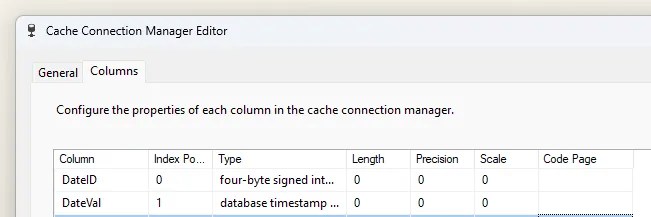
But this is simple metadata for a cache. We need to populate it.
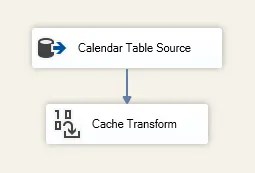
This requires a new data flow to be added. Naturally, it’ll need to be earlier in the package than when you want to use the cache. Inside that flow we need to send our data to a Cache Transform object:
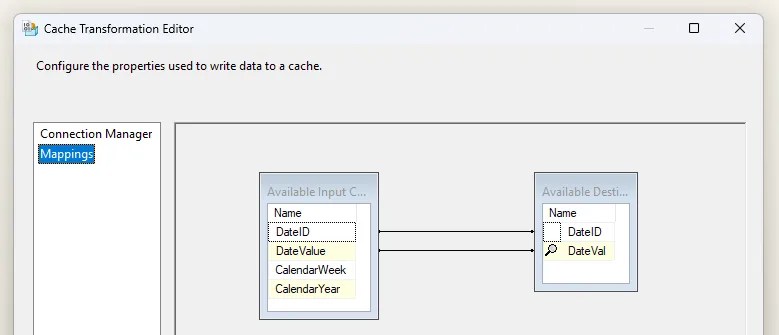
When we open the Cache Transform, we can choose the cache to populate, and then map the columns. This is a simple mapping operation between the source data and cache schema which we defined:
With that, the cache will be populated. Now let’s use it.
In the lookup transformation we change the Connection Type from the typical ‘OLEDB Connection Manager’ to use a ‘Cache Connection Manager’…
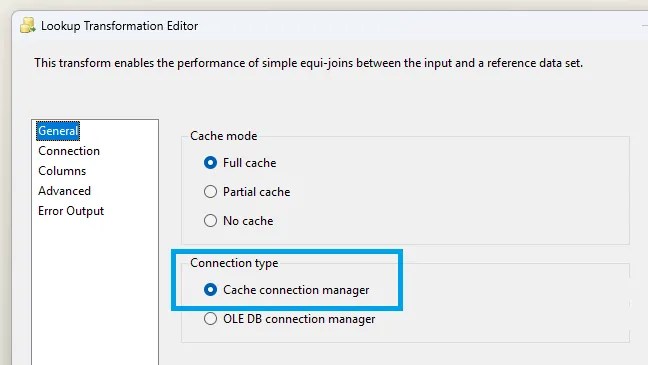
…and then in the Connection options we simply select the relevant cache:
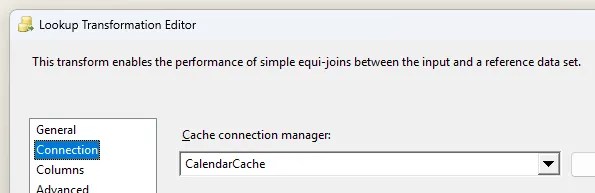
The column mapping and output aliases are identical to a typical lookup so you can continue as usual.
Whether using a Cache Connection at the package or project level, all of the above still applies. When using at the project level, the population of the cache and its usage can be in different packages if you’re running them in a parent / child package or metadata driven approaches.
One gotcha
⚠️ A word of warning which can pop up when caching data. It’s static.
It may sound obvious but worth reiterating in this instance. We’re taking a copy of the data at a point in time and remains in that state unless refreshed. If your flow can change the source data, this needs to be factored in.
Let’s say a lookup may fail and a separate no-match path results in adding a new record. This won’t be present in the cache and therefore not available to other lookups which use the same cache.
The solution is very much dependent on the flow. Two options to resolve this would be:
- Stage the data and upsert outside of the data flow, removing duplicates which may arise
- Split the data flow into multiple with the cache being refreshed in between (which somewhat removes the benefit of the cache)
If you’re using data which is populated elsewhere or remains truly static – for example a calendar – then this won’t be cause for concern.
Wrap up
In this post we’ve looked at improving package performance by using a cache to speed up data flows reusing the same source for multiple lookups.
Instead of a number of lookups retrieving the data multiple times, the cache allows to be read once and reused multiple times. This is particularly beneficial for large static data sets.
If we’re running the same data flow multiple times such as through iteration, we also get the same benefits by building a single cache up front.
One area to note is where we have the data flow modifying the source data which has already been cached. Outside of that though, it can be a great benefit for repetition of lookups.
 Andy Brownsword
5 replies on “Optimising Multiple Lookup Transformations with Caching in SSIS”
[…] Andy Brownsword doesn’t want to keep hitting the database: […]
[…] week we looked at using a cache to improve lookup performance. We saw how a cache improves performance by being able to reuse reference data repeatedly. That […]
[…] recently looked at how caching can improve performance and I wanted to show how we can eek even more performance out of caches by using a custom approach […]
[…] Replacing multiple lookups with a cache is more efficient when using the same source […]
[…] to look for solutions, to solving blocking, and optimisations including buffer sizes, caching, more caching, and even more […]