
We’ve recently looked at how caching can improve performance and I wanted to show how we can eek even more performance out of caches by using a custom approach I’ll term Selective Caching.
I’ll note here that there’s a potential gotcha with this approach which we’ll get to before the end of the post!
Scenario
Let’s say we have a data flow as part of an incremental load to look up surrogate keys against a dimension table. The lookups use the same dimension, such as a calendar to look up an Order Date, Invoice Date, Shipping Date, etc.
Using a cache is a great option for reusability.
However with a large calendar table, the majority of it may be wasted in the cache. This results in:
- a larger cache and therefore more memory required
- slower execution as the lookups are searching a larger data set
We can alleviate both of these issues by being selective with what we cache.
Selective caching
Selective caching is simply reducing the number of records we’re caching. By only containing records we’re likely to need we can reduce the size of the cache.
In our example, if we’re performing an incremental load for orders, we wouldn’t be loading orders which are months old. Its likely that the Order, Invoice, and Shipping dates we mentioned will be within quite a small timeframe.
Analysing the incoming data is key to find the correct subset to use. For this example using 1 month either side of the current date would suffice.
To limit the records we only need to change the cache source. Rather than using the whole dimension as a source:

…we want to use a command to target the specific subset of records:
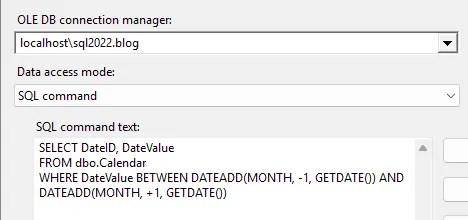
Finding the right subset is key to avoid failed lookups. Inevitably we’ll see some records which miss the cache but we want these to be minimal – as we’ll see below.
Cache misses
The potential for cache misses needs to be addressed within the data flow.
We have a few options:
- Fail the component – not a good option as a valid records could fail the package
- Ignore the failure – a potential option, and we’d need add additional functionality to deal with the
NULLvalue at another point - Use the no match output – another potential option where we can redirect the failed lookup to perform a lookup against the live data to catch outliers
For this example I’ll stick to the third option so the logic stays in the same data flow.
Each lookup will need an additional lookup attaching which references the live data. Both of these lookups will then combine to ensure a successful match:
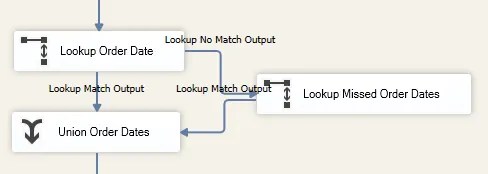
The initial lookup needs to be configured to redirect non-matched records to the No Match output which can feed into the new lookup.
The selective cache should contain the majority of records needed. Therefore the secondary lookup will only need to use a Partial Cache to retrieve the small number of records which fail.
Once both lookups are complete, we can use a union to bring the records back together.
The same pattern will be repeated for all lookups in the data flow which use the selective cache.
This approach provides us with the performance benefits of a cache whilst also allowing fallback to the remaining records if required. So how does performance look?
Performance benefits
To test this approach I took 10mil records through a flow which contains 2x lookup transformations against a 500k record table (a very large calendar). The lookups used a selective cache with a fallback to a live lookup.
With the dates of all records contained within the selective cache window, this reduced memory usage by nearly 50% and reduced execution time by over 10% compared to a full cache.
⚠️ A word of warning though.
When the same tests were done with some records outside of the selective cache (<5%), the additional lookups and union were required and negatively impacted performance versus the baseline. In this instance, although memory usage dropped by 25% we actually saw execution time increase by 20% compared to a full cache, undoing any benefits from the partial cache.
A file cache
A final point about the File Cache we looked at last week. Where you don’t have (or want) direct access to the database, you need to ensure the file cache has the full copy of the data.
If we populate a file cache selectively, the processes which rely on it won’t have a source to fall back to in the event of a cache miss. We need the full copy in the File Cache.
To use selectivity for a File Cache, the cache file must be loaded into a regular cache via the Raw File Source with the data filtered in the data flow.
By doing this, we still have the full file cache to fall back to should it be needed.
Wrap up
In this post we’ve looked at how using a Selective Cache and choosing which records to cache can increase performance of a data flow.
By being selective with what we load into the cache, we can reduce its size which leads to a smaller memory footprint and faster execution.
We need to be mindful though that if we are too selective, this can reduce performance for the data flow when performing secondary lookups. The crucial challenge is getting the selection right.
If you can’t be certain what values may be looked up then stick to a full cache. If you’re almost certain you can be more selective, you’ll be able to reap the performance benefits.
 Andy Brownsword
3 replies on “Improving Cache Performance in SSIS with Selective Caching”
[…] Andy Brownsword takes us through a pattern: […]
[…] Reduce resources required for a large lookup / cache using a selective caching approach […]
[…] to look for solutions, to solving blocking, and optimisations including buffer sizes, caching, more caching, and even more […]