
Handling data modifications to large tables can be tricky. We can end up with long running queries and large transactions. Efficiently handling them comes from batching.
Effective batching in general helps us by:
- Reduce transaction length and minimise blocking
- Avoids unnecessary checking of the same rows repeatedly
- Introduce graceful pacing to reduce impact on busy environments or data replication
In this post we’ll take a look at a key-range approach to solve the issue. With this solution a batch will be a set number of rows from the table before any filtering has been applied.
Here’s an example using the StackOverflow database to make some dummy updates to the Votes table:
/* Configurable variables */
DECLARE @ScanSize BIGINT = 100000,
	@BatchDelay VARCHAR(10) = '00:00:03';

/* Internal variables (set data types appropriately) */
DECLARE @RangeStartId INT = 0,
	@RangeEndId INT = 1,
	@MaxId INT;

/* Find the end of the table */
SELECT TOP (1) @MaxId = Id
FROM dbo.Votes
ORDER BY Id DESC;

WHILE (@RangeStartId < @MaxId)
BEGIN

	/* End of table won't return anything below
		so default here to catch that */
	SET @RangeEndId = @MaxId;

	/* Find the row ending the next batch */
	SELECT @RangeEndId = Id
	FROM dbo.Votes
	WHERE Id > @RangeStartId
	ORDER BY Id
	OFFSET @ScanSize ROWS
	FETCH NEXT 1 ROWS ONLY;

	/* Perform modification within key range */
	UPDATE v
	SET v.BountyAmount = v.BountyAmount         /* Dummy change */
	FROM dbo.Votes v
	WHERE v.VoteTypeId = 3
		AND v.Id > @RangeStartId
		AND v.Id <= @RangeEndId;

	/* Wait if we've made changes */
    IF (@@ROWCOUNT > 0)
		WAITFOR DELAY @BatchDelay;

	/* Move the pointer forward */
	SET @RangeStartId = @RangeEndId;

END
The batching finds the range of rows to review based on the defined batch size. This is done with the OFFSET ... FETCH pattern to identify the next boundary. Once the range is found, the filter and change is made just to that window of rows.
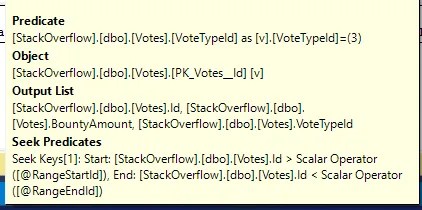
We can see the efficiency of the update in the tooltip where the boundaries are used as Seek Predicates against the clustered index. The residual Predicate is where we see the filter to identify rows to update:
Here are the benefits and drawbacks for this approach:
- Benefits
- Each batch scans the same number of rows to help keep timings predictable
- Only needs a unique clustered key to walk, handy for audit/log type tables which may be light on indexes
- Drawbacks
- Each batch touches the index twice; once to find the boundary, then again for the change which adds overhead
- With skewed data distributions some batches can modify drastically more rows than others
Alternatives
Of course as with most problems, there’s no one right way to do this. Here are a couple of other solutions which could be used or adapted:
Michael uses another careful approach based on volume of rows being updated rather than being analysed. If rows being impacted have a skewed distribution, this approach provides more consistent transaction size for modifications, although areas of the table without matching rows could lead to longer running queries. It’s horses for courses.
Brent uses a fast ordered delete technique to deal with historical rows by using an index and a cunning view to batch the modifications. Purging or archiving old data is a typical situation where we see large volumes of data which need batching. If that’s what you’re looking for, give this a read.
Wrap up
Batching is key to efficiently deal with modifications to large tables, and Michael’s post above has the metrics to prove it. In this post we’ve looked at one example to implement this which achieves our original goals:
- ✅ Smaller consistent transaction length from batching
- ✅ Avoid unnecessary reads by maintaining key position
- ✅ Graceful pacing by waiting when changes are made
There are various approaches to take, and some have particular characteristics which can be preferable depending on your data. When I’ve tried various approaches, I find this method provides consistent throughput and performance.
If batching is what you’re after, give this a try. If it doesn’t hold up, check out the alternatives above from other (smarter) folks.
 Andy Brownsword
One reply on “Batching Large Data Changes Using Key Ranges”
[…] Andy Brownsword updates or deletes a batch of rows: […]