
I know, clickbait right? Hear me out.
Searching vast log or audit tables without indexes is painful. Narrowing down a specific time range often means scanning millions or billions of rows. But that doesn’t have to be the case.
Approach
This approach is designed for tables with two particular characteristics:
- They have an incrementing clustered key (think
BIGINTandIDENTITY) - Records are written chronologically (say with
GETDATE())
The combination of these characteristics is crucial. It means that as the clustering key value increases, so does the timestamp.
Specifically we’ll use a binary search approach to narrow the search range. We abuse the correlation between the clustering key and timestamp to zero in on the records, using the key for navigation, and the timestamp to guide us.
We’ll start with the first and last records as boundaries, followed by checking the timestamp at the mid-point. Depending on whether the timestamp is before or after our target point in time, the appropriate boundary is moved. This halves the key space, and the search repeats until we’ve narrowed the range sufficiently to scan a very small portion of records.
For 1 billion records, 20 lookups reduce the target area to around 1,000 records (99.9999% reduction).
Script
Here’s the function. This finds the first record at or after a given timestamp. This version is tailored for the Posts table in StackOverflow. Check it out:
CREATE FUNCTION dbo.FastSearchPosts (@SearchDateTime DATETIME, @MaxScanRange BIGINT = 10000)
RETURNS BIGINT AS
BEGIN

	DECLARE @StartPointer BIGINT, @EndPointer BIGINT,
		@ProbePointer BIGINT, @ProbeResult BIGINT, @ProbeTimestamp DATETIME;

	/* Grab the boundaries */
	SELECT TOP (1) @StartPointer = Id, @ProbeTimestamp = CreationDate
	FROM dbo.Posts
	ORDER BY Id ASC;

	/* Short circuit if we're out of range */
	IF (@ProbeTimestamp >= @SearchDateTime)
		RETURN @StartPointer;

	SELECT TOP (1) @EndPointer = Id, @ProbeTimestamp = CreationDate
	FROM dbo.Posts
	ORDER BY Id DESC;

	IF (@ProbeTimestamp <= @SearchDateTime)
		RETURN @EndPointer;

	WHILE (@EndPointer - @StartPointer > @MaxScanRange)
	BEGIN

		SET @ProbePointer = @StartPointer + ((@EndPointer - @StartPointer) / 2);

		SELECT TOP (1)
			@ProbeResult = Id,
			@ProbeTimestamp = CreationDate
		FROM dbo.Posts
		WHERE Id >= @ProbePointer
		ORDER BY Id ASC;

		/* If there's a large gap, try the other direction */
		IF (@ProbeResult = @EndPointer)
		BEGIN

			SELECT TOP (1)
				@ProbeResult = Id,
				@ProbeTimestamp = CreationDate
			FROM dbo.Posts
			WHERE Id <= @ProbePointer
			ORDER BY Id DESC;

			/* If we have a genuine gap, drop out */
			IF (@ProbeResult = @StartPointer)
				BREAK;

		END

		IF (@ProbeTimestamp < @SearchDateTime)
			SET @StartPointer = @ProbeResult;
		ELSE IF (@ProbeTimestamp >= @SearchDateTime)
			SET @EndPointer = @ProbeResult;

	END

	/* Perform the final scan */
	SELECT TOP (1) @ProbeResult = Id
	FROM dbo.Posts
	WHERE Id BETWEEN @StartPointer AND @EndPointer
		AND CreationDate >= @SearchDateTime
	ORDER BY Id ASC;

	RETURN @ProbeResult;

END
GO
The goal of the function is to narrow down the search space within the table to be smaller than @MaxScanRange records, and perform a very small scan to return the ID of the first record at or after the specified timestamp.
There are additional boundary checks at the beginning, and checks for identity gaps within the loop, but otherwise it’s as described above. The meat is within the WHILE loop where the probe is defined and start / end pointers updated accordingly. Once they’re exhausted or reduced within the target @MaxScanRange range, the small scan can be made to pick out the target record.
So, ‘blazing fast‘ I said? Ok, let’s see how it performs.
Usage
How many Posts in StackOverflow had a score greater than 100 in January 2014? (150gb database, 40m records)
SELECT COUNT(1)
FROM dbo.Posts
WHERE CreationDate BETWEEN '2014-01-01'
        AND '2014-02-01'
	AND Score > 100;
First up, with no indexes its 11,202,802 reads, 41s CPU:

With an index on CreationDate this reduces to 2,967,146 reads, 3.2s CPU (+64s to build index)
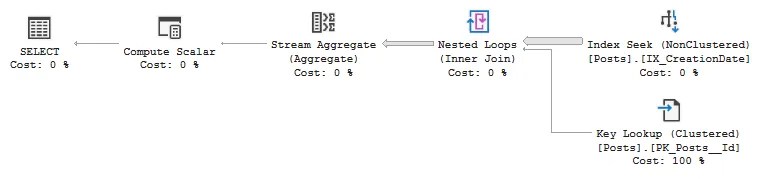
Let’s see how we fare with our function:
SELECT COUNT(1)
FROM dbo.Posts
WHERE Id BETWEEN dbo.FastSearchPosts('2014-01-01', DEFAULT)
		AND dbo.FastSearchPosts('2014-02-01', DEFAULT)
	AND Score > 100;

That’s 139,508 reads, 387ms CPU (including function stats from sys.dm_exec_function_stats).
Over 100x faster than a regular clustered index scan, and around 8x improvement compared to a nonclustered index in this example. With this approach walking the clustered index, it avoids a large number of key lookups when using the nonclustered index, resulting in around a 20x improvement in reads too.
The key to these results is correlation between the timestamp and the clustering key. If you have records slightly out of sequence, you’d want to broaden the search window and add the date range as a predicate in addition to the clustering key. In this example, the Posts table has circa 40k records (out of 40m) which are out of sequence, but that didn’t impact results in this case.
⚠️ Update 18/03 – On reflection, the upper boundary search can be slightly inaccurate in edge cases. If the exact boundary doesn’t exist the search can overshoot, and where multiple rows share the same timestamp, only the first is returned – due to the final scan being in ascending order.
To guarantee accurate results, slightly expand the search window and include the timestamp as a predicate in the final query. This will be handled much cleaner when reworked to use dynamic SQL.
Wrap up
In this post we’ve looked at a very helpful method for time range searches where records are correlated to the clustering key. By using a binary search approach, the search space reduces drastically which leads to vast improvements compared to clustered scans and even index seeks and key lookups.
Depending on the situation, this may not be a suitable replacement for indexing. But if your table fits the criteria and you don’t fancy waiting to scan the clustered index (for querying or building an index), this type of search will give you what you need. Quickly.
Frankly, the biggest drawback with this function is its portability, so the next challenge is converting this to dynamic SQL so it can be dropped in deployed whenever it’s needed. I’ll get back to you on that.
Next time you want to narrow a search range – whether querying or clearing out data – try a binary search approach and see just how little of the table you need to touch.
 Andy Brownsword
2 replies on “Blazing Fast Searches Without an Index”
[…] Andy Brownsword performs several probes: […]
[…] week I demonstrated a fast binary search approach to quickly slice through large unindexed tables. I love the approach, but it fell short in two key […]