
Last time out we discussed blocking transformations, what they are, the impact of them, and touched on how to deal with them. In this post we’re going a step further to tackle one of them head on.
Here we’ll demonstrate the impact of blocking caused by the Sort transformation, and look at two options for solving this and slashing execution time.
The issue
For this demonstration we’ll use the big StackOverflow database and we’ll be sorting the ~9mil users based on location.
As discussed last time the Sort transformation is a blocking one, so until its complete the data flow won’t proceed. Whilst its doing its thing:
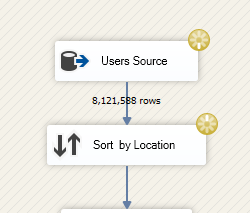
The impact of this is that the memory usage will ramp up as SSIS is holding all those records in memory concurrently:

As long as there’s enough memory to hold all that data, you’re good. If so and the process can complete, it’ll release a big chunk of memory afterwards:

Allowing this data flow to run through completely on my machine takes 125 seconds so we’ll use that as our baseline with blocking.
Moving the sort
When we looked at dealing with blocking transformations last time, one of the options to deal with them is to move the work elsewhere.
Since we’re using a SQL database let’s move it to there by updating the data source:
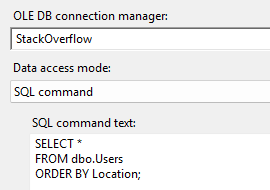
This means we can remove the Sort transformation and the blocking from the SSIS package.
Now when it executes we don’t need for SSIS to gather and sort all of the data. Instead the SQL database will be doing the heavy work. We can see the sort in the execution plan:

That’s great. This reduces the package execution time down to 95 seconds, good progress.
But that’s not the whole story. The data still needs to be sorted – which requires all of the data – so we still have blocking.
So, if we run it in Management Studio we’ll see that it has a memory grant of 372mb and yet it still needs to spill to disk to sort that much data. It spilled by 1.2gb. Ouch.

The problem has simply been moved elsewhere. We can do better.
Pre-sorting
Another way to approach this is to have the data already sorted. This avoids the need to sort during execution and eradicate the blocking.
One way to achieve this is to create an index which can be used to retrieve the data in the order needed.
Let’s create one for the location:
CREATE INDEX IX_Location
ON dbo.Users ([Location]);
With the index created if we execute the query again in Management Studio, the first thing we’ll notice is that the results start to return immediately. We’ll also be getting a plan using our new index:

The data here can flow straight through as its already sorted and doesn’t need to be sorted again (sounds familiar, like our data flow, right?). As this can flow through freely, nothing needs to be kept in memory so there’s zero memory grant needed.
So how does this impact the package?
Much like what we see in Management Studio, data is returned and ready to be used immediately, so the blocking has been cleared. This results in the package completing in 65 seconds which is a 48% improvement.
This approach removes any blocking from either SSIS or SQL Server as no sort is taking place. The majority of execution time is now taken up by handing the sheer volume of data passing through the data flow.
Wrap up
In this post we’ve tackled the blocking Sort transformation in SSIS head on and halved the execution time.
We’ve looked at the issue it brings and the impact on our SSIS package by using the operator. We then tried one fix by sorting to the SQL database which improved the situation but simply moved the issue.
We avoided the need for sorting by indexing the sort column which removed the blocking and saw a saw a big increase in performance.
Indexing was a great option for our narrow use case here. It won’t always be the right choice though as an index will add overhead to DML operations on the table which we may want to avoid. Another consideration could be to store a copy of the data pre-sorted elsewhere, such as a staging table refreshed during quiet periods.
Blocking transformations can bring a real challenge to optimising package performance. We can’t usually change the requirement to manipulate our data in a particular way, however we can be creative regarding where and how we do that type of manipulation.
 Andy Brownsword
3 replies on “Solving Sort Transformation Blocking in SSIS”
[…] Andy Brownsword knows that sometimes, the only winning move is not to play: […]
[…] covered a specific example of removing sort transformations which reduced execution by nearly […]
[…] featured heavily – from identifying bottlenecks, knowing where to look for solutions, to solving blocking, and optimisations including buffer sizes, caching, more caching, and even more […]